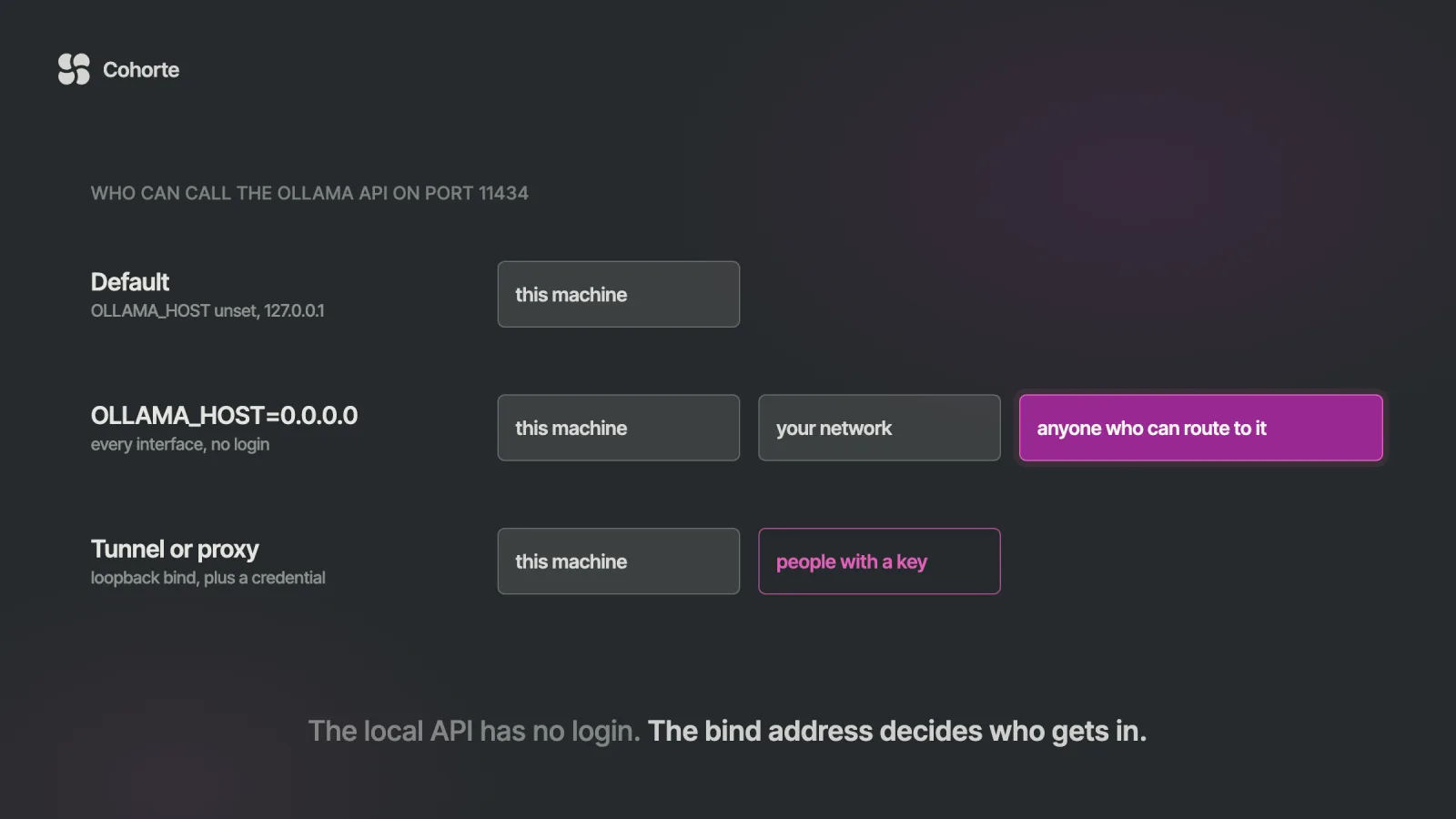
The Ollama API runs on port 11434. By default the server listens on 127.0.0.1:11434, so the base URL is http://localhost:11434. The native API sits under /api (/api/chat, /api/generate, /api/embed, /api/tags and the rest), an OpenAI-compatible API sits under /v1, and an Anthropic-compatible /v1/messages shares the same port. curl http://localhost:11434 answers Ollama is running when the server is up. Everything below was checked on 22 November 2026 against the documentation and source code of Ollama v0.40.17.
To change the port or the bind address, set OLLAMA_HOST on the server process, for example 127.0.0.1:11435 or 0.0.0.0:11434, and restart Ollama. The local API has no authentication, so binding to 0.0.0.0 lets anyone who can reach the port run, pull and delete models. For remote access, use an SSH tunnel or a reverse proxy that checks a credential. Two defaults surprise people in code. Responses stream as newline-delimited JSON unless you send "stream": false, and the context window is 4K, 32K or 256K tokens depending on GPU memory unless you set num_ctx.
A team puts a GPU workstation under someone's desk and installs Ollama, and the owner gets lovely answers from localhost. A colleague points a script at the machine's address from their laptop and gets connection refused.
A forum answer says to set OLLAMA_HOST=0.0.0.0. It works on the first try, the colleague is happy, and the setting goes into the service file and stays there. The machine now serves every model on it to anything that can route to port 11434, with no password, through an API that includes DELETE /api/delete.
On an office network that is a risk you can live with for a while. On a cloud VM with an open firewall rule it is a public endpoint. In September 2025, Cisco Talos used Shodan to find 1,139 exposed Ollama servers, and 214 of them answered test prompts without any credentials. If the box is also signed in to ollama.com, the same open port can run cloud models on the owner's account.
This page is the reference I would keep open while fixing it.
Ollama API base URL and default port
One server process answers three APIs on one port. The native API carries everything Ollama can do, including model management. The two compatible APIs let OpenAI and Anthropic client libraries talk to local models after a base URL change.
| API | Local base URL | Hosted base URL |
|---|---|---|
| Native Ollama | http://localhost:11434/api | https://ollama.com/api |
| OpenAI-compatible | http://localhost:11434/v1 | https://ollama.com/v1 |
| Anthropic-compatible | http://localhost:11434 | https://ollama.com |
The Anthropic client adds /v1/messages to its base URL by itself. Local requests need no key and hosted requests need an API key, according to Ollama's API introduction. Three calls tell you whether the server is up and what it runs.
curl http://localhost:11434
curl http://localhost:11434/api/version
curl http://localhost:11434/v1/models
The first returns the plain text Ollama is running. The second returns a small JSON object with a version field. The third lists your pulled models in OpenAI's format, with one entry per model in a data array.
Since v0.40.16, an install with no models returns an empty list there where it used to return null. If any of the three calls fails with connection refused, nothing is listening on that address and port. Usually the server is stopped or bound somewhere else.
How to start the Ollama server and confirm what it bound to
On macOS and Windows the desktop app starts the server and keeps it running in the background. On Linux, Ollama's Linux guide runs it as a systemd service called ollama, which runs ollama serve. Anywhere else, ollama serve starts it in the foreground.
The most common first error comes from starting a second copy. With the app or the service already up, ollama serve stops with Error: listen tcp 127.0.0.1:11434: bind: address already in use, as in issue #707. Nothing is broken. The server you wanted is already running.
To see what the running server picked up, read its log. At startup it writes a server config line with the OLLAMA_ settings it sees, then a line such as Listening on 127.0.0.1:11434 (version 0.40.17). That second line settles whether your setting took effect, because the variable in your terminal and the variable the service sees are often different things.
| How Ollama runs | Where the server log is |
|---|---|
| macOS app | cat ~/.ollama/logs/server.log |
| Linux service | journalctl -u ollama --no-pager --follow --pager-end |
| Windows app | server.log in %LOCALAPPDATA%\Ollama |
| Docker | docker logs <container-name> |
Those locations come from Ollama's troubleshooting page.
How to change the Ollama port and host with OLLAMA_HOST
OLLAMA_HOST sets the address and port the server listens on. Its parsing is forgiving, and two of its rules are worth knowing before you type a value. The rows below follow from the parsing rules and test cases in the v0.40.17 source.
OLLAMA_HOST | The server listens on |
|---|---|
| unset | 127.0.0.1, port 11434 |
0.0.0.0 | every interface, port 11434 |
127.0.0.1:11435 | this machine only, port 11435 |
:11435 | every interface, port 11435 |
[::1] | IPv6 loopback, port 11434 |
http://10.0.0.5 | 10.0.0.5, port 80 |
A value that starts with a colon looks like a way to change only the port. It also opens that port on every interface, because an empty host means all addresses to Go's network listener. And a value with http:// and no port switches the default to 80, so write the port out whenever you write the scheme.
Where you set the variable depends on how Ollama runs. A value exported in your terminal reaches an ollama serve started from that terminal and nothing else. For the app and the service, Ollama's FAQ documents one route per platform.
# macOS app: set it, then quit and reopen Ollama
launchctl setenv OLLAMA_HOST "127.0.0.1:11435"

# Linux service: add the two lines under it
sudo systemctl edit ollama.service
#   [Service]
#   Environment="OLLAMA_HOST=127.0.0.1:11435"
sudo systemctl daemon-reload
sudo systemctl restart ollama
On Windows, quit Ollama from the taskbar, add OLLAMA_HOST under "Edit environment variables for your account", and start Ollama again from the Start menu.
The same variable points clients at a server. The ollama command reads it, and so does the official Python library when you pass no host. OLLAMA_HOST=127.0.0.1:11435 ollama ps asks the server on 11435. A forgotten export in a shell profile can send your commands to a machine you stopped thinking about.
Docker needs its own note. The official image sets OLLAMA_HOST=0.0.0.0:11434 inside the container, which is correct there, and the documented run command publishes the port with -p 11434:11434. Docker's documentation says a port published without a host IP goes to all host addresses. Put the loopback address in front to keep it on the host.
docker run -d -v ollama:/root/.ollama \
  -p 127.0.0.1:11434:11434 --name ollama ollama/ollama
Every Ollama API endpoint, with what it does
The native API fits on one screen. This is the list registered in the v0.40.17 server, minus internal and experimental routes.
| Method | Path | What it does |
|---|---|---|
| GET | / | health check, returns Ollama is running |
| GET | /api/version | server version |
| GET | /api/tags | models you have pulled, with size, family and quantization |
| GET | /api/ps | models loaded in memory, with VRAM use, context length and unload time |
| POST | /api/show | one model's details, template, parameters and capabilities |
| POST | /api/generate | a response to a single prompt |
| POST | /api/chat | the next message in a conversation, with tools, images and thinking |
| POST | /api/embed | embeddings for one string or a list of strings |
| POST | /api/pull | download a model from the registry |
| POST | /api/push | upload a model to a registry |
| POST | /api/create | build a model from another model or from files |
| POST | /api/copy | copy a model under a new name |
| DELETE | /api/delete | delete a model |
| POST, HEAD | /api/blobs/:digest | upload or check a file that /api/create will use |
The older /api/embeddings is still registered, while the reference documents /api/embed. On the compatible side, the same port serves these.
| Method | Path | Compatible with |
|---|---|---|
| POST | /v1/chat/completions | OpenAI Chat Completions |
| POST | /v1/completions | OpenAI Completions |
| POST | /v1/embeddings | OpenAI Embeddings |
| GET | /v1/models, /v1/models/{model} | OpenAI Models |
| POST | /v1/responses | OpenAI Responses, stateless only |
| POST | /v1/audio/speech, /transcriptions, /translations | OpenAI Audio |
| POST | /v1/messages | Anthropic Messages |
These calls work as written against a pulled gemma4, the model Ollama's own reference uses.
# chat, one JSON answer
curl http://localhost:11434/api/chat -d '{
  "model": "gemma4",
  "messages": [
    {"role": "user", "content": "Why is the sky blue?"}
  ],
  "stream": false
}'

# a single prompt
curl http://localhost:11434/api/generate -d '{
  "model": "gemma4",
  "prompt": "Write one sentence about ports.",
  "stream": false
}'

# embeddings for two strings
curl http://localhost:11434/api/embed -d '{
  "model": "embeddinggemma",
  "input": ["first text", "second text"]
}'
Then the model-management calls, which are the ones you least want a stranger to have.
curl http://localhost:11434/api/tags
curl http://localhost:11434/api/ps
curl http://localhost:11434/api/show -d '{"model": "gemma4"}'
curl http://localhost:11434/api/pull -d '{"model": "gemma4"}'
curl http://localhost:11434/api/copy -d '{
  "source": "gemma4", "destination": "gemma4-backup"
}'
curl -X DELETE http://localhost:11434/api/delete -d '{
  "model": "gemma4-backup"
}'
Ollama's reference sends these without a Content-Type header, and they work. In application code, set Content-Type: application/json anyway, since proxies and browsers pay attention to it.
Streaming is on by default: reading NDJSON
Remove "stream": false from the chat call above and the answer arrives as dozens of lines. /api/chat, /api/generate, /api/pull and /api/create all stream by default. Per Ollama's streaming page, the format is newline-delimited JSON, served as application/x-ndjson.
Each line is a complete JSON object with a piece of the answer and "done": false. The last line has "done": true, a done_reason, and the token counts and timings for the whole request.
Code that calls .json() on that body fails, because it holds many JSON documents in a row. Error handling suffers too. A failure after the stream starts arrives as one more line with an error field, and the HTTP status stays 200, as the errors page explains. Reading the stream with requests takes a dozen lines.
import json
import requests

URL = "http://localhost:11434/api/chat"
body = {
    "model": "gemma4",
    "messages": [{"role": "user", "content": "Hello"}],
}

with requests.post(URL, json=body, stream=True) as r:
    r.raise_for_status()
    for line in r.iter_lines():
        if not line:
            continue
        chunk = json.loads(line)
        if "error" in chunk:
            raise RuntimeError(chunk["error"])
        msg = chunk.get("message", {})
        print(msg.get("content", ""), end="", flush=True)
        if chunk["done"]:
            print(f"\n{chunk['eval_count']} tokens")
The timing fields on the last line are in nanoseconds, per the usage page. eval_count divided by eval_duration, times a billion, gives tokens per second. load_duration shows how much of the wait was the model loading.
For the library route, with typed responses, tool calling and structured outputs, our Ollama Python tutorial covers the official ollama package. Plain requests is useful when you want to see exactly what crosses the wire.
The context window: the default and how to set it per request
Ollama sizes the context window from your GPU memory unless you set it. Its context-length documentation gives 4K tokens under 24 GiB, 32K from 24 to 48 GiB, and 256K at 48 GiB or more, and recommends at least 64K for agents and coding tools.
Per request, the window is num_ctx inside options. For the whole server, it is OLLAMA_CONTEXT_LENGTH. The CONTEXT column of ollama ps shows what the loaded model got, and /api/ps returns it as context_length.
import requests

r = requests.post(
    "http://localhost:11434/api/chat",
    json={
        "model": "gemma4",
        "messages": [{"role": "user",
                      "content": "Summarize our plan."}],
        "stream": False,
        "keep_alive": "30m",
        "options": {"num_ctx": 32768},
    },
    timeout=600,
)
r.raise_for_status()
out = r.json()
print(out["message"]["content"])
print("load seconds:", out["load_duration"] / 1e9)
Here is the part that costs people an afternoon. The window is fixed when the model loads. When a request asks for a different num_ctx than the loaded copy has, the scheduler reloads the model, as the v0.40.17 scheduler code shows (Ollama's MLX engine on Apple silicon is the exception). Two clients asking for different windows make the server reload every time they alternate, and each reload shows up as a large load_duration.
So pick one window per model and set it in one place. The server variable is the simplest. A model of your own suits the case where different models need different windows. It is also how one model gets its own window on the OpenAI endpoint, since OpenAI's request format has no field for it.
curl http://localhost:11434/api/create -d '{
  "from": "gemma4",
  "model": "gemma4-32k",
  "parameters": {"num_ctx": 32768}
}'
When a conversation outgrows the window, Ollama trims the oldest messages for most models and answers anyway, with nothing in the response to say so. Our Claude Code with Ollama guide shows exactly what gets dropped. For a quick check, compare prompt_eval_count with the window, and treat a near match as a sign of trimming.
keep_alive and the slow first request
A model stays in memory for five minutes after its last request, then Ollama unloads it. The next call pays for the load again, which on a large model is most of the wait for the first token.
keep_alive on a request changes this for the model it names. The FAQ accepts a duration such as "10m" or "24h", a number of seconds, or any negative number to keep the model loaded indefinitely. 0 unloads it as soon as the response is done. OLLAMA_KEEP_ALIVE sets the server default, and the request value wins.
# load now and keep it loaded
curl http://localhost:11434/api/generate -d '{
  "model": "gemma4", "keep_alive": -1
}'

# unload now
curl http://localhost:11434/api/generate -d '{
  "model": "gemma4", "keep_alive": 0
}'
A request with a model name and no prompt loads the model without generating, which makes a good warm-up step in a deploy script. ollama stop gemma4 unloads from the command line.
Two side effects are worth planning for. A model pinned with -1 holds its memory until someone unloads it, which can push other models onto the CPU on a shared card. And since keep_alive travels with each request, one client sending 0 every time makes the next caller pay for a fresh load. When a server feels slow for no visible reason, read /api/ps and its expires_at field first.
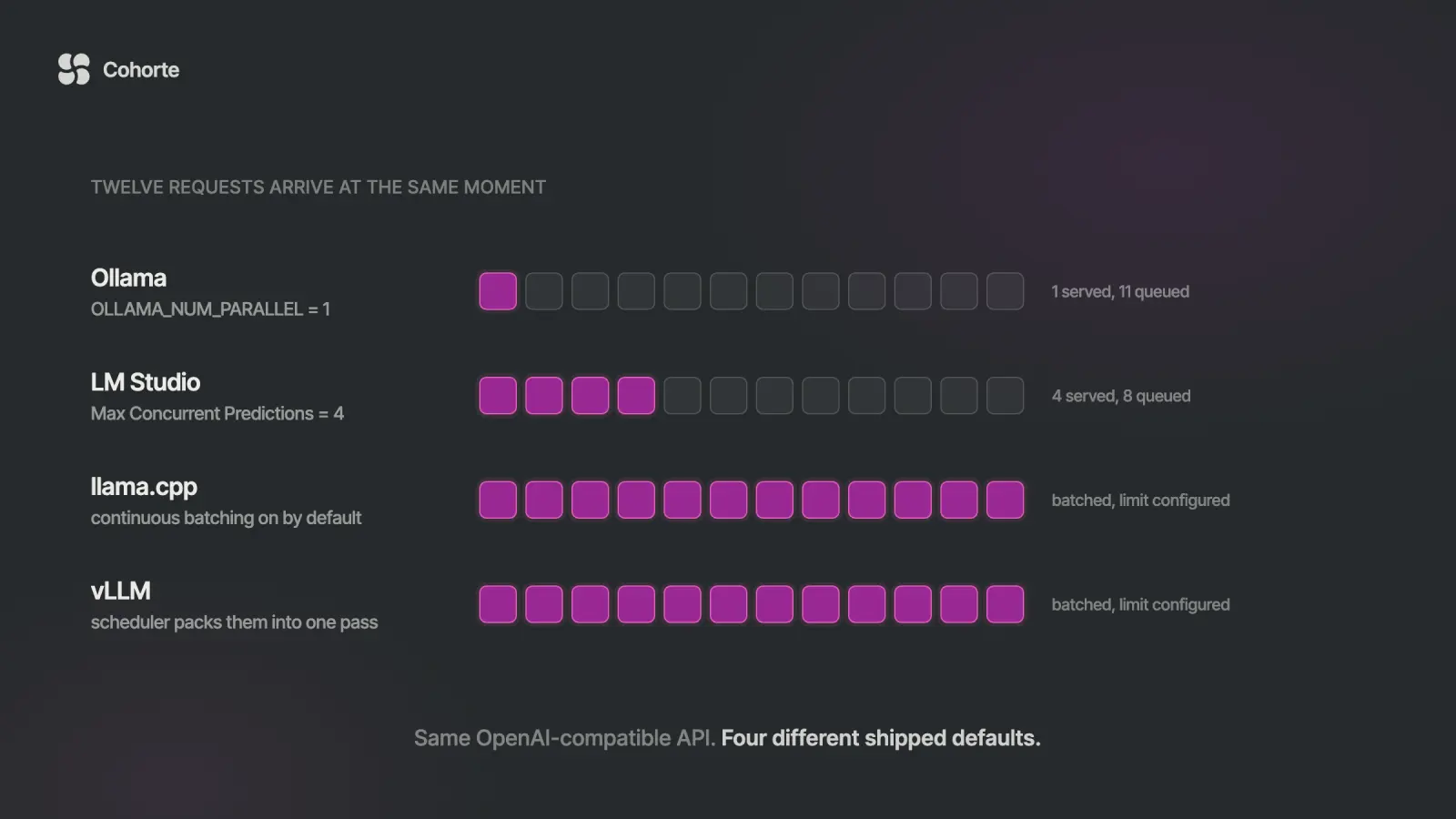
A related default: apart from Ollama's MLX engine on Apple silicon, a model serves one request at a time unless you raise OLLAMA_NUM_PARALLEL. Our local LLM server comparison has a load tester that finds where your setup starts to queue.
The OpenAI- and Anthropic-compatible endpoints on the same port
Point an OpenAI client at http://localhost:11434/v1/ and pass any string as the API key. The client insists on one, and Ollama ignores it.
curl http://localhost:11434/v1/chat/completions \
  -H "Content-Type: application/json" \
  -d '{
    "model": "gemma4",
    "messages": [{"role": "user", "content": "Hello"}]
  }'
Streaming here follows OpenAI's conventions: off unless you send "stream": true, then delivered as server-sent events. The docs list tool_choice, logit_bias, user, n and logprobs as unsupported on chat completions, and images must be base64. Logprobs do work on the native /api/chat, so a pipeline that needs them should call that.
The Anthropic side is a single endpoint, /v1/messages. Set ANTHROPIC_BASE_URL=http://localhost:11434 and ANTHROPIC_AUTH_TOKEN=ollama, and the Anthropic SDK or Claude Code talks to local models. Ollama's Anthropic compatibility page lists token counting, prompt caching, PDFs and batches as unsupported.
Calling Ollama from a browser: CORS and OLLAMA_ORIGINS
A web page can call the local API with fetch when Ollama trusts the page's origin. The default list in the source trusts localhost, 127.0.0.1 and 0.0.0.0 on any port, plus a few app schemes such as tauri:// and vscode-webview://. A front end on http://localhost:5173 works with no setup.
A page served from anywhere else gets a 403 before any model sees the request, and the browser reports a CORS failure. To allow it, add its origin to OLLAMA_ORIGINS, a comma-separated list, on the server.
OLLAMA_ORIGINS=https://tools.example.com ollama serveBrowser extensions need their scheme listed too, such as chrome-extension://*. I would resist OLLAMA_ORIGINS=*. It lets any website you visit use your local models from your own browser, including pulling and deleting them, because the API has no other line of defense. Chrome's Local Network Access rules add a permission prompt, added in Chrome 142, before a public site reaches localhost. That helps, and listing your real origins is still the better habit.
Here is a streaming call from a page, inside a <script type="module"> that has an element with the id out.
const out = document.querySelector("#out");
const res = await fetch("http://localhost:11434/api/chat", {
  method: "POST",
  headers: { "Content-Type": "application/json" },
  body: JSON.stringify({
    model: "gemma4",
    messages: [{ role: "user", content: "Hello" }],
  }),
});
const reader = res.body.getReader();
const dec = new TextDecoder();
let buf = "";
while (true) {
  const { value, done } = await reader.read();
  if (done) break;
  buf += dec.decode(value, { stream: true });
  const lines = buf.split("\n");
  buf = lines.pop();
  for (const line of lines) {
    if (!line.trim()) continue;
    const chunk = JSON.parse(line);
    out.textContent += chunk.message?.content ?? "";
  }
}
The buffer matters because a network chunk can end in the middle of a JSON line. The official JavaScript library has a browser build, import ollama from 'ollama/browser', that handles this for you. Keep hosted API keys out of browser code entirely, as Ollama's authentication page also asks.
How to reach Ollama from another machine safely
The local API has no login, and a wider bind address changes nothing about that. Remote access comes down to who can reach the port, because whoever reaches it can do everything in this table.
| Endpoint | What an unauthenticated caller can do |
|---|---|
/api/chat, /api/generate, /v1/* | run prompts on your hardware |
/api/tags, /api/show | list your models and read their templates and parameters |
/api/pull | download models onto your disk |
/api/delete | delete your models |
/api/create, /api/copy | add models under any name |
| cloud model names, when signed in | run Ollama cloud models on your account |
There is one guard to know about. On a loopback bind, the server checks the Host header and returns 403 unless the name is local, such as localhost, a private IP or a name ending in .local. That is why a reverse proxy has to rewrite the header. Bound to 0.0.0.0, the server skips the check.
For one person, an SSH tunnel is the cleanest answer. The server keeps its default bind, and the -L option in the ssh manual gives your laptop a local port that leads to it.
# on your laptop, leave this running
ssh -N -L 11435:localhost:11434 you@gpu-box

# then, in another terminal
curl http://localhost:11435/api/tags
OLLAMA_HOST=127.0.0.1:11435 ollama ps
The example uses 11435 on the laptop so it does not collide with a local Ollama. Any tool that takes a base URL now uses http://localhost:11435, and the server still listens only to itself.
For a team, put a reverse proxy in front that terminates TLS and checks a credential, and keep Ollama on 127.0.0.1. This builds on the nginx example in Ollama's FAQ, with basic authentication and two settings for streaming.
server {
    listen 443 ssl;
    server_name ollama.example.com;
    # ssl_certificate and ssl_certificate_key go here

    location / {
        auth_basic "ollama";
        auth_basic_user_file /etc/nginx/ollama.htpasswd;
        proxy_pass http://127.0.0.1:11434;
        proxy_set_header Host localhost:11434;
        proxy_buffering off;
        proxy_read_timeout 600s;
    }
}
proxy_buffering off passes each streamed line through as it arrives. proxy_read_timeout defaults to 60 seconds between reads, which a cold model on a long prompt can exceed. Create the password file with htpasswd, then test with curl -u alice https://ollama.example.com/api/tags.
Basic authentication suits scripts and curl. OpenAI and Anthropic client libraries send their own Authorization header, so for them have the proxy check a bearer token, or use a gateway that issues a key per person. Cloudflare Tunnel and ngrok also work with the Host header flags in Ollama's FAQ, as long as you switch on their access controls. A bare tunnel URL is a public endpoint with a long name.
Whichever route you take, keep Ollama updated. In 2024 Wiz disclosed a path traversal in /api/pull that could lead to remote code execution, fixed in 0.1.34. Only someone who could reach the API could trigger it, which is this whole section in one bug.
A written answer to "who can reach this port" is also what lets a security team approve local models, the subject of my letter on why trust is the real AI bottleneck.
The hosted Ollama API with an API key
Ollama runs the same API on its own servers for its cloud models. Create a key at ollama.com/settings/keys, export it as OLLAMA_API_KEY, and send it as a bearer token, following Ollama's cloud API guide.
curl https://ollama.com/api/chat \
  -H "Authorization: Bearer $OLLAMA_API_KEY" \
  -H "Content-Type: application/json" \
  -d '{
    "model": "gemma4:31b",
    "messages": [{"role": "user", "content": "Hello"}],
    "stream": false
  }'
The OpenAI-compatible base is https://ollama.com/v1. Keys do not expire, so revoke them in your account settings when a project ends. The official Python library reads OLLAMA_API_KEY from the environment and sends the header for you.
Signing in changes the local server too. After ollama signin, the local API runs cloud models such as gpt-oss:120b-cloud without a key, which is why the table above has a cloud row. What leaves the machine on that path, and how to switch it off, is in Ollama Cloud vs local models.
Related reading. Ollama for model serving covers concurrency, keep-alive and the point where vLLM makes more sense. The best Ollama models picks a model per task and GPU size, and shows why the context window decides the fit. Our Ollama guide covers installing, running and Modelfiles from the start.
What I'd do
Read the server log for the Listening on line first, so you know what you are really serving. If it shows anything other than 127.0.0.1, decide whether that was deliberate, and if the machine is signed in to ollama.com, decide today. Move remote users to an SSH tunnel or an authenticating proxy, put the bind back on loopback, and publish Docker ports on 127.0.0.1. In code, set "stream" on every call, choose one num_ctx per model in one place, and give each model a keep_alive that matches how often it is used. Then note the base URL, the port, the window and who has access in one place your team can find, a habit we teach as part of running an AI Operating System. If you are building an application on this API, Engineering Foundations covers API architecture, tool use and evaluation-first development, and AI Security Engineering teaches you to break your own setup before someone else does. For a company rolling local models out across teams, our team programs run the same review on your stack.
FAQ
What port does Ollama use?
Port 11434. The server binds to 127.0.0.1:11434 by default, so the base URL is http://localhost:11434, with the native API under /api and the OpenAI-compatible API under /v1. The official Docker image listens on 0.0.0.0:11434 inside the container, so publish it as -p 127.0.0.1:11434:11434.
How do I change the Ollama host or port?
Set OLLAMA_HOST on the server and restart it, with launchctl setenv on macOS, systemctl edit ollama.service on Linux, or your account's environment variables on Windows. 127.0.0.1:11435 moves the port. 0.0.0.0:11434 opens it to the network with no authentication, so prefer an SSH tunnel or an authenticating proxy.
How do I check if the Ollama server is running?
Run curl http://localhost:11434, which returns Ollama is running, or curl http://localhost:11434/api/version for the version. ollama ps lists loaded models. The Listening on line in the server log shows the address it bound to.
What are the Ollama API endpoints?
The native ones are /api/chat, /api/generate, /api/embed, /api/tags, /api/ps, /api/show, /api/pull, /api/push, /api/create, /api/copy, /api/delete and /api/version. OpenAI-compatible ones include /v1/chat/completions, /v1/embeddings and /v1/models, and /v1/messages serves Anthropic's Messages API.
Does the Ollama API need an API key?
The local API does not, and it has no authentication of its own. OpenAI and Anthropic client libraries require a key value, which Ollama ignores, so any placeholder works. The hosted API at https://ollama.com/api needs a key from your account, sent as Authorization: Bearer.
How do I keep an Ollama model loaded?
Send "keep_alive": -1 with a request to /api/generate or /api/chat, or start the server with OLLAMA_KEEP_ALIVE set to the duration you want. The default is five minutes, 0 unloads right away, and the request value overrides the server setting.
The colleague in the opening needed one port on one machine, and the forum answer opened every endpoint to anything that could route there. A tunnel would have given them the same curl and left the server talking only to itself.
Know which address your server listens on, and make it a choice someone wrote down.
Charafeddine MouzouniNovember 22, 2026