Claude Code runs on Ollama. Run ollama launch claude, or set three environment variables that point at http://localhost:11434, and Claude Code sends its requests to Ollama's Anthropic-compatible API with a local model such as qwen3.5 or a cloud model such as kimi-k2.6:cloud. Everything below was checked on 31 October 2026 against Ollama v0.40.13 and the current Claude Code documentation.
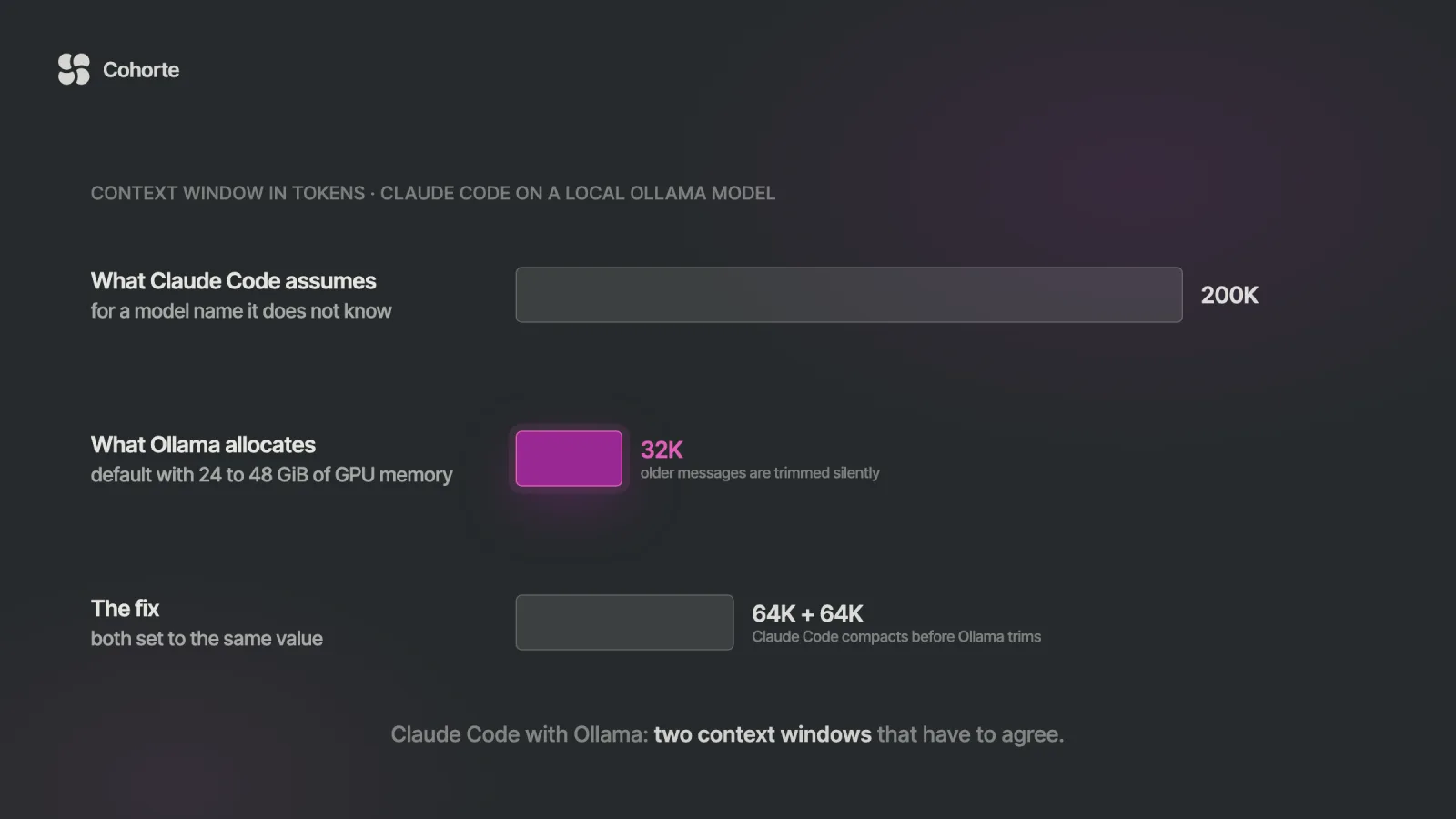
On a local model, the setting that decides whether it works is the context window, and there are two of them. Ollama gives a local model 4K, 32K or 256K tokens depending on GPU memory, while Claude Code assumes 200K for any model name it does not recognise. The launch command reconciles the two for cloud models only, so on a local model you set OLLAMA_CONTEXT_LENGTH and CLAUDE_CODE_MAX_CONTEXT_TOKENS to the same number, at least 64,000.
Here is the shape this usually arrives in. A developer wants Claude Code on a client repository that should stay on the laptop, so they install Ollama, pull qwen3.5 and run the launch command. The first twenty minutes are a pleasant surprise: the agent reads files, proposes a plan, and makes edits that compile.
Somewhere in the second half hour it changes. The agent asks which file it was working on, re-reads a module it summarised earlier, then edits the wrong one with the same confident tone it had at the start. The terminal shows no error and no warning, so the natural conclusion is that local models are not ready for agentic coding.
Sometimes that conclusion is right. Often the model never saw the beginning of the conversation, because Ollama quietly removed it to make the prompt fit, and Claude Code had no idea the window was that small.
What is supported, and by whom
Ollama treats Claude Code as a first-class integration. There is a launch command, a dedicated integration page, and an Anthropic-compatible /v1/messages endpoint that handles messages, streaming, system prompts, images, tool calls and extended thinking. Claude Code, for its part, sends requests to whatever endpoint you give it through ANTHROPIC_BASE_URL.
Anthropic's position is narrower, and it is worth knowing before you write this into a team guide. Its gateway documentation says Anthropic "doesn't support routing Claude Code to non-Claude models through any gateway". The harness is Anthropic's, while the model and the server belong to someone else, so when something breaks the issue tracker you want is Ollama's.
None of this makes the tool less worth having. A coding agent that works on your own folders changes how a lot of non-coding work gets done too, which is the argument of the letter I Stopped Using AI Chatbots, and wanting that on a private repository is a reasonable thing to want.
That split is perfectly workable for personal projects and for evaluation. It deserves one sentence in any internal guide that recommends the setup, because readers will assume the company whose name is on the tool stands behind the combination.
The two-minute setup
The short path is a single command. It offers to install Claude Code if it is missing, lets you pick a model, pulls the model if needed, and starts Claude Code with the right environment.
ollama launch claudeFor scripts and CI, Ollama documents a non-interactive form. The --yes flag skips the pickers and requires --model, and everything after -- goes straight to Claude Code.
ollama launch claude --model qwen3.5 --yes \
  -- -p "how does this repository work?"
The manual path is three variables. Claude Code needs a credential variable before it stops using your Claude subscription login, Ollama ignores its value, and the empty API key clears any Anthropic key you may have exported so it never travels to Ollama.
export ANTHROPIC_BASE_URL=http://localhost:11434
export ANTHROPIC_AUTH_TOKEN=ollama
export ANTHROPIC_API_KEY=""
claude --model qwen3.5
Run /status inside Claude Code to confirm where requests are going. Claude Code's settings files can override shell variables, as Ollama's own guide points out, so a forgotten ANTHROPIC_BASE_URL in ~/.claude/settings.json beats whatever you just exported.
What the launch command sets for you
The launch code is short, and reading it is the fastest way to see what the one-liner does. In v0.40.13 it sets more than a dozen variables before starting Claude Code, most of them housekeeping such as switching off error reporting and the feedback survey. These are the ones that change behaviour.
| Variable | Value | Effect |
|---|---|---|
ANTHROPIC_BASE_URL | your Ollama host | requests go to Ollama |
ANTHROPIC_AUTH_TOKEN | ollama | a credential, so the subscription login is set aside |
ANTHROPIC_API_KEY | empty | clears any Anthropic key in your shell |
ANTHROPIC_DEFAULT_OPUS_MODEL, _SONNET_, _HAIKU_ | your model | every model alias resolves to it |
CLAUDE_CODE_SUBAGENT_MODEL | your model | subagents use it too |
CLAUDE_CODE_MAX_CONTEXT_TOKENS | the model's window | set for cloud models only |
CLAUDE_CODE_AUTO_COMPACT_WINDOW | the same, when 100K or more | set for cloud models only |
CLAUDE_CODE_MAX_OUTPUT_TOKENS | the model's output limit | set for cloud models only |
Two rows matter for daily use. The alias rows mean the background work Claude Code normally hands to a small, fast model also lands on your local model, so background tasks and subagents share the same model and the same GPU as your main session.
The last three rows only apply when the model is a cloud model. For a local model, Claude Code is left to guess the window, and the rest of this article is about what it guesses.
Two context windows that have to agree
Ollama decides how many tokens a local model can hold. Its context length page sets the default from the GPU memory it detects, and the numbers are smaller than most people expect.
| GPU memory Ollama detects | Default context window |
|---|---|
| under 24 GiB | 4K tokens |
| 24 to 48 GiB | 32K tokens |
| 48 GiB or more | 256K tokens |
The same page recommends at least 64,000 tokens for agents and coding tools, and the Claude Code integration page repeats it. An older line in Ollama's FAQ still gives 4,096 as the default for everything, so treat ollama ps as the source of truth. Its CONTEXT column shows what the loaded model actually received.
Claude Code makes its own assumption. Its model configuration page says that when it does not recognise a model ID, it assumes a 200K window and compacts the conversation when it gets there. Names like qwen3.5 and gemma4 are outside the list it knows.
Put the two together on a machine where Ollama detects 32 GB of GPU memory. Claude Code believes it has room for 200,000 tokens, Ollama has allocated 32,000, and Claude Code's system prompt, its tool definitions, your CLAUDE.md and a handful of file reads all compete for that smaller space. Claude Code sees no reason to compact for a long time after the real window has filled.
What Ollama does when the prompt does not fit
For most models Ollama does not reject an oversized prompt. Its chat code removes messages from the front of the conversation until the rest fits, always keeping the system messages and the latest message. Truncation is on by default for any request that does not switch it off, and the Anthropic-compatible endpoint Claude Code uses never does.
The only trace is a log line written at debug level, which a default install does not show. Claude Code receives an ordinary response and carries on.
One exception is worth stating precisely. Models served by Ollama's MLX engine on Apple Silicon skip this trimming step in v0.40.13, so an oversized prompt takes a different path there, and the symptom can look different. The cure is the same either way: keep the conversation inside the real window.
The effect is the scene from the opening. The system prompt survives, so the agent still knows how to behave like Claude Code. Your original request, the plan it agreed with you and the files it read early on are the first things to go, which is why it keeps its confident tone while losing the thread.
Make the two numbers match
The fix is two settings with the same value. Raise Ollama's window first, then tell Claude Code the real size so that it compacts before Ollama starts cutting.
OLLAMA_CONTEXT_LENGTH=65536 ollama serveIn the Mac and Windows apps the same setting is a slider under Settings. Then start Claude Code with the matching window.
export CLAUDE_CODE_MAX_CONTEXT_TOKENS=65536
ollama launch claude --model qwen3.5
The launch command passes your exported variable through untouched for local models. With the manual setup, add the same export next to the three variables from earlier.
Check both sides once the session has started. ollama ps should show 65536 under CONTEXT and 100% GPU under PROCESSOR. Claude Code's startup warning about an unrecognised model should be gone, and /context now measures usage against the window you set.
A bigger window costs memory, and Ollama's documentation says so directly. If the model plus a 64K window no longer fits on the GPU, ollama ps shows a split between CPU and GPU and generation slows down. On a smaller machine the honest options are a smaller model at 64K, or a cloud model.
One trap in Claude Code's own settings: the auto-compact window only accepts values from 100K to 1M, so it cannot express a 64K threshold. CLAUDE_CODE_MAX_CONTEXT_TOKENS is the variable that does the job here, because Claude Code compacts at the window it believes the model has.
Make both settings survive a restart
An exported variable lasts as long as the terminal. The Ollama app on a Mac also ignores your shell, so the value has to reach the app itself, and Ollama's FAQ gives one method per platform.
# macOS app: set it, then restart Ollama
launchctl setenv OLLAMA_CONTEXT_LENGTH 65536

# Linux service: systemctl edit ollama.service
[Service]
Environment="OLLAMA_CONTEXT_LENGTH=65536"
On Linux, finish with systemctl daemon-reload and systemctl restart ollama. On Windows, Ollama reads your user environment variables, so add OLLAMA_CONTEXT_LENGTH there and restart the app from the Start menu.
On the Claude Code side, be careful where the variables live. Claude Code reads an env block from its settings files, and an ANTHROPIC_BASE_URL in ~/.claude/settings.json sends every session in every project to Ollama, including the ones where you wanted Claude.
Keep the Ollama variables in a shell alias or in the project's .claude/settings.local.json, which applies to you in that project only.
{
  "env": {
    "ANTHROPIC_BASE_URL": "http://localhost:11434",
    "ANTHROPIC_AUTH_TOKEN": "ollama",
    "ANTHROPIC_API_KEY": "",
    "CLAUDE_CODE_MAX_CONTEXT_TOKENS": "65536"
  }
}
Local models are also slower to start answering than a hosted API, especially on a long prompt. Claude Code gives each request ten minutes to receive its first response headers by default, and API_TIMEOUT_MS raises that if a large prompt on modest hardware keeps timing out.
Which model to run
The launch picker in v0.40.13 recommends six models, two local and four in Ollama's cloud. The local pair is sized for ordinary hardware, and the cloud four exist for the work a laptop cannot carry.
| Model | Runs on | Context | Ollama's description |
|---|---|---|---|
gemma4 | your machine, about 12 GB | set it yourself, 64K or more | reasoning and code generation |
qwen3.5 | your machine, about 14 GB | set it yourself, 64K or more | reasoning, coding, visual understanding |
kimi-k2.6:cloud | Ollama's cloud | 262K | coding and long-horizon execution |
qwen3.5:cloud | Ollama's cloud | 262K | reasoning, coding and tool use |
glm-5.1:cloud | Ollama's cloud | 203K | reasoning and code generation |
minimax-m2.7:cloud | Ollama's cloud | 205K | fast, efficient coding |
Treat the list as a starting point and qualify the model on your own repository. A model that handles a ten-file service can lose the thread in a monorepo, and the only way to find out is a real task with an answer you already know.
Tool calling deserves its own check, because most of what Claude Code does is tool calls: reading files, editing them, running commands. Ollama says compatible models support function calling, which leaves the choice of a compatible model to you. Its model search has a tools filter for exactly that.
What works and what does not
Ollama's compatibility page lists what its Anthropic endpoint leaves out. Most of the gaps are invisible in daily use, and a few touch Claude Code directly.
| Capability | On Ollama | What it means in Claude Code |
|---|---|---|
| Messages, streaming, tools, images, thinking | supported | the core loop works |
tool_choice | not supported | a request cannot force or forbid a specific tool |
| Deferred tools | not fully supported | MCP tool search can fall back to loading every MCP tool upfront |
| Hosted web search | not fully supported | use Ollama's own web search instead |
| PDF document blocks, citations, batches | not supported | features built on them are unavailable |
| Remote Control | switched off by Claude Code | whenever the base URL is a host other than Anthropic's |
The deferred-tools row deserves attention on a small window. Behind a custom base URL, Claude Code tries MCP tool search and, according to its MCP documentation, retries without it after a rejection it does not recognise, loading MCP tools upfront. Every connected server's full tool schemas then sit in the 64K you just allocated, so connect only the servers the task needs.
Ollama's web search works from Claude Code once you have an Ollama account. Those searches go to ollama.com, which is worth knowing if the reason you chose a local model was to keep everything on the machine.
When a cloud model is the honest answer
A cloud model removes the context problem. Ollama runs cloud models at their maximum window, and the launch command tells Claude Code the size, so the two numbers agree without any work on your side.
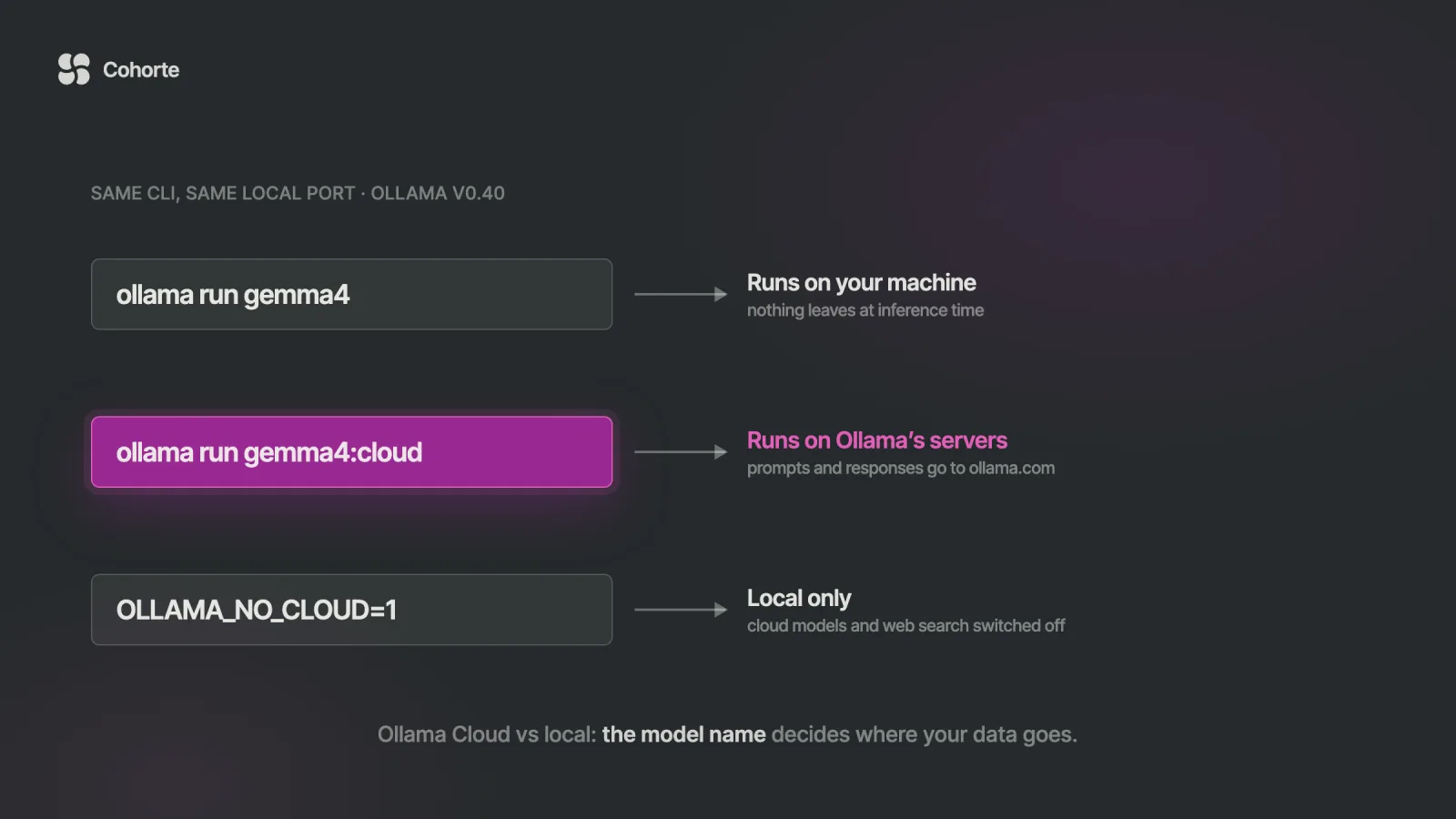
It also removes the reason many people chose Ollama in the first place. Through a signed-in Ollama server, a model name ending in :cloud runs on Ollama's servers: the command looks local, and your code travels to ollama.com.
You can also skip the local install entirely and point Claude Code straight at Ollama's cloud with an API key.
ANTHROPIC_BASE_URL=https://ollama.com \
ANTHROPIC_AUTH_TOKEN="$OLLAMA_API_KEY" \
ANTHROPIC_API_KEY="" \
claude --model glm-5.3-flash
That is a reasonable trade for a side project and a decision with a paper trail for a client repository. The companion piece on Ollama Cloud vs local models covers what Ollama says happens to your prompts, what it costs, and how to switch the cloud off for a machine.
A ten-minute qualification run
Before you trust the setup with real work, run one session designed to fail loudly. It answers the only question that matters here: whether this model, at this window, on this machine, keeps hold of a task.
- Start Ollama with your chosen window and confirm it with
ollama ps. - Open Claude Code on a repository you know well. Make your first message a task plus a canary, an instruction such as "end every reply with the word KESTREL".
- Give it work that needs ten or more file reads, so the conversation grows past half the window.
- Watch the canary. When it disappears, the start of the conversation has gone, and you know where the real limit sits.
- At the end, ask it to restate the original task in one sentence and compare it with what you wrote.
Run it once without CLAUDE_CODE_MAX_CONTEXT_TOKENS and once with the numbers matched. A canary is a crude instrument and an honest one, and watching it vanish on your own repository settles the question faster than any benchmark table.
Three neighbours to this piece. Ollama for model serving covers the server underneath, including concurrency and memory. The local LLM server comparison covers Ollama, LM Studio, vLLM and llama.cpp side by side. And Agent Skills vs MCP covers the two ways Claude Code gets extended, which matters more when every token of context counts.
What I'd do
Set OLLAMA_CONTEXT_LENGTH and CLAUDE_CODE_MAX_CONTEXT_TOKENS to the same value before the first session, 64K if your GPU memory allows it, then run ollama launch claude with one of the two recommended local models. Run the canary session on a repository you know, and keep the model only if it holds the task to the end. If neither local model holds it, decide deliberately whether the repository can go to a cloud model, and write that decision down where your team will find it, the way we teach operators to keep their AI Operating System as a living document. Keep Anthropic's own models for the work where you want the vendor behind the result. The AI OS Course has a lesson where an agent such as Claude Code works on your own folder under your rules, and if you want the engineering underneath setups like this one, that is what Engineering Foundations covers.
FAQ
Can Claude Code use Ollama?
Yes. Ollama exposes an Anthropic-compatible API, and ollama launch claude starts Claude Code against it with a local or cloud model. Anthropic does not support routing Claude Code to non-Claude models, so support for the combination comes from Ollama.
How do I set up Claude Code with Ollama?
Run ollama launch claude and pick a model. For the manual setup, set ANTHROPIC_BASE_URL=http://localhost:11434, ANTHROPIC_AUTH_TOKEN=ollama and an empty ANTHROPIC_API_KEY, then run claude --model qwen3.5. For a local model, also set OLLAMA_CONTEXT_LENGTH and CLAUDE_CODE_MAX_CONTEXT_TOKENS to the same value, 64,000 or more.
What is the best Ollama model for Claude Code?
Ollama's launch picker recommends gemma4 and qwen3.5 to run locally, at about 12 and 14 GB, and kimi-k2.6, qwen3.5, glm-5.1 and minimax-m2.7 in its cloud. The best one is the one that holds a real task on your repository, so run a short qualification session before committing.
Why does Claude Code lose track of the task with a local Ollama model?
Usually because the context windows disagree. Claude Code assumes 200K tokens for a model name it does not recognise, while Ollama may have allocated 4K or 32K, and Ollama silently drops the oldest messages when the prompt does not fit. Matching OLLAMA_CONTEXT_LENGTH and CLAUDE_CODE_MAX_CONTEXT_TOKENS fixes it.
Does Claude Code with Ollama send my code to the cloud?
Not with a local model: requests go to the Ollama server on your machine. A model name ending in :cloud runs on Ollama's servers, and Ollama's web search also goes to ollama.com. Setting OLLAMA_NO_CLOUD=1 turns the cloud features off for that server.
Is Claude Code with Ollama free?
Running a local model through Ollama has no per-token cost, only your hardware and electricity. Cloud models are billed per token at Ollama's published rates, or drawn from the monthly credits included in its Pro, Max and Team plans.
The developer in the opening did not need a better model on day one. They needed two numbers to agree, and a way to notice when they did not.
Local models can carry real work in Claude Code. Give them the window you told Claude Code they have.
Charafeddine MouzouniOctober 31, 2026