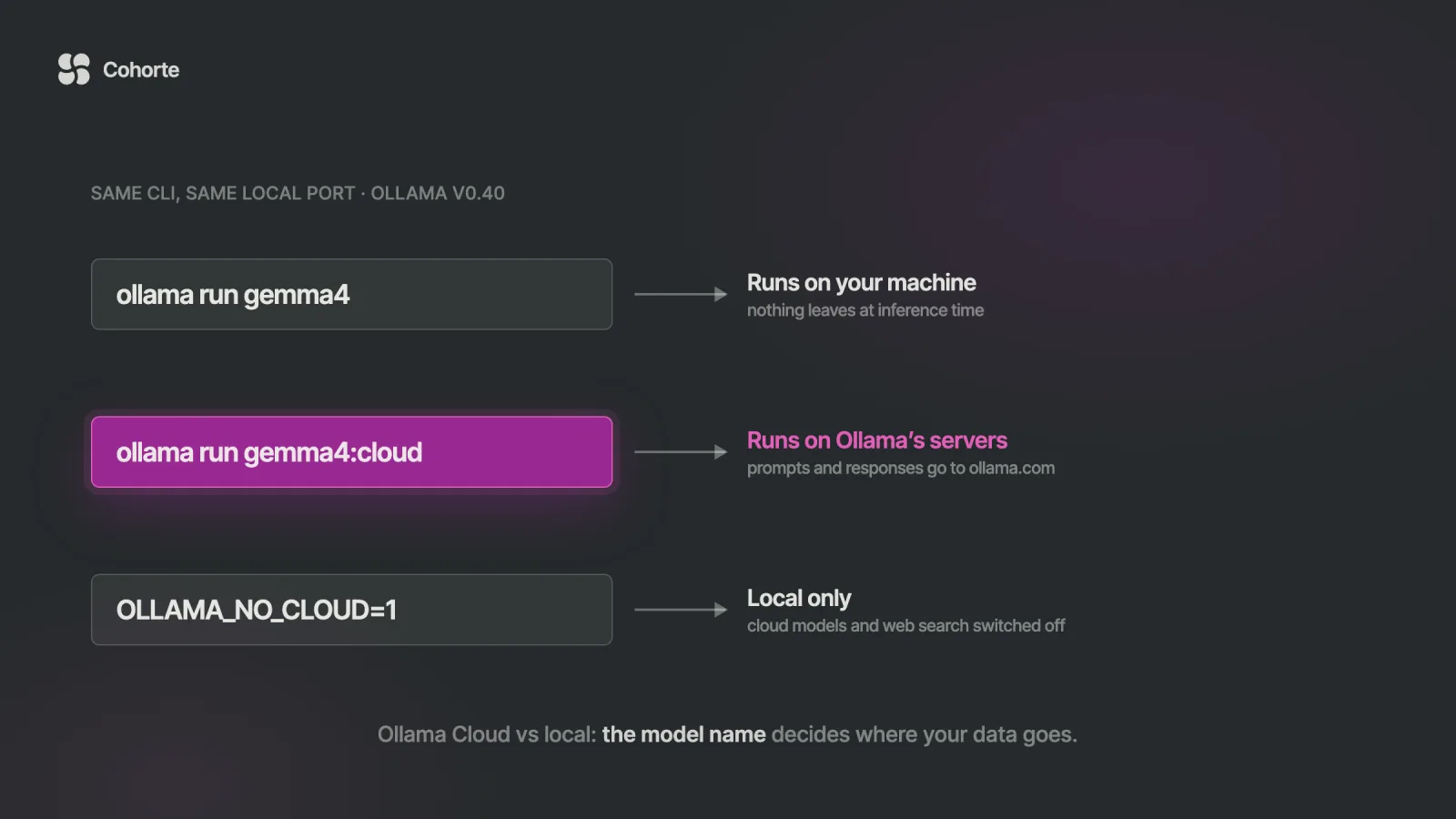
Ollama Cloud runs open models on Ollama's servers through the same app, CLI and local API you already use for local models. Once you sign in, a cloud model name, such as gemma4:cloud or gpt-oss:120b-cloud, is sent to ollama.com instead of running on your GPU. Ollama says it processes those prompts transiently, does not log them or train on them, and hosts mainly in the United States.
Cloud usage is billed per token, $0.14 per million input tokens for gemma4 for example, either pay as you go or from the credits included in the $20 Pro, $100 Max and $500 Team plans. To keep a machine local only, set OLLAMA_NO_CLOUD=1 or add "disable_ollama_cloud": true to ~/.ollama/server.json, then restart Ollama. Everything here was checked on 31 October 2026 against Ollama's documentation, pricing page and privacy policy.
Here is the shape this usually takes inside a company. A security team reviews Ollama, reads that it runs models locally, and approves it for work on internal code, because the review question was where the data goes and the answer was the laptop. That was a careful decision, and it was correct for the product they reviewed.
A few months later a developer hits a bug the local model cannot crack, signs in to try a larger model, and types kimi-k2.6:cloud. The command is the same, the port is the same, and the approval document still says local. Nothing about the experience tells the developer that the decision has changed.
Three ways a request can travel through Ollama
Ollama now offers three distinct paths, and two of them look identical from the keyboard. The difference is entirely in the model name and the sign-in state.
| Path | How you call it | Where the model runs | What leaves the machine |
|---|---|---|---|
| Local model | ollama run gemma4 or localhost:11434 | your GPU or CPU | nothing at inference time |
| Cloud model through your local server | ollama run gemma4:cloud, after ollama signin | Ollama's servers | prompts and responses |
| Direct cloud API | https://ollama.com/api with an API key | Ollama's servers | prompts and responses |
The middle row is the one that surprises people. Ollama's authentication page shows the same cloud request working through the local API at localhost:11434, so a program that only knows about your local server can still reach the cloud once you are signed in.
Model names differ slightly between the paths. In the app and CLI you use gemma4:cloud, while direct API calls to ollama.com use the hosted identifier, such as gemma4:31b, which curl https://ollama.com/api/tags lists.
What Ollama says happens to your prompts
Ollama makes three statements about cloud data, across three pages. Its cloud documentation says it processes cloud prompts and responses to answer your requests and does not use them to train models.
The privacy policy, last updated in March 2026, adds that this content is processed transiently and not stored beyond the time needed to fulfil the request. It also says Ollama collects account information and usage metadata that excludes prompt and response content.
The pricing page answers the hosting questions. Models run primarily in the United States, with routing to Europe when extra capacity is needed. Ollama works with NVIDIA Cloud Providers to host the models, and says it requires those partners to have no-logging, no-training and zero-retention policies in place.
Those are clear commitments, and they are commitments: statements in Ollama's documents that your review relies on. If your code belongs to a client, or the prompts contain personal data from the European Union, the contract and the transfer to the United States are questions for your legal team or data protection officer. This article cannot settle them for you, and neither can a vendor's FAQ.
What Ollama Cloud costs
Every plan includes local use without limits. The paid plans differ in included credits, model access and how many requests can run at once.
| Plan | Price | Included usage | Concurrent requests |
|---|---|---|---|
| Pay as you go | $0, pay per token | none | 3 |
| Pro | $20 a month, or $200 a year | $60 of credits a month | 3 |
| Max | $100 a month | $300 of credits a month | 10 |
| Team | $500 a month, unlimited users | $1,000 a month, shared | 10 |
| Enterprise | custom | volume pricing | not published |
Usage is charged per million tokens at each model's rate. A few rows from the published table show the spread, from small open models that cost cents to frontier-scale ones priced closer to the large commercial APIs.
| Cloud model | Input, per million tokens | Output, per million tokens |
|---|---|---|
gpt-oss:20b | $0.07 | $0.30 |
gemma4 | $0.14 | $0.40 |
gpt-oss:120b | $0.15 | $0.60 |
kimi-k2.6 | $0.95 | $4.00 |
glm-5.3 | $1.40 | $4.40 |
kimi-k3 | $3.00 | $15.00 |
Two details change the arithmetic. Some models have cheaper off-peak rates, which apply outside 12:00 to 18:00 UTC on weekdays and all weekend, and on most models cached input tokens are billed at a fraction of the normal input price. Included credits reset monthly and do not roll over.
To make those rates concrete, take an illustrative coding-agent session that sends 2 million input tokens and receives 100,000 output tokens. At list prices it costs $2.30 on kimi-k2.6 and $0.32 on gemma4, before any cached-input discount, so the $60 in a Pro plan covers about 26 such sessions on the larger model. Agent sessions vary enormously in size, which is why the usage endpoint further down matters more than any example.
Ollama says cloud models run the weights as released by the model provider. On recent NVIDIA hardware they may use accelerated formats such as NVFP4, so the cloud version of a model is not guaranteed to behave byte for byte like the quantised copy on your laptop.
Calling the cloud directly with an API key
Applications can skip the local install entirely. Create a key in your Ollama account settings, keep it on the server side, and call ollama.com with a bearer token. Ollama's native API lives at https://ollama.com/api, and OpenAI-compatible and Anthropic-compatible endpoints sit under https://ollama.com/v1, each supporting a subset of the original API.
import json, os, urllib.request

req = urllib.request.Request(
    "https://ollama.com/v1/chat/completions",
    data=json.dumps({
        "model": "gemma4:31b",
        "messages": [{"role": "user",
                      "content": "One line on Ollama."}],
    }).encode(),
    headers={
        "Authorization":
            "Bearer " + os.environ["OLLAMA_API_KEY"],
        "Content-Type": "application/json",
    },
)
with urllib.request.urlopen(req) as r:
    out = json.load(r)
print(out["choices"][0]["message"]["content"])
Any OpenAI client works the same way with its base URL set to https://ollama.com/v1. The hosted endpoints require the Authorization: Bearer header, and the Anthropic-compatible one rejects an x-api-key header on its own.
Watch what the cloud is costing you
Paid plans send an email at 90% of the included monthly usage, which is useful and late. Ollama also exposes a usage endpoint that returns requests, tokens and dollars for the last 24 hours, 7 days or 30 days, and a few lines turn it into a daily check.
import json, os, urllib.request

url = "https://ollama.com/api/usage?range=7d"
req = urllib.request.Request(url, headers={
    "Authorization":
        "Bearer " + os.environ["OLLAMA_API_KEY"]})
with urllib.request.urlopen(req) as r:
    t = json.load(r)["totals"]

cached = t["cached_input_tokens"] / max(t["input_tokens"], 1)
print(f"{t['request_count']} requests, "
      f"${t['usage_usd']:.2f} in 7 days")
print(f"cached share of input: {cached:.0%}")
if t["usage_usd"] > 40:
    print("over the weekly budget, check who and why")
The figures cover the account that owns the key, and new usage can take a little while to appear. The cached share is worth watching because on most models cached input is billed at a fraction of the normal rate, so a falling share usually means the same work just got more expensive.
How a local setup ends up in the cloud
Three ordinary facts combine here, and each is documented. The local API at localhost:11434 does not require authentication. A signed-in server forwards :cloud model names to ollama.com. And the integrations Ollama ships, such as ollama launch claude, offer cloud models in the same picker as local ones.
Put together, any tool on the machine that can reach the local port can use a cloud model once someone has signed in. That includes coding agents, editor plugins and scripts, and it includes models the person never meant to choose for that repository.
Two more settings widen the circle. OLLAMA_HOST controls the bind address, which is 127.0.0.1 by default; setting it to 0.0.0.0 exposes that unauthenticated port to the network. And Ollama API keys do not expire, so a key created for a weekend experiment stays valid until someone revokes it in the account settings.
Ollama's web search sits in the same category. It needs an Ollama account and sends each query to ollama.com, so turning on search in a coding agent sends part of your context off the machine even when the model itself is local.
How to keep a machine local only
Ollama's FAQ documents a local-only mode. It switches off cloud models and web search for that Ollama server, and it takes one line in either of two places.
# ~/.ollama/server.json
{
  "disable_ollama_cloud": true
}

# or, as an environment variable
OLLAMA_NO_CLOUD=1
Restart Ollama after the change. The server log then prints Ollama cloud disabled: true, which is the line to check rather than assuming the setting took effect.
For the Mac app the environment variable has to reach the app itself, which the same FAQ handles with launchctl setenv OLLAMA_NO_CLOUD 1 followed by a restart. On a Linux service it goes in an Environment= line through systemctl edit ollama.service, and on Windows in your user environment variables.
For a fleet, the configuration file is easier to distribute and to audit than a variable someone can unset in a terminal. Pair it with an inventory check of who has signed in: the public key Ollama uses for the account lives at ~/.ollama/id_ed25519.pub on macOS, and ollama signin is the command that registers it.
When the cloud model is the better choice
Local models have real limits, and the cloud exists for good reasons. The largest open models will not fit on a laptop, and cloud models run at their full context window, often 200K tokens or more, where a local model on modest hardware defaults to 4K or 32K.
Speed matters too. A large model on data-centre GPUs usually answers a long prompt faster than a quantised model on a laptop, and for a coding agent that waits on every turn, the difference shapes the whole session. For open-source work, experiments, or code that is already public, the trade is easy.
Local keeps its own advantages. There is no per-token bill, it works offline, and a downloaded model never retires: Ollama's cloud documentation notes that cloud models get retirement dates, while local models are unaffected.
| Situation | Better fit |
|---|---|
| Client code, regulated data, or an approval that says local | local, with cloud disabled |
| A task the local model cannot hold, on code you may share | cloud, chosen deliberately |
| No GPU, or a laptop that must stay responsive | cloud |
| Offline work, or a model you must pin for months | local |
| A team that needs budgets and model access rules | cloud on the Enterprise plan, or local with a gateway you run |
What the security review should ask now
An approval written for local-only Ollama is still a good approval. It needs a few extra lines so that it matches the product as it exists today.
- Is cloud allowed on this machine, and for which kinds of code or data? If the answer is no, the configuration file above is part of the standard install.
- Who may sign in, and with which account? Ollama allows one account per person, so team use belongs on the Team or Enterprise plan with central billing.
- Are API keys inventoried and revoked when someone leaves, given that they do not expire?
- Is web search allowed for coding agents, knowing that queries go to ollama.com?
- Does anything bind Ollama to an address other than
127.0.0.1?
Answering these is what turns a tool people are nervous about into one they can use without asking permission every week. Trust tends to be the real constraint on AI adoption, a point I made at length in the letter on trust as the real AI bottleneck. A clear written answer earns more of it than any feature.
The Enterprise plan adds controls a security team will recognise: limiting a team to specific models, and setting cost budgets for users and API keys. Those are useful, and they apply only to the cloud side, so the local-only setting remains the control for machines that must keep everything at home.
Three neighbours to this piece. Claude Code with Ollama covers the setup where this choice usually comes up, and the context setting that decides whether a local model can keep up. The self-hosting break-even covers when your own GPUs beat paying per token. Running LLMs locally with Ollama covers hardware and model choice on the local side.
What I'd do
Decide the policy before anyone signs in, because afterwards the decision gets made one model name at a time. For machines that touch client code or regulated data, ship ~/.ollama/server.json with "disable_ollama_cloud": true as part of the standard install and check the server log for Ollama cloud disabled: true. For everyone else, allow the cloud on purpose, put team usage on the Team plan so billing and keys are central, and add API keys to the offboarding checklist. Write the rule down in one place people actually read, the way we teach teams to keep their AI Operating System as a living document, with the date you last checked Ollama's terms. If your organisation is working through decisions like this one across several AI tools at once, that is the conversation our team programmes are built for, and Building Accountable AI Agents covers how governance gets built into the platform itself.
FAQ
What is the difference between Ollama local and cloud models?
A local model runs on your own GPU or CPU, and nothing leaves the machine at inference time. A cloud model, named with a :cloud suffix in the app and CLI, runs on Ollama's servers, so your prompts and responses travel to ollama.com. Both work through the same CLI and the same local API once you are signed in.
How much does Ollama Cloud cost?
Pay as you go is $0 with per-token billing, Pro is $20 a month with $60 of monthly credits, Max is $100 with $300, and Team is $500 a month for unlimited users with $1,000 of shared credits. Per-token input rates run from $0.015 per million tokens for nemotron-3-super to $3.00 for kimi-k3. Local models stay free on every plan.
Is Ollama Cloud private?
Ollama says cloud prompts and responses are processed transiently, never logged and never used for training, and that its hosting partners must have zero-retention policies. They still leave your machine and are processed mainly in the United States, so for client or regulated data the decision belongs to your legal or security team.
Where is Ollama Cloud hosted?
Primarily in the United States, according to Ollama's pricing page, with routing to Europe when extra capacity is needed. Ollama works with NVIDIA Cloud Providers to host the models.
How do I disable Ollama cloud models?
Set "disable_ollama_cloud": true in ~/.ollama/server.json, or set the environment variable OLLAMA_NO_CLOUD=1, then restart Ollama. The server log shows Ollama cloud disabled: true when it worked. This also turns off Ollama's web search.
Do Ollama cloud models need a GPU?
No. Cloud models run on Ollama's hardware and need no download, so they work on any machine with the Ollama app or CLI, or with no Ollama install at all through the API at ollama.com and an API key.
The security team in the opening made the right call for the product they reviewed. The product grew a second mode that answers to the same commands, and the approval needs to say which of the two it covers.
Ollama is still a good local tool. Decide where the cloud fits before a model name decides for you.
Charafeddine MouzouniOctober 31, 2026