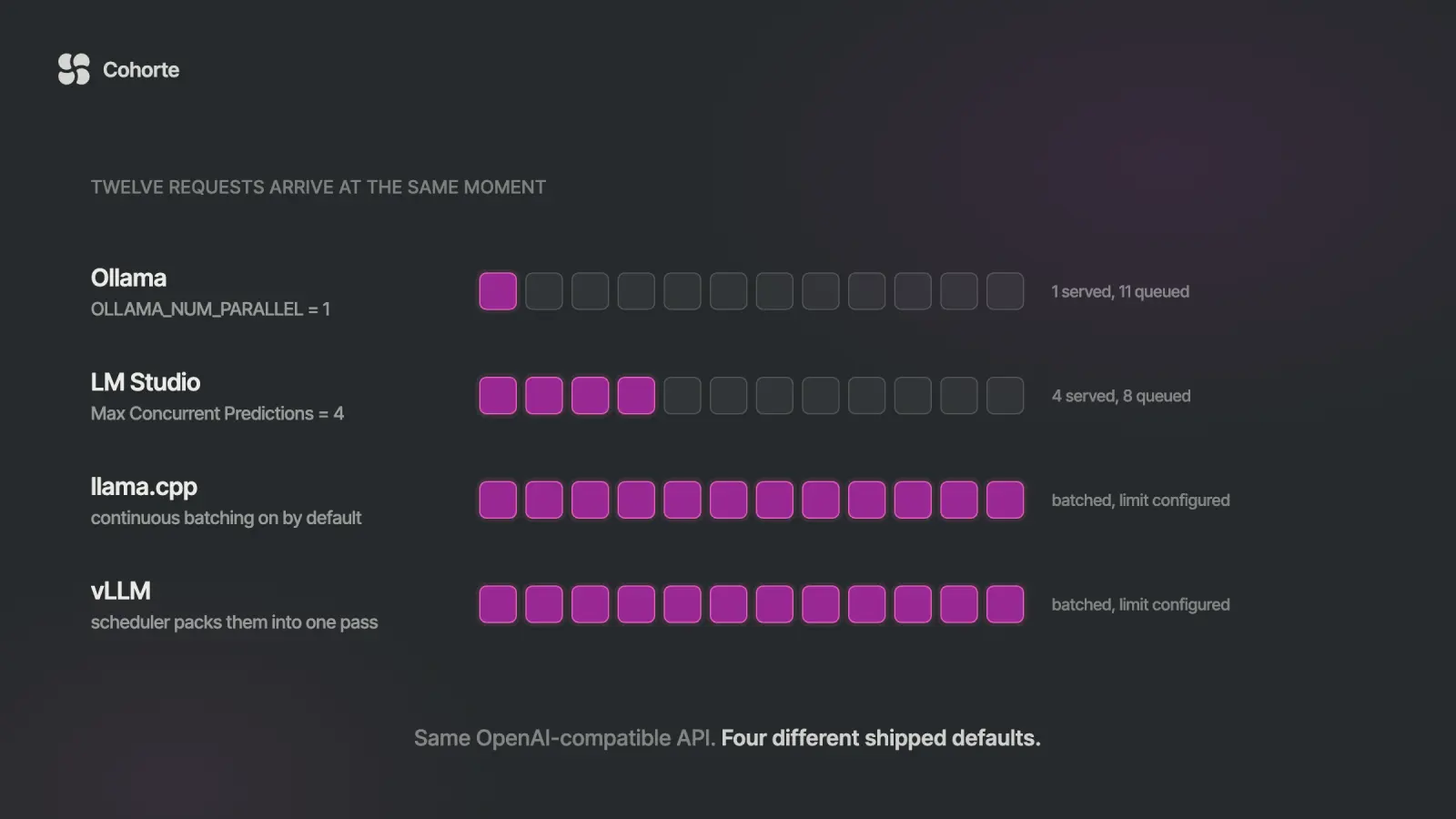
Ollama, LM Studio, llama.cpp and vLLM all expose an OpenAI-compatible endpoint, and they ship with very different ideas about how many people can use it at once. Ollama's documentation gives OLLAMA_NUM_PARALLEL a default of 1 request per model, with a queue of 512 behind it. LM Studio defaults to 4 concurrent predictions. llama.cpp's server turns continuous batching on by default. vLLM is built around a scheduler whose whole job is packing concurrent requests into one compute pass. Same API surface, four different answers to the only question that decides whether your local server survives a second user.
Most comparisons of these four are feature tables, and feature tables hide the thing that breaks. This piece covers what each one actually is (an experience layer, an engine, or a serving system), the concurrency defaults with their sources, a fifty-line script that finds the point where your own setup stops scaling, the base URLs and ports, and the reference that sits scattered across four vendors' docs: which OpenAI parameters each runtime honours, and which it accepts and quietly drops. Ollama documents tool_choice, logit_bias, user and n as unsupported. vLLM documents that it ignores user. Your client library will send all of them and report success.
The way this usually surfaces is undramatic. Somebody gets a model running locally, wires it into an internal tool, and it is genuinely good. Fast, private, free at the margin. They demo it and the team asks for access.
Then four people use it at once, and the fourth one waits through three other people's answers before a single token comes back. Yesterday it replied instantly. The logs show nothing wrong: no errors, no timeouts, no memory pressure. Requests are standing in a line that the default configuration created, and nothing in the logs mentions the line.
The fix is usually one environment variable. Finding it takes a week, because every guide to these tools is written for one person on one laptop, which is the case where the setting does not matter.
Three different jobs on one comparison table
The category confusion is where most of this goes wrong. These four names get compared as if they were competing products in one market. They do three different jobs.
llama.cpp is an engine. It is the C++ inference implementation that actually runs the model. Ollama uses it. LM Studio uses it. When you read that one of those tools got faster, the improvement often landed here first.
Ollama and LM Studio are experience layers. They wrap an engine in model management, a registry, a GUI or a CLI, and sane defaults. The value they add is that you stop thinking about quantisation formats and memory mapping. They are excellent at that, and it is a different skill from scheduling.
vLLM is a serving system, and so is SGLang. They exist to answer a different question: given a GPU and a queue of requests, how do you get the most work through per second. Paged attention, continuous batching and a scheduler are the product, and the model runner is a component inside them.
So "which is fastest" has no answer on its own. A laptop chat app and a batching scheduler are both fast at the thing they were built for. The question that has an answer is how many concurrent requests your setup absorbs before response times start climbing, and that one you can measure in an afternoon.
The concurrency defaults, side by side
These are the shipped defaults as documented on 20 September 2026. Check yours, because they move between releases and a guide written last year may be describing a version you are no longer running.
| Runtime | Default concurrency | Past the limit | Source |
|---|---|---|---|
| Ollama | OLLAMA_NUM_PARALLEL = 1 per model | queued to 512, then rejected | Ollama FAQ |
| LM Studio | Max Concurrent Predictions = 4 | queued | LM Studio docs |
| llama.cpp | --parallel auto, --cont-batching on | server slots; --no-cont-batching disables | server README |
| vLLM | --max-num-seqs per iteration | --max-num-queued-reqs, none by default | vllm serve |
Read the Ollama row again, because it is the one that catches people. The default is one request at a time per model. Everything else waits. A team of five sharing that endpoint will see the fifth person's latency stack behind four other people's generations, and the server will report itself perfectly healthy throughout.
There is a lovely irony in that row. Ollama wraps llama.cpp, and llama.cpp ships with continuous batching enabled. The engine underneath is ready to serve several people; the wrapper's default declines to.
Raising it is one variable, and it is not free. Each parallel slot needs its own KV cache, so concurrency is bought with memory, and on a card that was already close to full you will trade context length for it. That is a real decision, which is presumably why the conservative default exists.
Setting it is where the platform starts to matter, because Ollama runs as a background service and a variable exported in your shell never reaches it. The documented route is launchctl setenv OLLAMA_NUM_PARALLEL "4" on macOS followed by restarting the app, systemctl edit ollama.service on Linux with an Environment= line under [Service] then daemon-reload and restart, and the account environment variables in system settings on Windows followed by relaunching. Running ollama serve by hand in a terminal picks up your shell environment and skips all of it, which is why the setting works while you are testing and disappears the moment the machine reboots into the managed service.
LM Studio's 4 comes from the same llama.cpp continuous batching, exposed as a setting on the model instead of an environment variable. Worth knowing if you have been treating LM Studio as the GUI-only option; since 0.4.0 it also runs as a standalone daemon.
What continuous batching actually does
Batching is the mechanism behind every number in this article, and it is worth thirty seconds of mental model.
Generation happens one token at a time. Each step is a pass over the model weights, and moving those weights through memory dominates the cost. If one request occupies that pass, the GPU spends most of its effort fetching weights to produce a single token.
Continuous batching lets several requests share the pass. Ten people generating at once cost barely more per step than one, because the expensive part was the weights and they were already in flight. That is why aggregate throughput climbs steeply with concurrency on a batching server and stays flat on one that processes requests end to end.
"Continuous" is the important half. Naive batching waits for a fixed group, runs it to completion, then starts the next one, so a short request sits waiting for a long one. Continuous batching adds and removes requests every step, so finished ones leave immediately and new arrivals join the next pass.
The cost lands on the individual. Deeper batches raise total throughput and lengthen any one person's wait, which is the same dial that decides the economics in the self-hosting cost analysis. You are choosing where on that dial to sit, whether or not you know the dial exists.
Measure your own collapse point
Published benchmarks are run on hardware you do not have, with models you are not serving, at context lengths that do not match your prompts. The number worth having is yours, and it takes about ten minutes to get.
This ramps concurrency against any OpenAI-compatible endpoint and reports time to first token and total throughput at each level. Standard library only, no dependencies. Point BASE at whichever server you are testing and leave everything else alone.
import json, time, urllib.request
from concurrent.futures import ThreadPoolExecutor

BASE   = "http://localhost:11434/v1"   # your server
MODEL  = "llama3.1:8b"
PROMPT = "Explain a database index in 200 words."
LEVELS = [1, 2, 4, 8, 16, 32]

def one(_=None):
    body = json.dumps({
        "model": MODEL, "stream": True,
        "messages": [{"role": "user", "content": PROMPT}],
    }).encode()
    req = urllib.request.Request(
        BASE + "/chat/completions", body,
        {"Content-Type": "application/json"})
    t0 = time.perf_counter(); ttft = None; n = 0
    with urllib.request.urlopen(req) as r:
        for line in r:
            if not line.startswith(b"data: "):
                continue
            if line.strip() == b"data: [DONE]":
                break
            d = json.loads(line[6:])
            c = d["choices"][0]["delta"].get("content")
            if not c:
                continue
            if ttft is None:
                ttft = time.perf_counter() - t0
            n += 1
    return ttft or 0.0, n

for c in LEVELS:
    t0 = time.perf_counter()
    with ThreadPoolExecutor(c) as ex:
        res = list(ex.map(one, range(c)))
    wall = time.perf_counter() - t0
    ttfts = sorted(r[0] for r in res)
    toks = sum(r[1] for r in res)
    p95 = ttfts[min(len(ttfts) - 1, int(len(ttfts) * 0.95))]
    p50 = ttfts[len(ttfts) // 2]
    print(f"{c:>3} streams | TTFT p50 {p50:6.2f}s"
          f" p95 {p95:6.2f}s | {toks/wall:8.1f} tok/s")
Two columns tell you everything. Total throughput should climb as concurrency rises; the level where it stops climbing is the ceiling of your setup. Time to first token at p95 should stay flat until then; the level where it starts rising in proportion to concurrency is the point where you have started queueing.
On a server with parallelism set to 1, p95 grows roughly linearly from the very first step up and total throughput barely moves. That shape is unmistakable once you have seen it, and it is the shape most people are running without knowing.
Run it twice and keep the second result. The first pass includes model load and cache warm-up, which is a real cost worth knowing separately and a poor thing to average into a throughput number.
The OpenAI-compatible surface, runtime by runtime
All four accept an OpenAI client with the base URL swapped. Here is where each one lives and what it serves, from the vendors' own documentation on 20 September 2026.
| Runtime | Default base URL | Endpoints |
|---|---|---|
| Ollama | http://localhost:11434/v1 | /chat/completions, /completions, /embeddings, /models, /responses |
| LM Studio | http://localhost:1234/v1 | /chat/completions, /completions, /embeddings, /models, /responses |
| llama.cpp | http://127.0.0.1:8080 | /v1/chat/completions, /v1/completions, /v1/embeddings, /v1/models, /v1/responses |
| vLLM | port 8000 | /v1/chat/completions, /v1/completions, /v1/embeddings, /v1/responses, batch, audio transcription and translation |
The API key field is the first thing that confuses people. All four accept any string, because authentication is off by default in all four. Most client libraries refuse to start without one, so the convention is to pass a placeholder. That placeholder is doing nothing, which matters for the next section.
Ollama and LM Studio both also expose a native API alongside the compatible one. Ollama's lives under /api and carries the model management calls that have no OpenAI equivalent, such as pulling and listing loaded models. Use the compatible surface for inference and the native one for operations.
Which parameters get honoured and which get dropped
This is the part that costs real debugging time, because a dropped parameter is silent. You send it, the request succeeds, and the behaviour you asked for is absent.
Three states matter here, and the difference between the last two is the practical lesson. Yes means the vendor documents support. No means the vendor documents that it will be ignored. Undocumented means the vendor's parameter list does not mention it at all, which tells you nothing about the behaviour and everything about how much you should assume.
| Param | Ollama | LM Studio | llama.cpp | vLLM |
|---|---|---|---|---|
tools | yes | undocumented | with --jinja | yes |
tool_choice | no | undocumented | undocumented | yes |
n | no | undocumented | undocumented | yes |
logprobs | no | undocumented | undocumented | yes |
logit_bias | no | yes | undocumented | yes |
user | no | undocumented | undocumented | ignored |
seed | yes | yes | yes | yes |
response_format | yes | undocumented | yes, schema | yes |
| image by URL | base64 only | undocumented | undocumented | by model |
Two rows in that table cost more than they look. logprobs is the expensive one: a retrieval pipeline that routes on confidence will run happily with the confidence missing and degrade in a way that reads as a model problem. n is the quiet one, because self-consistency sampling collapses into a single sample and the reliability argument you built on it disappears without producing an error.
The llama.cpp column is mostly undocumented because the project is refreshingly direct about the whole question. Its server README says, in its own words, that "no strong claims of compatibility with OpenAI API spec is being made" and that in practice it is enough for many apps. That is the most honest sentence written about this subject by anyone, and it generalises: the other three ship compatibility layers with gaps too, and two of them document the gaps less thoroughly.
Worth pulling out of the table: llama.cpp needs the --jinja flag before OpenAI-style function calling works at all. A server started without it will accept your tools array and return prose.
So the rule that saves the week is to treat compatibility as a claim and then test it. Send one request per parameter your pipeline depends on, and assert on the response body instead of the status code, because the status code will be 200 either way. Ten minutes of that up front is worth a week of hunting a phantom model regression.
The localhost default that stops it being a server
Ollama binds to 127.0.0.1:11434 and llama.cpp to 127.0.0.1:8080. Loopback means the machine itself and nothing else, so a colleague on the same network gets a connection refused while the owner sees a perfectly working server. It is the most ordinary form of "my local LLM server does not work", and the server is behaving exactly as configured.
Changing the bind address is easy, and doing it casually is how a model server ends up answering the office network with no authentication in front of it. Remember the API key field from earlier: any string works because there is nothing checking it.
If more than one machine needs access, put something in front. A reverse proxy that terminates TLS and checks a real credential is thirty lines of config and turns an open port into a service. On a laptop, an SSH tunnel is quicker and leaks nothing. The pattern to avoid is a bind address of all interfaces with no layer above it, which is the local equivalent of an unauthenticated public API.
The same caution applies to model provenance and tool surfaces around these servers; the MCP security checklist covers the part of that picture where tools reach the model.
Three neighbours to this piece. The self-hosting break-even works out whether the GPU pays for itself before you tune it. Ollama for model serving goes deeper on the Ollama API and keep-alive behaviour. The vLLM guide covers the serving system itself.
Choosing, in one page
Pick by the number of people who will hit the endpoint, and by whether anybody is waiting on the answer.
| Situation | Use | Why |
|---|---|---|
| One developer, one laptop, exploring models | Ollama or LM Studio | model management and defaults are the whole value; concurrency is irrelevant |
| A small internal tool, a handful of colleagues | Ollama with parallelism raised, or LM Studio | one setting takes you from a queue to a batch; watch KV cache memory |
| Anything a customer waits on | vLLM or SGLang | scheduling is the product, and tail latency under load is the thing you are buying |
| Overnight batch, evals, embedding backfills | vLLM | throughput is the only axis and deep batches cost you nothing |
| Embedded, edge, or unusual hardware | llama.cpp directly | fewest layers, widest hardware support, every flag exposed |
| Apple Silicon, single user | LM Studio or Ollama | both route to Metal-optimised paths; vLLM is built for datacentre GPUs |
Two moves get people into trouble. Choosing vLLM for a two-person tool buys operational weight for a problem that a single environment variable would have solved. Choosing Ollama for a customer-facing path means discovering the queue in production, which is expensive in a way that shows up as churn instead of as an error rate.
What I'd do
Run the script above against whatever you have today, before reading another comparison. Ten minutes gives you the one number that decides this, and it is specific to your hardware, your model and your prompt shape. Then write down how many people will realistically be waiting on that endpoint in six months, because that single figure tells you which row of the table you are in and saves the argument. If the answer is a handful of colleagues, raise the parallelism setting on what you already run, measure again, and watch memory rather than migrating; if the answer is customers, move to a serving system now while switching is a config change instead of a rewrite. Whichever you pick, spend the ten minutes asserting on the parameters your pipeline depends on, because a silently dropped logprobs or n will cost more than the migration did. Keep all of that written down with the date you measured it, the way we teach operators to keep the AI Operating System as a living document, so the next person inherits a decision instead of a folklore. If you want the serving layer built properly instead of assembled from blog posts, that is what Engineering Foundations covers, and the team programmes exist for when this decision belongs to a whole organisation.
FAQ
Does Ollama have an OpenAI-compatible API?
Yes. It serves /v1/chat/completions, /v1/completions, /v1/embeddings, /v1/models and /v1/responses at http://localhost:11434/v1, so an OpenAI client works with the base URL swapped and any placeholder API key. Four parameters are documented as unsupported: tool_choice, logit_bias, user and n. Image inputs must be base64 content rather than URLs.
How many concurrent requests can Ollama handle?
One per model by default. OLLAMA_NUM_PARALLEL is documented with a default of 1, and OLLAMA_MAX_QUEUE holds 512 waiting requests before rejecting more. Raising the parallel setting costs KV cache memory per slot, so check available VRAM before increasing it, and measure afterwards.
What is the difference between Ollama and vLLM?
Ollama is an experience layer over an inference engine, built around model management and good defaults for one machine. vLLM is a serving system built around a scheduler that packs concurrent requests into shared compute passes. For a single developer Ollama is far easier; for many simultaneous users vLLM keeps tail latency under control where Ollama's default will queue.
Is LM Studio good for a production server?
It is better suited than it used to be. Since 0.4.0 it supports parallel requests through llama.cpp continuous batching, defaults to 4 concurrent predictions, and ships a standalone server daemon that runs without the GUI. For customer-facing traffic a purpose-built serving system still handles load better, but LM Studio is a reasonable internal endpoint.
What port does a local LLM server use?
Ollama uses 11434, LM Studio 1234, llama.cpp 8080 and vLLM 8000. Ollama and llama.cpp bind to 127.0.0.1, which accepts connections only from the same machine. That is why another computer on the network gets a connection refused from a server that works fine locally.
Which local LLM server is fastest?
It depends entirely on concurrency. For one request at a time the engines are close and llama.cpp or an experience layer over it is often quickest to first token. As simultaneous requests rise, a batching scheduler such as vLLM pulls far ahead on total throughput while the others queue. Measure at the concurrency you will actually run.
The comparison that matters here fits in one question: how many people will be waiting on this endpoint at once. Every feature table in this category answers a different question, which is why they all agree with each other and leave you no better off.
Run the script. Write down the number. The rest of the decision follows from it.
Charafeddine MouzouniSeptember 20, 2026