The best Ollama models in November 2026, matched to the job and the memory you have: qwen3.8:27b for general chat and reasoning on a 24 GB GPU, gemma4:12b on 16 GB and qwen3.5:4b on 8 GB. For coding agents, devstral-small-2 (15 GB) or qwen3-coder:30b (19 GB) on 24 GB, and qwen3-coder-next (52 GB) once you have 64 GB or more. For images use qwen3-vl in the size that fits, for RAG embeddings qwen3-embedding, and for CPUs and small devices gemma4:e2b, lfm3 and embeddinggemma-2. Every tag, size and license below was read on ollama.com on 7 November 2026, with Ollama at v0.40.15.
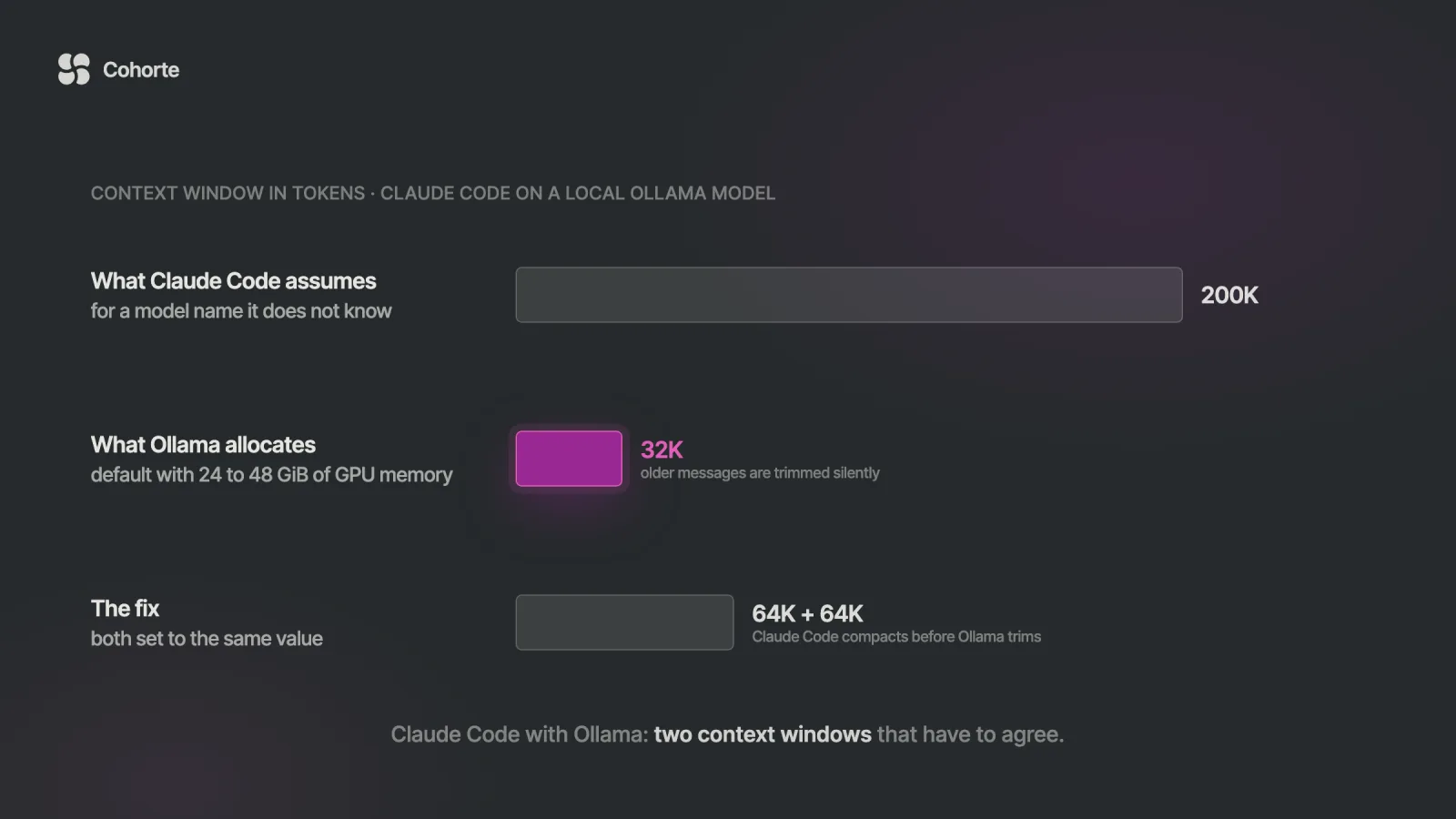
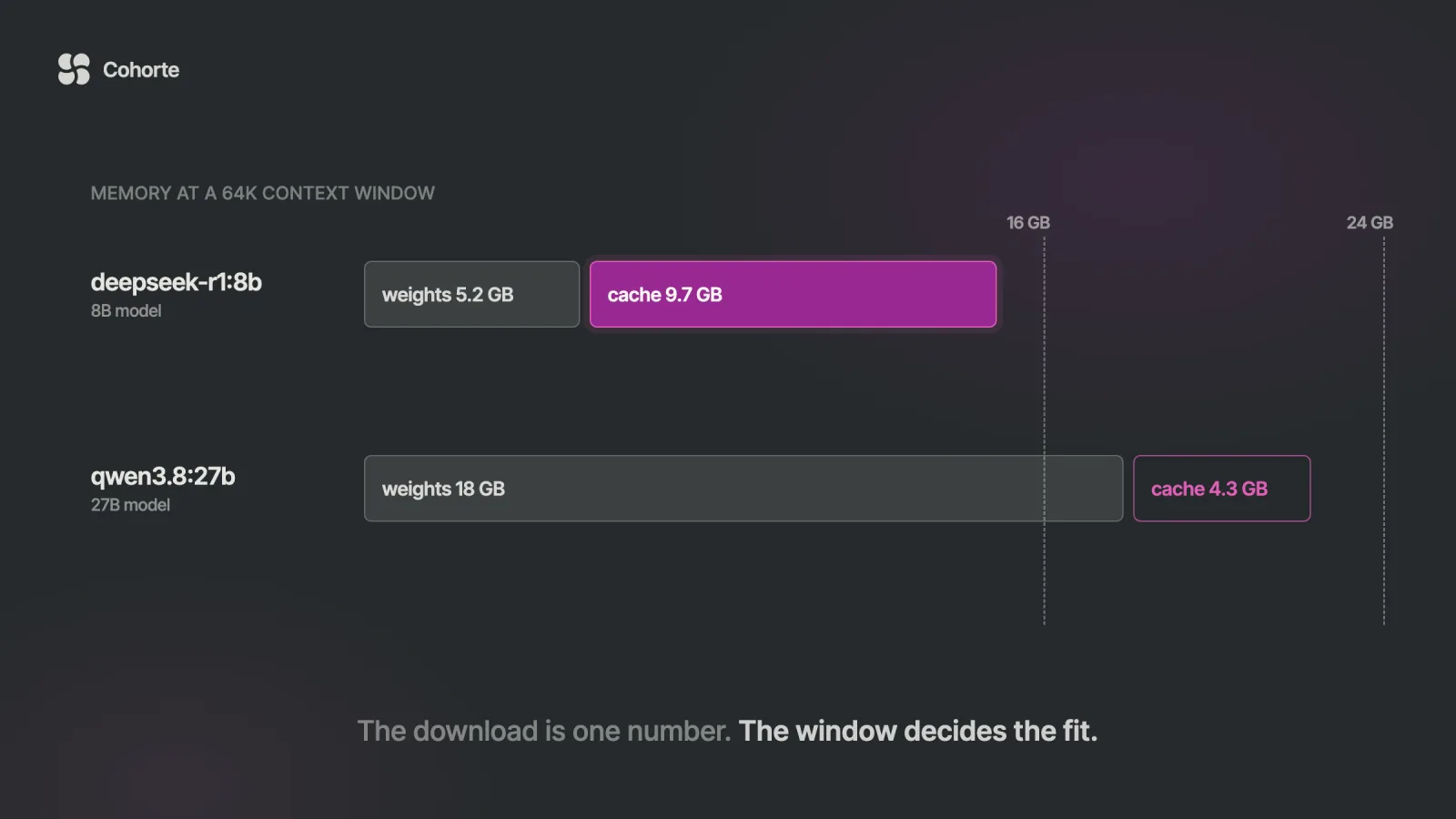
The size printed on a model page is the download, and the memory a model needs is larger. Ollama also has to hold the context window, which it sizes from your GPU memory: 4K tokens under 24 GiB, 32K from 24 to 48 GiB, and 256K above that. Coding tools need at least 64K, and at 64K an 8B model with ordinary attention needs about 9.7 GB of cache on top of its 5.2 GB file. Check the fit with ollama ps, and settle between two finalists by running your own prompts through both.
Here is the shape this usually takes. Someone with a 16 GB laptop GPU wants a private reasoning model for contract reviews. They open ollama.com, see deepseek-r1:8b listed at 5.2 GB, and conclude it fits three times over.
The first answers are good. They paste the contract in, one section per message, and by the tenth section the model has lost track of the first few. Ollama gave it a 4K window, and when a conversation outgrows the window it drops the oldest messages without saying so.
So they raise the window to 64K, as Ollama's documentation suggests for large-context work, and the next reply crawls. ollama ps shows why: the model now sits partly in system memory. The 5.2 GB label was accurate the whole time. It described the smallest part of the bill.
That gap, between the number on the page and the memory the job needs, decides most of the picks below.
How to read an Ollama model page
Each family on ollama.com/library has a page with a table of tags. The part before the colon is the family, the part after is the build, and latest points at a default: qwen3.5:latest is the 9B. Each row gives a download size, the context window the model supports, and whether it takes text or images.
The badges under the description matter more than the name. tools means the model can call functions, which an agent needs. thinking means it can reason before answering, vision means image input, and embedding marks a model that only produces vectors. cloud means some tags run on Ollama's servers, which changes the privacy story entirely.
Newer families show a size range on many tags, such as 6.6 to 7.6 GB for qwen3.5:9b, because one tag can cover more than one build. Where the page shows a range, this article quotes it as shown. If you need to know exactly which file you get, pin an explicit tag like qwen3.5:9b-q4_K_M.
Once a model is pulled, ollama show qwen3.5:9b prints its architecture, parameter count, context length and quantization, and ollama show --license prints the license it shipped with. Reading the registry manifest behind a tag shows a few things the page does not. The qwen3.6:27b download includes a 0.93 GB vision projector, and qwen3.6:27b-coding is byte for byte the same weights with a default temperature of 0.6 instead of 1.
The best Ollama models by task and GPU memory
The columns are the memory your GPU has, or the unified memory on a Mac. On a Mac, leave room for the operating system and your other apps, so a 16 GB machine behaves more like a 12 GB card. The CPU column assumes 16 GB of system RAM and no usable GPU.
| Task | 8 GB | 16 GB | 24 GB |
|---|---|---|---|
| General chat | qwen3.5:4b | gemma4:12b | qwen3.8:27b |
| Coding agents | a cloud model | qwen3.5:9b | devstral-small-2, qwen3-coder:30b |
| Reasoning | deepseek-r1:8b | deepseek-r1:14b | qwen3.8:27b |
| Vision | qwen3-vl:4b | qwen3-vl:8b | qwen3-vl:30b |
| Documents, OCR | glm-ocr | glm-ocr | glm-ocr |
| Embeddings | qwen3-embedding:0.6b | qwen3-embedding:4b | qwen3-embedding:8b |
For 48 GB of memory, and for a machine with no usable GPU:
| Task | 48 GB | CPU only |
|---|---|---|
| General chat | qwen3.6:35b | gemma4:e2b |
| Coding agents | qwen3.6:35b-coding | chat help only |
| Reasoning | qwen3.6:35b | qwen3.5:4b |
| Vision | gemma4:31b | qwen3-vl:2b |
| Documents, OCR | glm-ocr | glm-ocr |
| Embeddings | qwen3-embedding:8b | embeddinggemma-2:270m |
Above 48 GB the list changes character. gpt-oss:120b is 65 GB, mistral-medium-3.5 is 80 GB, qwen3.5:122b is 81 GB and nemotron-3.5-super is 80 to 90 GB, so those belong to 80 GB cards and large Macs.
Treat the table as a shortlist. The picks lean toward leaving room for context, because a model that fits with a 4K window and spills at 64K is a model you will stop using. Where two names share a cell, they are close enough that your own prompts should decide.
General chat models
The Qwen line shows up most in this row because it covers every size. qwen3.5 comes in 0.8b, 2b, 4b, 9b, 27b, 35b and 122b, all with a 256K window, image input, tools and thinking, under Apache 2.0. The 4b is listed at 3.3 to 4.0 GB and the 9b at 6.6 to 7.6 GB, which makes the 9b the default and the 4b the honest choice on an 8 GB card.
On 16 GB, gemma4:12b is the one I would start with. It is listed at 7.7 to 8.0 GB, with a 256K window and image input. Gemma 4 ships under Apache 2.0, a change from the Gemma Terms of Use that cover gemma3n and the first embeddinggemma.
On 24 GB, qwen3.8:27b is an 18 GB download, again with a 256K window, vision, tools and thinking, which is on by default and can be switched off per request. It fits better than its size suggests, for a reason the memory section explains: most of its layers keep no per-token cache.
On 48 GB, qwen3.6:35b is a 23 GB mixture-of-experts model with 3B parameters active per token. That leaves room for a long window, and the small active count keeps it quick. Its family page says the release prioritizes agentic coding and an option to keep reasoning from earlier messages.
| Tag | Download | Context | License |
|---|---|---|---|
qwen3.5:4b | 3.3 to 4.0 GB | 256K | Apache 2.0 |
qwen3.5:9b | 6.6 to 7.6 GB | 256K | Apache 2.0 |
gemma4:12b | 7.7 to 8.0 GB | 256K | Apache 2.0 |
gemma4:26b | 16 to 19 GB | 256K | Apache 2.0 |
qwen3.8:27b | 18 GB | 256K | Apache 2.0 |
qwen3.6:35b | 23 GB | 256K | Apache 2.0 |
gpt-oss:120b | 65 GB | 128K | Apache 2.0 |
gemma4:26b deserves a mention as the alternative on 24 GB. It is a mixture-of-experts model with 4B active parameters, so it answers faster than the dense 27B at a similar file size.
Coding and agentic coding models
A coding agent is the hardest job on this list for a local model. It sends long prompts full of files and tool results, it needs reliable tool calls, and Ollama recommends a window of at least 64,000 tokens for it. The model has to be good, and it also has to leave room on the card.
On 24 GB, two candidates stand out. devstral-small-2 is a 24B model from Mistral, a 15 GB download with a 384K window, image input and an Apache 2.0 license, and its small size leaves the most room for context. qwen3-coder:30b is 19 GB with 30B parameters and 3.3B active, trained with long-horizon reinforcement learning on software engineering tasks, also under Apache 2.0.
Two newer local options are worth a test on the same card. laguna-xs-2.1 is a 20 GB mixture-of-experts model with 33B parameters and 3B active, under the OpenMDW-1.1 license. Its page currently warns of an issue on macOS that its publisher is investigating. north-mini-code-1.0, from Cohere, is a 19 GB model with 3B active, a 256K window and up to 64K output tokens, under Apache 2.0 plus Cohere Labs' acceptable use policy.
The most useful benchmark table I read today sits on Laguna's own model card. It lists Laguna XS 2.1 at 70.9% on SWE-bench Verified and Qwen3.6-35B-A3B at 73.4%, so the publisher put a rival above its own model. That makes the rest of the table easier to trust, and it is a good reason to include qwen3.6:35b-coding in your test if you have 48 GB.
Above 64 GB, qwen3-coder-next is a 52 GB download with 80B parameters and 3B active, a 256K window and no thinking mode, which keeps responses fast. Its page says it works with Claude Code, Qwen Code, Cline and OpenCode.
On 16 GB, use qwen3.5:9b with the window raised to 64K. Ollama's own ollama launch picker recommends two local models for coding tools, gemma4 and qwen3.5, and labels them at about 12 GB and 14 GB of GPU memory. Their default tags are listed at 6.6 to 9.5 GB and 6.6 to 7.6 GB, which tells you how much the window costs. On 8 GB, an agent will spend most of its time losing context, and a cloud model is the honest answer for agent work.
| Tag | Download | Active params | Context | License |
|---|---|---|---|---|
qwen3.5:9b | 6.6 to 7.6 GB | dense 9B | 256K | Apache 2.0 |
devstral-small-2 | 15 GB | dense 24B | 384K | Apache 2.0 |
qwen3-coder:30b | 19 GB | 3.3B | 256K | Apache 2.0 |
north-mini-code-1.0 | 19 GB | 3B | 488K | Apache 2.0 |
laguna-xs-2.1 | 20 GB | 3B | 256K | OpenMDW-1.1 |
qwen3.6:35b-coding | 23 to 24 GB | 3B | 256K | Apache 2.0 |
qwen3-coder-next | 52 GB | 3B | 256K | Apache 2.0 |
The context column comes from each tag page. North Mini Code's own card gives 256K, while its tag page lists 488K, so plan around the smaller number.
Reasoning models
Reasoning models think out loud before they answer, and those thinking tokens fill the window. That makes the context budget even more important here than in chat.
deepseek-r1 is still the most familiar name. The default deepseek-r1:8b is now DeepSeek-R1-0528 distilled into Qwen3 8B, a 5.2 GB download with a 128K window, and the 14b and 32b tags are Qwen distills at 9.0 GB and 20 GB. All of them are under the MIT license.
On 16 GB, OpenAI's gpt-oss:20b is the stretch option at 14 GB. Its page says the mixture-of-experts weights are quantized to MXFP4 by OpenAI itself, which lets the 20B run in 16 GB and the 120B fit a single 80 GB GPU. Reasoning effort is adjustable between low, medium and high, and the license is Apache 2.0. With 2 GB left over on a 16 GB card, keep the window short or take deepseek-r1:14b.
From 24 GB up, the general picks reason well too. qwen3.8:27b has thinking on by default with adjustable depth, and qwen3.6:35b adds the option to keep earlier reasoning in the conversation.
Vision and document models
For general image understanding, qwen3-vl has the widest range: 2b at 1.9 GB, 4b at 3.3 GB, 8b at 6.2 GB, and 30b and 32b at 20 GB and 21 GB, all with a 256K window and Apache 2.0. Each size also comes as an -instruct and a -thinking tag. Its page highlights screen and interface understanding, which is the part that matters if you want an agent to read screenshots.
Many of the general models above take images as well. qwen3.5, qwen3.8 and gemma4 all list image input, so on 48 GB gemma4:31b at 19 to 20 GB gives you vision with a long window to spare.
Scanned documents are a different job, and glm-ocr is built for it. It is a 0.9B model, a 2.7 GB download, with prompts for text, tables and figures, and it is MIT licensed on Hugging Face. Because it is small, it fits next to a chat model on almost any machine.
ollama run glm-ocr "Table Recognition: ./invoice.png"Embedding models for RAG
Embedding models are small, and the choice has a long tail. Whatever you pick, Ollama's documentation says to use the same model for indexing and for queries, so switching later means re-embedding everything.
| Tag | Download | Dimensions | License |
|---|---|---|---|
qwen3-embedding:0.6b | 639 MB | up to 1,024 | Apache 2.0 |
qwen3-embedding:4b | 2.5 GB | up to 2,560 | Apache 2.0 |
qwen3-embedding:8b | 4.7 GB | up to 4,096 | Apache 2.0 |
embeddinggemma-2:270m | 304 to 378 MB | 768 | see card |
embeddinggemma-2:740m | 1.3 GB | 768 | see card |
nomic-embed-text | 274 MB | 768 | Apache 2.0 |
bge-m3 | 1.2 GB | 1,024 | MIT |
qwen3-embedding is the default I would reach for on a GPU. It covers more than 100 languages and code, accepts task instructions, and lets you choose the output size. embeddinggemma-2, the newest option here, maps text, code, images, video and audio into one 768-dimension space, with an 8,192-token window on its model card. The 270m tag is text only and the 740m adds image input.
Its card also publishes the storage trade-off. Cutting vectors from 768 to 256 dimensions moves its multilingual MTEB score from 61.36 to 60.41, according to Google's table. A vector database a third of the size for about a point of retrieval quality is a trade most RAG projects should take. Ollama's embed endpoint accepts a dimensions field for exactly this.
import ollama

out = ollama.embed(
    model="embeddinggemma-2:270m",
    input=["refund policy for annual plans",
           "how to cancel a subscription"],
    dimensions=256,
)
print(len(out["embeddings"]), len(out["embeddings"][0]))
Small models for laptops, CPUs and edge devices
Without a GPU, the limit is speed as much as memory. A mixture-of-experts model reads only its active parameters for each token, which is why the small-active models in this article are the better bet on a CPU. Prompt processing is the part that suffers most, so keep CPU models for short prompts.
gemma4:e2b and gemma4:e4b are Google's edge sizes, where the E stands for effective parameters. They are listed at 4.6 to 7.5 GB and 6.6 to 9.5 GB, with a 128K window, image input and Apache 2.0. lfm3:1.7b, from Liquid AI, takes about 1 GB at 4-bit according to its card (the tag lists 1.1 to 1.7 GB), with a 256K window, trained for agent harnesses and tool calling under the LFM Open License. Its own card says it is unsuited to agentic coding or complex multi-step reasoning, which is the kind of honesty that helps you choose.
Google's Gemma 4 table shows how much the step up costs you. On LiveCodeBench v6 it lists 52.0% for E4B and 80.0% for the 31B, so a small model is a deliberate trade, and it is worth knowing which tasks you are trading away. For the smallest machines, qwen3.5:0.8b is 1.2 to 1.3 GB and embeddinggemma-2:270m is 304 to 378 MB.
How to check what fits: size on disk vs memory
Three things have to fit in GPU memory: the weights, the cache for the context window, and the runtime's working space. The download size covers only the first.
The weights depend on quantization, the number of bits stored per parameter. The default tags I checked sit at or near the size of their 4-bit q4_K_M builds, and the same model at higher precision costs a lot more.
| Build | qwen3.5:27b | qwen3.6:35b-a3b |
|---|---|---|
q4_K_M (4-bit) | 17 GB | 24 GB |
q8_0 | 30 GB | 39 GB |
bf16 | 56 GB | 72 GB |
The cache is where the surprises live, because its size depends on architecture far more than on parameter count. Take the two models from earlier. deepseek-r1:8b is built on Qwen3 8B, whose published config has 36 layers, 8 key-value heads and a head size of 128, all with full attention. At 16-bit precision that is 144 KiB of cache per token, so a 64K window needs about 9.7 GB, nearly twice the weights.
qwen3.8:27b is three times larger and needs less. Its config has 64 layers, but only 16 run full attention with 4 key-value heads of size 256. The other 48 use linear attention, which keeps a fixed state instead of a per-token cache. That works out to 64 KiB per token, or about 4.3 GB at 64K. Our Qwen3.8-27B deployment guide walks through that arithmetic in full.
You can run the same estimate on any pulled model. This script reads the architecture from Ollama's /api/show endpoint. For hybrid and sliding-window models it overestimates, so treat the result as a ceiling.
import json, sys, urllib.request

def show(model):
    req = urllib.request.Request(
        "http://localhost:11434/api/show",
        data=json.dumps({"model": model}).encode(),
        headers={"Content-Type": "application/json"})
    with urllib.request.urlopen(req) as r:
        return json.load(r)["model_info"]

model, ctx = sys.argv[1], int(sys.argv[2])
info = show(model)
arch = info["general.architecture"]
g = lambda k: info.get(f"{arch}.{k}")
layers = g("block_count")
kv = g("attention.head_count_kv")
heads = kv if isinstance(kv, list) else [kv] * layers
k_len = g("attention.key_length") or (
    g("embedding_length") // g("attention.head_count"))
v_len = g("attention.value_length") or k_len
per_tok = sum(heads) * (k_len + v_len) * 2  # f16
print(f"{per_tok / 1024:.0f} KiB per token at f16")
print(f"{per_tok * ctx / 1e9:.1f} GB for {ctx} tokens")
Run it as python3 kv.py deepseek-r1:8b 65536. If the number is too big, Ollama can store the cache at 8 bits, which its FAQ says uses about half the memory of the 16-bit default with a very small loss in precision. It needs flash attention, which Ollama turns on automatically where the hardware supports it.
OLLAMA_KV_CACHE_TYPE=q8_0 \
OLLAMA_CONTEXT_LENGTH=65536 ollama serve
That brings the contract reviewer's cache down to about 4.8 GB, and on paper the whole job back inside a 16 GB card. Then confirm it the only way that counts. Load the model, send it a prompt, and read ollama ps: the PROCESSOR column should say 100% GPU and CONTEXT should show the window you asked for. A split such as 48%/52% CPU/GPU means part of the model moved to system memory, and that is what made the reply crawl.
How to compare two Ollama models on your own prompts
Public benchmarks tell you which models are worth downloading. They cannot tell you which one handles your contracts, your codebase or your support tickets. I ran ten rounds of my own tasks on four models in the letter Which AI Should You Use Now?, and the winner changed from round to round.
For a quick feel, ollama run qwen3.5:9b --verbose prints timings after each answer, including the generation rate. For a decision, write eight to fifteen real prompts into a file separated by lines of three dashes, with tasks you already know the right answer to. Then run both finalists at the same window and the same seed.
import json, sys, urllib.request

URL = "http://localhost:11434/api/chat"

def ask(model, prompt, ctx=32768):
    body = {"model": model, "stream": False,
            "messages": [{"role": "user",
                          "content": prompt}],
            "options": {"num_ctx": ctx, "seed": 7}}
    req = urllib.request.Request(
        URL, data=json.dumps(body).encode(),
        headers={"Content-Type": "application/json"})
    with urllib.request.urlopen(req, timeout=900) as r:
        return json.load(r)

models = sys.argv[1:3]
text = open("prompts.txt").read()
prompts = [p for p in text.split("\n---\n") if p.strip()]
rows = []
for i, p in enumerate(prompts):
    for m in models:
        out = ask(m, p)
        secs = out["eval_duration"] / 1e9
        rows.append({"prompt": i, "model": m,
                     "tok_s": round(out["eval_count"] / secs, 1),
                     "answer": out["message"]["content"]})
json.dump(rows, open("compare.json", "w"), indent=1)
Leave temperature alone, because each tag ships with its own default sampling settings. The timing fields come from Ollama's API and are in nanoseconds, so the script converts them. Then grade the answers without knowing which model wrote which.
import json, random

rows = json.load(open("compare.json"))
key = {}
for i in sorted({r["prompt"] for r in rows}):
    pair = [r for r in rows if r["prompt"] == i]
    random.shuffle(pair)
    for label, r in zip("AB", pair):
        key[f"{i}{label}"] = r["model"]
        print(f"\n=== prompt {i}, answer {label} ===")
        print(r["answer"][:2000])
json.dump(key, open("key.json", "w"))
Score each answer pass or fail against what you know is right, and open key.json only when you are done. Blind grading matters more than it sounds. A fluent answer from the model you were hoping would win is very easy to mark generously.
Using a local model with Claude Code or an OpenAI client
Ollama serves two compatible APIs on the same port, so most tools can use a local model without code changes. For Claude Code, the shortest path is one command, and our Claude Code with Ollama guide covers the context settings that keep it from losing the thread.
OLLAMA_CONTEXT_LENGTH=65536 ollama serve
ollama launch claude --model qwen3.5
Model pages now list the agent tools they launch into. The qwen3.8 page shows ready commands for Claude Code, OpenCode, Hermes Agent and OpenClaw, such as ollama launch opencode --model qwen3.8.
For your own code, point the OpenAI client at /v1. The client insists on an API key, and Ollama ignores whatever you send.
from openai import OpenAI

client = OpenAI(base_url="http://localhost:11434/v1/",
                api_key="ollama")
r = client.chat.completions.create(
    model="qwen3.5:9b",
    messages=[{"role": "user", "content": "Hello"}],
)
print(r.choices[0].message.content)
The OpenAI API has no field for the context size, which is the trap here. Ollama's documentation says to bake it into a model of your own with a Modelfile and call that name instead.
FROM qwen3.5:9b
PARAMETER num_ctx 65536
ollama create qwen3.5-64k -f ModelfileThe rest of the OpenAI surface, and how Ollama compares with LM Studio, vLLM and llama.cpp as a server, is in our local LLM server comparison.
Three neighbors to this piece. Ollama Cloud vs local models covers what happens to your prompts when a tag ends in :cloud. The Ollama Python tutorial covers tool calling and structured outputs in code. And the self-hosted cost break-even tells you when owning the GPU pays at all.
What I'd do
Write down the one job you want a local model for, and the memory you really have. Take the two names from that cell of the table, pull both, and run kv.py at the window the job needs before you trust either. Set the window and the cache type on the server, load each model, and check ollama ps for 100% GPU. Then run your own prompts blind, keep the winner, and record the tag, the window and the date in the document where your team keeps its working setup, the way we teach operators to maintain their AI Operating System as a living file. If you want to build that setup properly, on whichever model wins, the AI OS Course walks through it project by project. If you are wiring local models into an application, Engineering Foundations covers tool use and evaluation-first development, and our team programs run the same qualification on a company's own stack.
FAQ
What is the best Ollama model in 2026?
It depends on your memory more than anything else. For general use, qwen3.8:27b on 24 GB, gemma4:12b on 16 GB and qwen3.5:4b on 8 GB are strong starting points, all under Apache 2.0. Shortlist two for your job and compare them on your own prompts.
What is the best Ollama model for Claude Code?
Ollama's launch picker recommends gemma4 and qwen3.5 to run locally, at about 12 and 14 GB of GPU memory, plus four cloud models. With 24 GB, devstral-small-2 and qwen3-coder:30b are worth testing too. Set the context to at least 64K, and match it in Claude Code.
Which Ollama model should I use with 8 GB or 16 GB of VRAM?
On 8 GB, qwen3.5:4b for chat, deepseek-r1:8b for reasoning and qwen3-vl:4b for images. On 16 GB, gemma4:12b for chat, qwen3.5:9b for coding at 64K and deepseek-r1:14b for reasoning. Leave room for the context window, and confirm with ollama ps that the model runs at 100% GPU.
What is the best Ollama embedding model for RAG?
qwen3-embedding in 0.6b, 4b or 8b is a strong default, with 100+ languages, code and adjustable output size under Apache 2.0. For small devices or mixed media, embeddinggemma-2 embeds text, images, video and audio in one 768-dimension space. Use the same model for indexing and querying.
What is the Ollama models endpoint?
GET /api/tags lists the models you have pulled, with size, family and quantization, and GET /api/ps lists the ones loaded in memory. On the OpenAI-compatible side, GET /v1/models returns the same list in OpenAI's format. POST /api/show returns one model's details and architecture.
Can I set up an Ollama model as an agent?
Yes. Pick a model with the tools badge, give it at least a 64K window, and either call it with tool definitions through /api/chat or start a ready-made agent with ollama launch, which supports Claude Code, OpenCode, Codex and others. Test it on a real task before you trust it with one.
The contract reviewer from the opening picked a fine model. What they lacked was the second number, the memory the window would take, and a way to see when the model had spilled off the card.
Read the download size, then budget for the conversation you actually plan to have.
Charafeddine MouzouniNovember 8, 2026