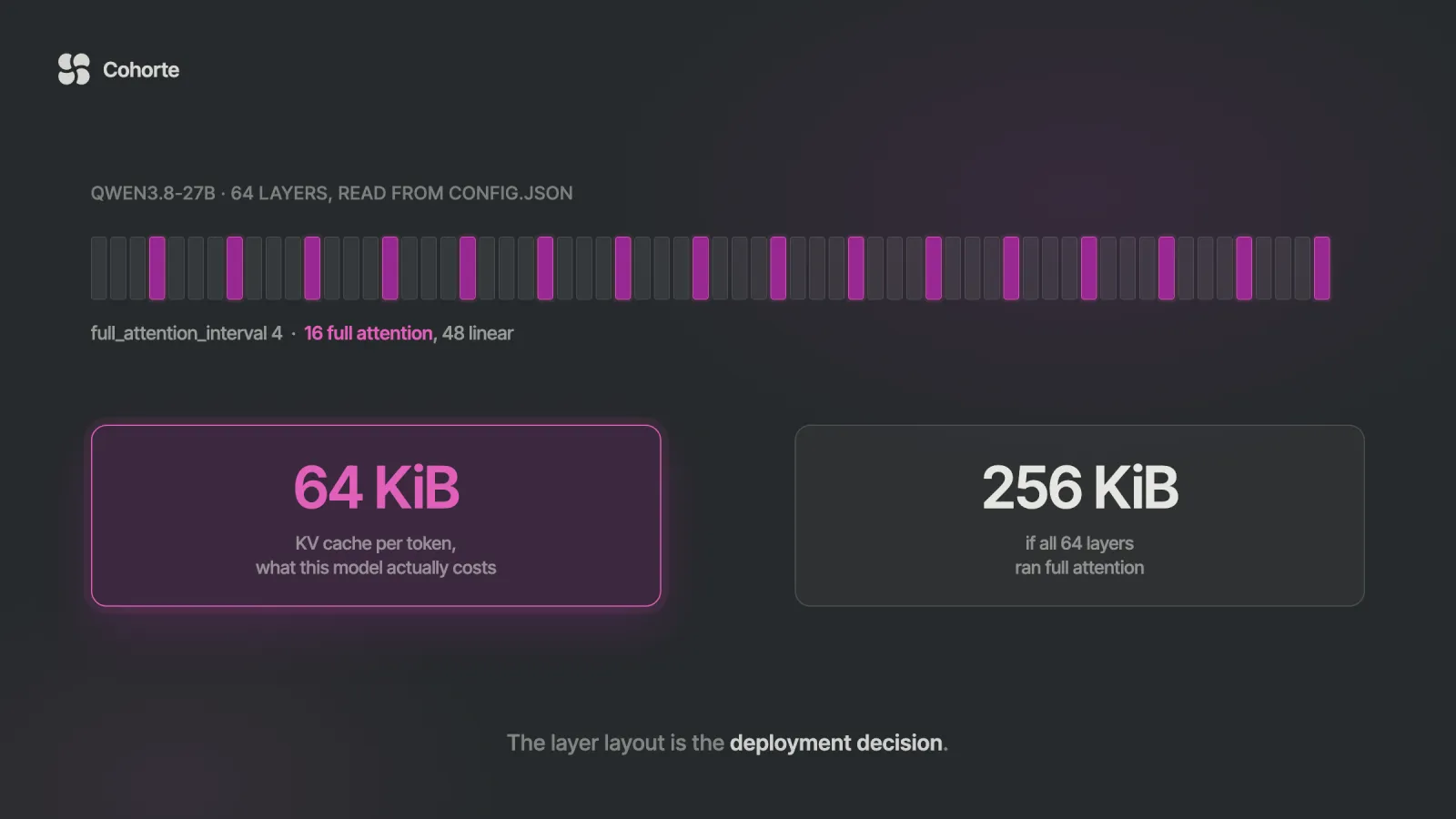
Qwen3.8-27B is a dense 27B vision-language model published by the Qwen team on Hugging Face in August 2026 under Apache 2.0, with a native 262,144-token context. Its published config is what makes it deployable on one card: 64 layers with full_attention_interval of 4, so 16 layers run full attention and 48 run linear attention. Work the KV cache arithmetic from those numbers and you get 64 KiB per token, against 256 KiB for a 27B that ran full attention everywhere. The architecture choice is the deployment decision, and it is the difference between a card that holds a useful context window and one that does not.
This is the deployment written past the first successful curl. You get the memory arithmetic derived from the model's own config, and a capacity table saying how many concurrent sequences a 24, 48 or 80 GB card actually holds at each context length. Then the serve flags that change the answer: --kv-cache-dtype fp8 doubles your capacity, and --reasoning-parser qwen3 is required for the output to parse at all. Then what stops working when a client moves off a provider SDK, how to treat a weight version as an artifact you can roll back, and a qualification card recording what this deployment is allowed to do.
Deployment tutorials end at the moment the first request returns text. That is a real milestone and it is roughly hour two of a job that runs for a fortnight.
What comes after is less photogenic. Somebody asks how many people it supports, and the honest answer is that it was never measured. A prompt template changes and output parsing breaks in a way that looks like a model regression. The weights get updated because a better checkpoint appeared, and there is no path back to the version the evals ran against. Six weeks later the model is answering questions in a workflow it was never qualified for, because the only thing anybody wrote down was the curl command.
The arithmetic below is the part you can do before any of that, on a laptop, in about twenty minutes.
Why this model on a single card
Three properties decide it, and two of them come straight out of the repository.
Apache 2.0. The model card states it plainly. No bespoke terms, no acceptable-use annex, no separate agreement for commercial deployment. Several strong open-weight models ship under custom licences with their own conditions. Each of those adds a legal review to your timeline, and Apache 2.0 is the one your counsel has already read.
The hybrid attention layout. The config declares 64 layers with full_attention_interval set to 4, so one layer in four keeps a growing key-value cache and the other three keep a constant recurrent state. Sixteen layers of KV instead of sixty-four is a factor of four on the thing that actually fills your card during a long conversation.
It fits the budget a team has. Weights at four-bit land in the high teens of gigabytes, which leaves real headroom on a 48 GB card. RunPod lists L40S at $1.09 an hour on Secure Cloud and $0.79 on Community, so the hardware conversation starts around $800 a month instead of the $6,117 that the break-even analysis works through for a pair of H100s.
It is also natively multimodal, with image and video understanding in the same weights. That matters less for the memory arithmetic and more for the qualification card at the end, because a model that accepts images is a model somebody will eventually send images to.
Where the memory actually goes
Two things occupy the card: the weights, which are fixed, and the key-value cache, which grows with every token of every active conversation. Teams size for the first and get surprised by the second.
The KV arithmetic comes out of the config and nowhere else. For each full-attention layer you store a key and a value for every token, across the KV heads, at the head dimension, in whatever precision the cache runs at:
KV bytes per token
  = 2 (key and value)
  x full-attention layers
  x num_key_value_heads
  x head_dim
  x bytes per element

Qwen3.8-27B, from config.json:
  layers 64, full_attention_interval 4  -> 16 full
  num_key_value_heads 4
  head_dim 256

  bf16: 2 x 16 x 4 x 256 x 2 = 65,536 B = 64 KiB
  fp8 : 2 x 16 x 4 x 256 x 1 = 32,768 B = 32 KiB
Run the same sum with all 64 layers on full attention and you get 256 KiB per token. That is the hybrid layout paying for itself, and it is worth doing for any model you are sizing, because the headline parameter count says nothing about it.
| Context in one sequence | KV at bf16 | KV at fp8 |
|---|---|---|
| 8,192 | 0.5 GB | 0.25 GB |
| 32,768 | 2.0 GB | 1.0 GB |
| 65,536 | 4.0 GB | 2.0 GB |
| 131,072 | 8.0 GB | 4.0 GB |
| 262,144 (native max) | 16.0 GB | 8.0 GB |
Those figures are per sequence. Eight people holding 32K conversations at once need 16 GB of cache between them, on top of the weights, and the server will accept all eight until the moment it cannot.
Images count against the same budget. A vision-language model turns each image into a run of tokens that occupy context exactly like text does, so an image-heavy conversation consumes KV cache faster than its word count suggests. If the vision path is part of what you are deploying, measure a realistic image request before you size the card, because the token count depends on resolution and on how the server tiles the image.
What one card actually holds
Put the two together and you get a capacity number you can promise against. The worked example below assumes four-bit weights at roughly 19 GB and about 2 GB of runtime overhead.
That 19 GB is worth a sentence, because it is higher than the naive estimate. Twenty-seven billion parameters at about four and a half bits is around 15 GB, and the embeddings add the rest: a 248,320-token vocabulary at hidden size 5,120, untied, is roughly 2.5 billion parameters on its own, and quantisation schemes usually keep those at higher precision. Check the actual size of the build you pull instead of trusting anyone's estimate, including this one.
| Card | KV budget | Sequences at 32K (bf16 / fp8) | At 128K (bf16 / fp8) |
|---|---|---|---|
| 24 GB | 3 GB | 2 / 3 | under 1 either way |
| 48 GB | 27 GB | 14 / 27 | 3 / 6 |
| 80 GB | 59 GB | 30 / 59 | 7 / 14 |
Read the 24 GB row before buying a 24 GB card. The weights fit, which is the claim most hardware guides make, and what is left holds two simultaneous 32K conversations. That is a single-user machine with a good context window, and it is a perfectly reasonable thing to own as long as somebody wrote down that it is one.
The 48 GB row is where a team lands. Twenty-seven concurrent 32K sessions at fp8 covers an internal tool for a department. Six concurrent 128K sessions covers a document workflow. Both on one card at about $800 a month.
And notice what the fp8 column does. Halving the cache precision doubles every capacity number on the page, for one flag. It is the largest single lever in this article, and the thing it costs is a small amount of numerical fidelity in the attention cache, which is a different and much cheaper trade than quantising the weights further.
The serve command, and the flags that matter
vLLM needs 0.17.0 or later for this architecture, because the linear-attention layers need runtime support that older builds do not have. The vLLM recipes page publishes tested commands per card; this is the single-GPU shape with the reasoning behind each flag.
vllm serve <your-quantised-repo> \
  --tensor-parallel-size 1 \
  --max-model-len 32768 \
  --kv-cache-dtype fp8 \
  --reasoning-parser qwen3 \
  --enable-auto-tool-choice \
--tool-call-parser qwen3_xml| Flag | What it decides |
|---|---|
--max-model-len | the ceiling on one sequence, and therefore the KV budget per user; set it to the context you will actually serve, because the native 262,144 reserves cache you may not have |
--kv-cache-dtype fp8 | halves cache memory and doubles concurrency; the recipes recommend it for this model |
--reasoning-parser qwen3 | separates the thinking block from the answer; without it the reasoning arrives inside your content field and downstream parsing breaks |
--enable-auto-tool-choice with --tool-call-parser qwen3_xml | tool calls come back in this model's own format and need the matching parser to become OpenAI-shaped calls |
--tensor-parallel-size | leave at 1 on a single card; it splits the model across GPUs and does nothing useful with one |
Two practical notes from the published recipes. On a single consumer card, --enforce-eager avoids CUDA graph memory issues, at some cost in speed. The second is about quantisation format, which has to match your GPU generation. NVFP4 builds target Blackwell, so on an Ada card such as the L40S or a 4090 you want an FP8 or int4 build. Picking a format your silicon does not accelerate is a common way to end up slower than the unquantised model.
Measure before you promise
The capacity table above is arithmetic. It tells you what fits, which is a different claim from what performs.
Before anybody depends on this endpoint, ramp concurrency against it and record where throughput stops climbing and where time to first token starts rising. The load-test script in the runtime comparison does exactly this in fifty lines of standard library, and it works against any OpenAI-compatible server including this one.
Run it at the context length you will actually serve, with prompts shaped like your real prompts. A benchmark at 512 tokens tells you very little about a workflow that sends 20,000, because prefill dominates the first and generation dominates the second.
Write the resulting number somewhere a product manager will find it. "This deployment supports twelve concurrent sessions at 32K with a p95 first token under three seconds" is a sentence somebody can plan against. "It's fast" is the sentence that gets you paged.
What stops working when you leave the provider SDK
vLLM serves an OpenAI-compatible API, so most client code moves over with a base URL change. Most is doing some work in that sentence.
Check each parameter your pipeline depends on against the server you are running, because a dropped one returns 200 and no error. vLLM documents that it ignores user, and the parameter reference covers the rest across the common runtimes. Send one request per parameter and assert on the response body.
Three things reliably surprise people on this particular model. Reasoning output needs the parser flag or it lands in your content. Tool calls need the matching parser or they arrive as text that looks like markup. And the vision path expects images the way this server wants them, which is worth one deliberate test before anybody builds a feature on it.
The safety framing matters too. Exposing a model server is exposing an endpoint, and the tool surface around it is where most of the risk lives; the MCP security checklist covers that side.
Four numbers to log from day one
You are now the provider. The dashboard you used to complain about is a thing you have to build, and four fields cover most of what you will need.
Queue depth. The single most useful signal on a self-hosted server, because it distinguishes a slow model from a busy one. A rising queue with flat GPU utilisation means you are admission-limited. A flat queue with saturated utilisation means you have found the ceiling.
Time to first token, at p95. The mean hides the experience. Users notice the slow tail, and the tail is what moves when concurrency rises.
Prompt and completion tokens per request. This is how you discover that the average prompt tripled after a retrieval change, which shows up as a latency regression nobody can trace to a deploy.
The weight revision. Stamped on every response, for the reason in the next section.
Two more are worth having once the basics are in place: KV cache utilisation, which tells you how close you are to the capacity table above, and preemption count, which tells you the server has started evicting sequences to fit new ones. Preemptions are the mechanical signature of overcommitment, and they arrive before users complain.
A weight version is a deployment artifact
The habit that separates a deployment from a demo is treating the weights the way you treat a container image.
Pin the exact revision. Hugging Face repositories move, and "the latest Qwen3.8-27B" is not a version. Record the commit hash of the repo you pulled, and the digest of the quantised build if somebody else produced it, and serve from your own copy so that an upstream change cannot alter what is running.
Keep the previous version reachable. A weight change is a behaviour change and it can regress a workflow that the benchmark score says improved. The rollback is a config line pointing at the old revision, which costs you disk and buys you the ability to undo a bad afternoon in ten minutes.
Run the evals before the swap, against both versions, on your own tasks. A model that scores higher on public benchmarks can still be worse at the one obligation you deployed it for, and the only way to know is to have kept a small set of cases that represent that obligation.
Log the version with every response. When somebody reports an odd answer three weeks later, the first question is which weights produced it, and a trace without that field cannot answer it.
The card that says what this is allowed to do
The last artifact is a page of text, and it is the one that makes the difference between a deployment and a liability.
Write down what this serving setup is qualified for and what it is explicitly not. The value is in the second half. A model that answers well in a demo will be pointed at new work by people who were not in the room, and the card is what tells them the boundary before they find it the hard way.
| Field | Example entry |
|---|---|
| Obligation | drafting first-pass replies to tier-1 support tickets in English and French |
| Weights | repo revision and quantised build digest, both pinned |
| Serving config | the exact vllm serve line, including max-model-len and KV dtype |
| Measured capacity | concurrent sessions at a stated context, with p95 time to first token |
| Evidence | which eval set was run, when, and the result per task class |
| Not qualified for | anything customer-visible without review; images; anything touching money; the 262K context, which was never tested |
| Owner | a named person who decides on regressions and approves weight changes |
| Rollback | the previous revision and the command that restores it |
The "not qualified for" row is the one people skip and the one that earns its keep. It costs ten minutes and it is the difference between a bounded tool and an open question about what the model has been doing.
This is the third of three. The break-even analysis works out whether the GPU pays for itself at all. The runtime comparison decides what you serve it with and hands you the load tester used above. The self-hosted agent stack covers the four layers that sit above the model server.
What I'd do
Do the memory arithmetic before you rent anything, because it takes twenty minutes and it changes which card you buy. Open config.json for whatever model you are considering, count the full-attention layers, and work out the per-token cost; a hybrid layout and a dense one differ by four times on the number that decides your context window. Then set --max-model-len to the context you will actually serve instead of the native maximum, turn on --kv-cache-dtype fp8, and spend the headroom on concurrency. Measure the real ceiling with the load tester before anyone outside the team touches the endpoint, and write the resulting sentence down where a product manager can find it. Pin the weight revision, keep the previous one reachable, and log the version with every response, because the first question about a strange answer is always which weights produced it. Then fill in the qualification card, especially the row about what this deployment is not for, and keep it as a living document the way we teach operators to keep the AI Operating System. If you want this built properly with us instead of assembled from blog posts, that is Engineering Foundations, and the team programmes exist for when the decision belongs to a whole organisation.
FAQ
What GPU do you need to run Qwen3.8-27B?
At four-bit the weights are roughly 19 GB, so a 24 GB card loads the model but leaves about 3 GB for the KV cache, which is two concurrent 32K conversations. A 48 GB card such as an L40S leaves around 27 GB, or 27 concurrent 32K sessions with an fp8 cache. The weights fitting and the deployment working are two different tests.
How much VRAM does the Qwen3.8-27B KV cache use?
64 KiB per token at bf16 and 32 KiB at fp8, derived from its config: 16 of the 64 layers run full attention, with 4 key-value heads at head dimension 256. That is 2 GB for one 32K sequence at bf16, and 16 GB for one sequence at the native 262,144-token context.
Is Qwen3.8-27B free for commercial use?
The model card states Apache 2.0, which permits commercial use without a separate agreement or an acceptable-use annex. Confirm the licence on the repository you actually pull, because quantised community builds are republished by third parties and carry their own terms.
What vLLM version do you need for Qwen3.8-27B?
0.17.0 or later. The model uses linear attention on 48 of its 64 layers, and older builds lack the runtime support for it. The published recipes also recommend --kv-cache-dtype fp8, and --reasoning-parser qwen3 is needed for the thinking block to be separated from the answer.
Why does my model return reasoning inside the answer?
The reasoning parser is off. Serve with --reasoning-parser qwen3 and the thinking block arrives in its own field instead of inside your content. It presents as a formatting problem in whatever consumes the response, which is why it usually gets diagnosed as a prompt issue first.
Should you quantise the weights or the KV cache first?
The cache. Moving the KV cache to fp8 doubles concurrency and touches only the attention cache, while quantising weights further changes the model's outputs everywhere and needs its own evaluation. Take the cheap capacity first and reserve weight quantisation for when the arithmetic still does not work.
The first curl is hour two. The fortnight is the arithmetic, the measured ceiling, the pinned revision and the page saying what this is allowed to do.
All four fit in an afternoon, and they are the difference between a model you deployed and a model you can answer questions about.
Charafeddine MouzouniSeptember 20, 2026