This OpenAI API tutorial takes you from no account to a working agent in Python. You create an API key on the OpenAI platform, store it in the OPENAI_API_KEY environment variable, install the official SDK with pip install openai (version 3.46.0 on PyPI today, Python 3.10 or newer), and make your first request with client.responses.create. The Responses API is the interface OpenAI recommends for all new projects. Chat Completions remains supported, and you will see it in older code.
For learning, start on gpt-6-luna at $0.10 per million input tokens and $0.50 per million output tokens. Move up to gpt-6.1-sol ($2 and $10) or gpt-6-astra ($10 and $50) when a task needs deeper reasoning. Every example below was written against the November 2026 SDK: streaming, structured outputs with Pydantic, function calling, conversation state, a small agent, error handling, rate limits and cost control.
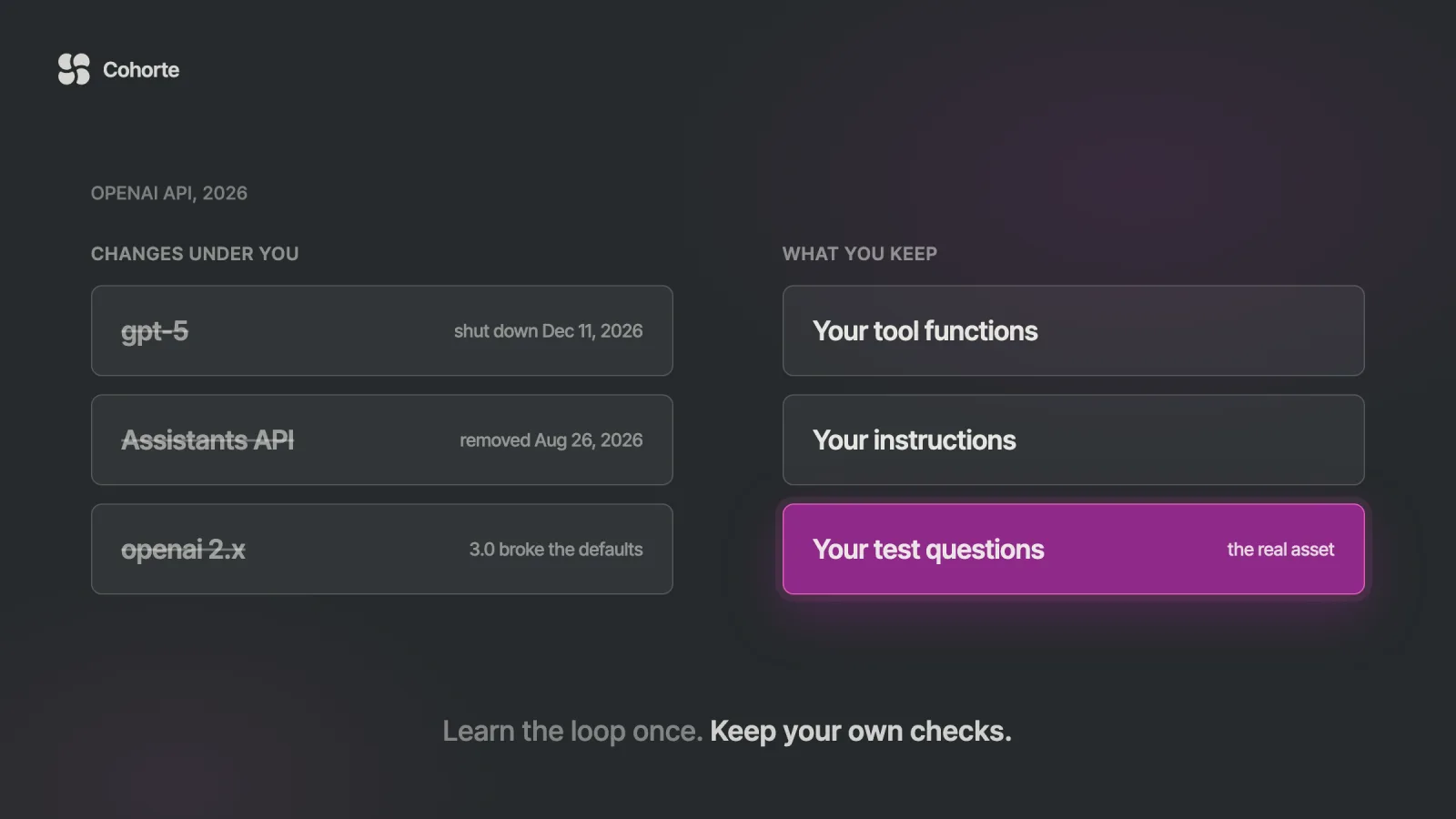
Here is the shape this usually takes. A small team builds a support assistant in 2024 from a tutorial on the Assistants API: create an assistant, open a thread per customer, start a run, poll until it finishes. It works for a year and a half. Then OpenAI deprecates the Assistants API in August 2025 and removes it on August 26, 2026.
The rebuild is where the lesson sits. The tutorial code, threads and runs and polling, has to go. What carries over untouched is the team's own work: the functions that look up orders, the instructions they tuned, and the short list of real customer questions they use to check every change.
A smaller version is coming. OpenAI's deprecations page gives December 11, 2026 as the shutdown date for gpt-5, gpt-5-mini and gpt-5-nano, so a tutorial written this summer has about five weeks left. This guide sticks to the parts that last: the Responses API, a key handled like a secret, and an agent loop you write yourself.
For a short tour of what the Responses API added at launch, our earlier quickstart to the Responses API covers that 2025 moment. This page is the complete path, from an empty folder to a working agent.
Step 1: get an OpenAI API key and store it safely
Sign in at platform.openai.com and open the API keys page. Keys live inside a project, so create a project called "learning" and make the key there.
New accounts in supported countries start on a free tier, enough for test requests. To keep building, you add credits on the billing page, and once purchases reach $5 the account moves to the Build tier, with a $500 monthly usage limit, according to the rate limits guide.
The API reference puts the main rule plainly: your API key is a secret, and it should never sit in client-side code such as a browser page or a mobile app. If a front end needs AI, it calls your server, and your server calls OpenAI.
The SDK reads the key from the OPENAI_API_KEY environment variable, so your code never has to contain it:
# macOS or Linux, for this terminal session
export OPENAI_API_KEY="paste-your-key-here"

# Windows PowerShell (open a new terminal afterwards)
setx OPENAI_API_KEY "paste-your-key-here"
For a real project, the SDK's README suggests a .env file loaded with python-dotenv. Add .env to .gitignore before you put the key in it, then call load_dotenv() at the top of your script. If the key does reach a public repository, the usual cost is an outage. Since 2021, GitHub's secret scanning forwards OpenAI keys found in public commits to OpenAI, which disables them. Your credits are safe, and your app stops working the moment you push.
Step 2: install the official OpenAI Python SDK
Use a virtual environment so the SDK version belongs to the project:
python3 -m venv .venv
source .venv/bin/activate
pip install --upgrade openai pydantic
python -c "import openai; print(openai.__version__)"
The openai-python README asks for Python 3.10 or higher. Version 3.46.0 is the current release on PyPI as I write, and the changelog already lists 3.47.0, so new versions arrive every few days.
One change matters for older code. Version 3.0.0, released August 12, 2026, made HTTPX2 the default HTTP client and stopped installing httpx, so a 2025 tutorial that passes its own httpx client to OpenAI() needs the HTTPX2 equivalent.
Step 3: your first call with the Responses API
Save this as first.py and run it with python first.py:
from openai import OpenAI

client = OpenAI()  # reads OPENAI_API_KEY from the environment

response = client.responses.create(
    model="gpt-6-luna",
    instructions="You explain APIs to beginners. Be brief.",
    input="What is a rate limit, in two sentences?",
)

print(response.output_text)
print(response.usage.input_tokens, response.usage.output_tokens)
Three parameters do most of the work. model picks the model, instructions carries the standing rules (the system or developer message), and input is what the user says, as a string or a list of items.
output_text is a shortcut that joins the text the model produced, while output is the full list of items, including reasoning and tool calls. usage tells you how many tokens you paid for. The SDK also exposes response._request_id, and OpenAI recommends logging request IDs in production. If you get an AuthenticationError, the key is missing or mistyped in this terminal.
Which OpenAI model to use in November 2026
The models page lists four flagship models today, each with a 1.05 million token context window, up to 128,000 output tokens, and function calling and web search. Prices per million tokens on the Standard tier, from the pricing page:
| Model ID | Input | Cached input | Output | OpenAI's description |
|---|---|---|---|---|
gpt-6-astra | $10.00 | $1.00 | $50.00 | Most capable, for the most demanding work |
gpt-6.1-sol | $2.00 | $0.10 | $10.00 | Near-Astra performance at a lower cost |
gpt-6.1-terra | $1.00 | $0.05 | $5.00 | Fast, for visual reasoning, computer use and writing |
gpt-6-luna | $0.10 | $0.01 | $0.50 | Most efficient, for focused high-volume tasks |
The models page suggests Astra if you are unsure where to start. For learning, I would start on Luna: it costs a hundredth of Astra per token, it supports every feature in this tutorial, and your mistakes stay cheap. When a task fails on Luna after you have checked your prompt and tools, try Sol before Astra.
You control how hard these models think by passing reasoning={"effort": "low"} to responses.create. The reasoning guide lists the possible values as none, minimal, low, medium, high, xhigh and max, and each model accepts a subset. Astra rejects none with an HTTP 400, Sol accepts neither none nor minimal, and Luna accepts none. Sol and Luna default to medium.
Reasoning tokens are billed as output tokens even though you never see them. Print response.usage.output_tokens_details.reasoning_tokens while you experiment and the first invoice will not surprise you.
Streaming responses as they are generated
With stream=True, the SDK hands you events as the model writes, instead of one answer at the end:
stream = client.responses.create(
    model="gpt-6-luna",
    input="Explain HTTP streaming in one short paragraph.",
    stream=True,
)

for event in stream:
    if event.type == "response.output_text.delta":
        print(event.delta, end="", flush=True)
    elif event.type == "response.completed":
        print("\ntokens:", event.response.usage.total_tokens)
    elif event.type == "error":
        print("\nerror:", event.message)
The streaming guide names the events you will use most: response.created at the start, response.output_text.delta for each piece of text, response.completed at the end with the full response and usage, and error.
OpenAI's production guide says streaming cuts time to first token without reducing total generation time. The streaming guide adds the catch: partial output is harder to moderate, so decide whether you filter chunks or wait for the full text.
Structured outputs: JSON that matches your schema
When your code needs to use the answer, plain text gets awkward. Structured outputs make the model fill a schema you define, and with Pydantic and responses.parse, you get a typed Python object back:
from typing import Literal
from pydantic import BaseModel
from openai import OpenAI

class Ticket(BaseModel):
    category: Literal["bug", "billing", "question"]
    urgency: int  # 1 (low) to 5 (drop everything)
    summary: str

client = OpenAI()
response = client.responses.parse(
    model="gpt-6-luna",
    instructions="Classify the support ticket.",
    input="Export has been broken for three days "
          "and our audit is on Friday.",
    text_format=Ticket,
)

ticket = response.output_parsed
if ticket is None:
    print("No parsed output (refusal or cut off)")
else:
    print(ticket.category, ticket.urgency, ticket.summary)
The Literal type becomes an enum, so the model can only pick one of your three categories. Without Pydantic, pass the schema yourself as text={"format": {"type": "json_schema", ...}} with "strict": True. The examples in the structured outputs guide mark every property required and set additionalProperties to false; copy that pattern.
Two edge cases need a line each. A refusal arrives as a separate item that ignores your schema, and a response cut off by max_output_tokens comes back incomplete. The guide calls structured outputs the evolution of JSON mode and says to prefer them when possible, so treat json_object examples in older tutorials as legacy.
The schema guarantees the shape of the answer and says nothing about whether it is true. A ticket marked urgency 5 parses perfectly whether or not anything is urgent, which is why the production section ends with a test set.
Function calling: let the model ask your code for data
Function calling, also called tool calling, is how a model reaches your database or order system. The model never runs your code: it returns a request naming a function and its arguments, your code runs it, and you send the result back.
import json
from openai import OpenAI

client = OpenAI()

tools = [{
    "type": "function",
    "name": "get_order_status",
    "description": "Look up the shipping status of an order.",
    "parameters": {
        "type": "object",
        "properties": {
            "order_id": {"type": "string"},
        },
        "required": ["order_id"],
        "additionalProperties": False,
    },
    "strict": True,
}]

def get_order_status(order_id):
    orders = {"A-1001": "shipped", "A-1002": "processing"}
    return orders.get(order_id, "not found")

history = [{"role": "user", "content": "Where is A-1001?"}]
response = client.responses.create(
    model="gpt-6-luna", input=history, tools=tools,
)

history += response.output  # keep the model's turn
for item in response.output:
    if item.type == "function_call":
        args = json.loads(item.arguments)
        history.append({
            "type": "function_call_output",
            "call_id": item.call_id,
            "output": get_order_status(**args),
        })

response = client.responses.create(
    model="gpt-6-luna", input=history, tools=tools,
)
print(response.output_text)
Each function_call item has a call_id, a name, and arguments as a JSON string. Your result goes back as a function_call_output with the same call_id. The line history += response.output matters: the function calling guide says reasoning models need their reasoning items passed back along with the tool outputs.
The model may call several functions in one turn, which is why the code loops; parallel_tool_calls=False limits it to one. tool_choice defaults to "auto" and also takes "required", one named function, or "none".
The guide's design advice: keep the set small (it suggests fewer than 20 functions), turn strict mode on, use enums to rule out invalid values, and never ask the model for an argument your code already knows. Its test is a good one: could an intern use the function correctly from the name, description and parameters alone?
OpenAI also hosts built-in tools. tools=[{"type": "web_search"}] gives the model web search with cited sources, at $10 per 1,000 calls plus the search content tokens.
Conversation state: three ways to keep context
Each request starts from nothing, so the model only remembers what you supply. The conversation state guide gives three ways:
| Method | How it works | Where state lives | Good for |
|---|---|---|---|
| Manual history | Append each output to a list and send the list | Your code | Full control, store=False, local models |
previous_response_id | Pass the last response's ID | OpenAI, 30 days by default | Short chats with little code |
| Conversations API | Create a conversation once, pass its ID each turn | OpenAI, a durable object | Long-running threads |
The function calling example above already used manual history. The other two are one argument each:
second = client.responses.create(
    model="gpt-6-luna",
    previous_response_id=first.id,
    input="Suggest a name for my shop.",
)

conv = client.conversations.create()
# then pass conversation=conv.id on every call
Two details catch people out. Instructions are not carried over when you chain with previous_response_id, so pass instructions on every call. And the guide states that all previous input tokens in the chain are billed as input on each new request: the server remembers the conversation, and you still pay for it to be read again every turn.
Retention is the other decision. Response objects are stored for 30 days by default and conversation objects have no such limit. If your data cannot stay on OpenAI's servers, use manual history with store=False.
Build a small working agent in Python
An agent is the function calling loop with the ending left open: the model keeps calling tools until it decides it can answer. Your code supplies what the model cannot, the actual tools and a limit on how long it may keep going.
This one answers questions from a folder of Markdown notes. Put a few .md files in a notes folder next to the script and save this as agent.py:
import json
from pathlib import Path
from openai import OpenAI

client = OpenAI()
MODEL = "gpt-6-luna"
NOTES = Path("notes").resolve()

def list_notes():
    return "\n".join(p.name for p in NOTES.glob("*.md"))

def read_note(name):
    path = (NOTES / name).resolve()
    if path.parent != NOTES or not path.is_file():
        return "error: no such note"
    return path.read_text()[:8000]

FUNCTIONS = {"list_notes": list_notes, "read_note": read_note}

def tool(name, description, properties):
    return {
        "type": "function",
        "name": name,
        "description": description,
        "parameters": {
            "type": "object",
            "properties": properties,
            "required": list(properties),
            "additionalProperties": False,
        },
        "strict": True,
    }

TOOLS = [
    tool("list_notes", "List the note files you can read.", {}),
    tool("read_note", "Read one note file by its file name.",
         {"name": {"type": "string"}}),
]

INSTRUCTIONS = (
    "Answer using the notes only. Name the file behind "
    "each fact. If the notes do not say, say so."
)

def run(fn, args):
    try:
        return str(FUNCTIONS[fn](**args))
    except Exception as exc:  # report it, let the model adapt
        return f"error: {exc}"

def ask(question, max_turns=8):
    history = [{"role": "user", "content": question}]
    for _ in range(max_turns):
        response = client.responses.create(
            model=MODEL,
            instructions=INSTRUCTIONS,
            input=history,
            tools=TOOLS,
        )
        history += response.output
        calls = [item for item in response.output
                 if item.type == "function_call"]
        if not calls:
            return response.output_text
        for call in calls:
            print(f"  [tool] {call.name} {call.arguments}")
            args = json.loads(call.arguments)
            history.append({
                "type": "function_call_output",
                "call_id": call.call_id,
                "output": run(call.name, args),
            })
    return "Stopped after max_turns without an answer."

if __name__ == "__main__":
    print(ask("What did we decide about pricing?"))
Four pieces carry the safety of the whole thing. The path check in read_note turns a request for ../.env into an error, because the model can only reach what your functions allow. max_turns stops a confused model from looping on your credit card. run turns exceptions into text the model can react to, so one bad call does not crash the session. And the print line gives you a trace, the first thing you want when an answer looks wrong.
Once you have written this loop, frameworks are easier to judge. OpenAI's Agents SDK (pip install openai-agents) wraps the same loop in an Agent and a Runner, and our step-by-step guide to the OpenAI Agents SDK picks up from there.
A turn limit is the smallest possible stop button. When your agent can write, send or spend, you need a real one, and our guide to why your AI agent needs a kill switch shows how to build it.
Errors, retries and OpenAI API rate limits
The SDK raises one exception class per kind of failure, all inheriting from openai.APIError. The error codes guide explains the causes:
| HTTP status | SDK exception | Usual cause | What to do |
|---|---|---|---|
| 401 | AuthenticationError | Wrong, expired or revoked key | Check the key, or make a new one |
| 400 | BadRequestError | Malformed request | Fix the request; retrying will not help |
| 403 | PermissionDeniedError | Unsupported country or no access | Check region and permissions |
| 429 | RateLimitError | Too many requests or tokens per minute | Back off and follow Retry-After |
| 429 | RateLimitError | No credits left, or a spend limit reached | Add credits or raise the limit; retries will not help |
| 500, 503 | InternalServerError | Server error or model overloaded | Retry after a short wait |
The two kinds of 429 look identical to a naive retry loop, so check the error code: credit_balance_exhausted or project_spend_limit_exceeded will not clear by waiting. Catch specific exceptions before APIStatusError, their parent class:
import openai
from openai import OpenAI

client = OpenAI(max_retries=3, timeout=60.0)

try:
    response = client.responses.create(
        model="gpt-6-luna",
        input="Say hello.",
    )
    print(response.output_text, response._request_id)
except openai.AuthenticationError:
    print("401: key missing, mistyped or revoked")
except openai.RateLimitError as e:
    # rate limit, or out of credits / spend limit
    print("429:", e.code, e.request_id)
except openai.APIStatusError as e:
    print("HTTP", e.status_code, e.request_id)
except openai.APIConnectionError:
    print("Network problem or timeout")
The SDK already retries eligible 429 and 503 responses, with max_retries defaulting to 2. Its default timeout is 10 minutes, far too long for a web request, so set your own. If you write your own backoff, set max_retries=0 so the two loops do not multiply.
Rate limits are measured in requests and tokens per minute and per day (RPM, RPD, TPM, TPD), and they grow with your usage tier:
| Tier | To qualify (total credit purchases) | Monthly usage limit |
|---|---|---|
| Free | Account in an allowed geography | $100 |
| Build | $5 | $500 |
| Launch | $100 | $5,000 |
| Grow | $500 | $200,000 |
Limits also vary by model: on the Build tier, Luna allows 5,000 requests and 2,000,000 tokens per minute, Sol 5,000 requests and 1,000,000 tokens. The x-ratelimit-remaining-tokens header tells you where you stand.
One detail from the guide changes how you write a client: failed requests count toward your per-minute limit, so hammering the API after a 429 makes it worse.
Cost control: what a call costs and how to cap it
Cost is tokens multiplied by price. A call with 2,000 input tokens and 500 output tokens costs $0.00045 on Luna, or $4.50 for 10,000 calls a day. The same traffic on Astra costs $0.045 a call and $450 a day.
Reasoning tokens count as output, so a medium-effort answer that thinks for 3,000 tokens before writing 500 visible ones bills 3,500. The levers, roughly in order of size:
- The model. Luna and Astra differ by a factor of 100 per token, so test the cheap model against your checks first.
- Reasoning effort. Lower effort means fewer hidden output tokens, so measure
reasoning_tokensat each level on your real prompts. - Prompt caching. On by default for prompts of 1,024 tokens or more on GPT-5.6 and later, per the caching guide. Put stable instructions first; cached input on Luna costs $0.01 per million tokens against $0.10.
- Batch and Flex. Both cost half the Standard price on current models. Batch suits overnight jobs, and
service_tier="flex"suits work that can wait. - Context length. On Luna, prompts over 272,000 input tokens cost twice as much for input and 1.5 times for output, for the whole request.
Conversation growth is the cost people miss, because every turn re-sends every earlier turn. A 20-turn chat adding 300 tokens a turn sends 63,000 input tokens in total, against 6,000 if each turn stood alone. Long chats need trimming, a summary, or the compaction features in the conversation state guide.
max_output_tokens caps everything the model generates, reasoning included. Set it too low and the response comes back incomplete, sometimes before any visible text, and you still pay for the input and the reasoning. The reasoning guide suggests reserving at least 25,000 tokens while you experiment.
Finally, put a ceiling on the account. The spend limits guide separates spend alerts, which only notify you, from hard spend limits, which make requests fail with a 429 once spend reaches the cap. Enforcement takes a moment, so spend can run slightly past it.
Run the same code against local models
The SDK talks to any server that speaks the same protocol. Ollama added a /v1/responses endpoint in version 0.13.3, and its compatibility page shows this pattern:
from openai import OpenAI

client = OpenAI(
    base_url="http://localhost:11434/v1/",
    api_key="ollama",  # required by the SDK, ignored by Ollama
)
response = client.responses.create(
    model="qwen3:8b",
    input="Say hello in five words.",
)
print(response.output_text)
Ollama supports streaming and function calling there, in the stateless flavor only, with no previous_response_id and no conversation. The agent above keeps its own history, so it runs locally with only the client and model lines changed.
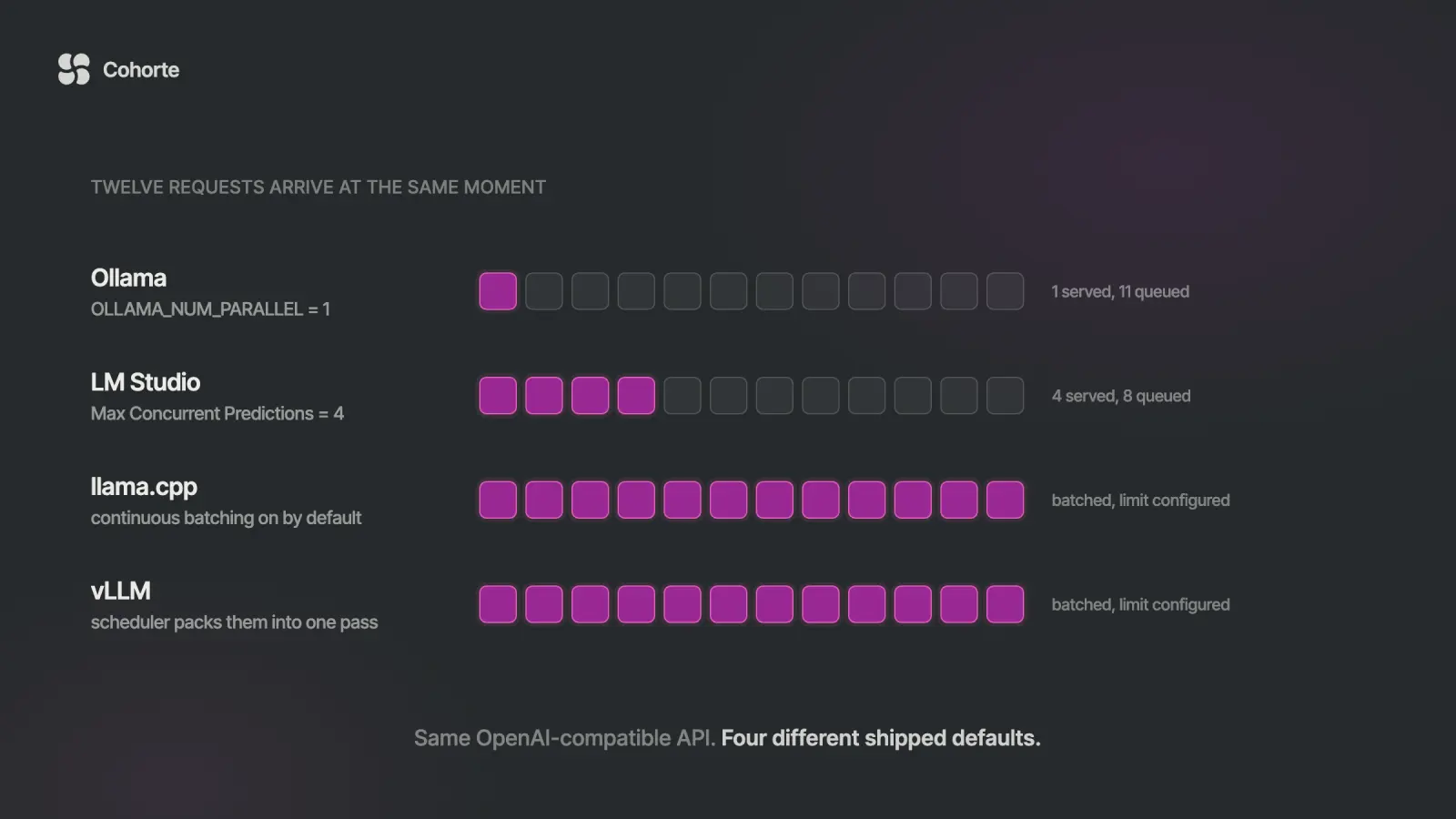
Local servers differ in how many requests they serve at once, which decides whether your agent survives a second user. Our comparison of local LLM servers with an OpenAI-compatible API covers Ollama, LM Studio, vLLM and llama.cpp, and which OpenAI parameters each one quietly drops.
Before production: what to check
The script works on your laptop, which is the easy half. Before real users touch it, I would want these checks, most of them from OpenAI's production best practices:
- Separate projects. One for staging and one for production, each with its own keys, rate limits and spend limit.
- A service account key. The application gets a project service account with an expiration date. To rotate, create the new key, deploy it, and revoke the old one only after the new one works.
- Request IDs in the logs. Log
_request_idwith every call, along with the model, token usage and latency. - Timeouts and alerts. Set timeouts and retries on purpose, and make quota errors page someone.
- Data settings. Decide on
store=False, and send a hashed user ID assafety_identifier, which the SDK now prefers over the olderuserfield. - Pinned model IDs. Pin them and put the deprecations page on someone's monthly calendar.
- A test set. Keep real inputs with known good answers, and run them before every change of model, prompt or tool.
The last item is the one that saves you. A 200 response with a well-formed answer looks exactly the same whether the answer is right or wrong. Charafeddine Mouzouni's letter AI Never Says "I Don't Know" tells how a compliance team learned this from an audit. Our guide to evaluating AI agents shows how to build the test set that catches it first.
What I'd do
This week, make a project with a hard spend limit of $10, put the key in a .env file that git ignores, and run the first call on gpt-6-luna. Then point the notes agent at a folder of your real documents and write down five questions you know the answers to. Run them after every change of model, instructions or tool, and move to Sol or Astra only when Luna fails one for a reason you can name. Keep the loop, your tool functions and those questions in an AI Operating System you own, because they survive the next deprecation.
For the engineering layer around this, with multi-model fallback, evaluation pipelines and cost per request, see AI Engineering Foundations, the first course in our Engineering Series. If you do not write code and want the same habits with the AI tools you already use, start with the AI OS Course. Companies training a whole team can look at Cohorte for Teams.
FAQ
Is the OpenAI API free to use?
You can make test requests on the free tier if your account is in a supported country. Real use is paid per token: you add credits on the billing page, and $5 of purchases moves you to the Build tier with a $500 monthly usage limit.
How do I use the OpenAI API in Python?
Install the SDK with pip install openai, set your key in the OPENAI_API_KEY environment variable, then create a client with OpenAI() and call client.responses.create(model="gpt-6-luna", input="..."). The answer is in response.output_text. The SDK needs Python 3.10 or newer.
What is the difference between the Responses API and Chat Completions?
Responses is the newer interface, and OpenAI's migration guide recommends it for all new projects, while Chat Completions remains supported. Responses adds built-in tools such as web search and optional server-side conversation state, and the guide reports 40% to 80% better cache use in OpenAI's internal tests.
How do you integrate with the OpenAI API for AI agents?
Define your functions as tools with a JSON schema and pass them to responses.create. Run any function_call items the model returns and send the results back as function_call_output items with the matching call_id. Repeat, with a turn limit, until the model answers without calling a tool.
What are the OpenAI API best practices?
Keep the key on your server and out of git, separate staging and production projects, set a hard spend limit, log request IDs, set your own timeouts, and use strict schemas. Above all, keep a test set of real inputs and run it before every model or prompt change.
How much does the OpenAI API cost per request?
On gpt-6-luna, 2,000 input tokens and 500 output tokens cost about $0.00045, and the same request on gpt-6-astra about $0.045. Reasoning tokens bill as output, so measure usage on your real prompts before you set a budget.
The team with the Assistants API bot lost its tutorial code and kept its functions, its instructions and its questions. Build in that order from the start and the next deprecation notice costs you an afternoon.
Learn the loop once, keep your own checks, and let the model names change underneath you.
Charafeddine MouzouniNovember 8, 2026