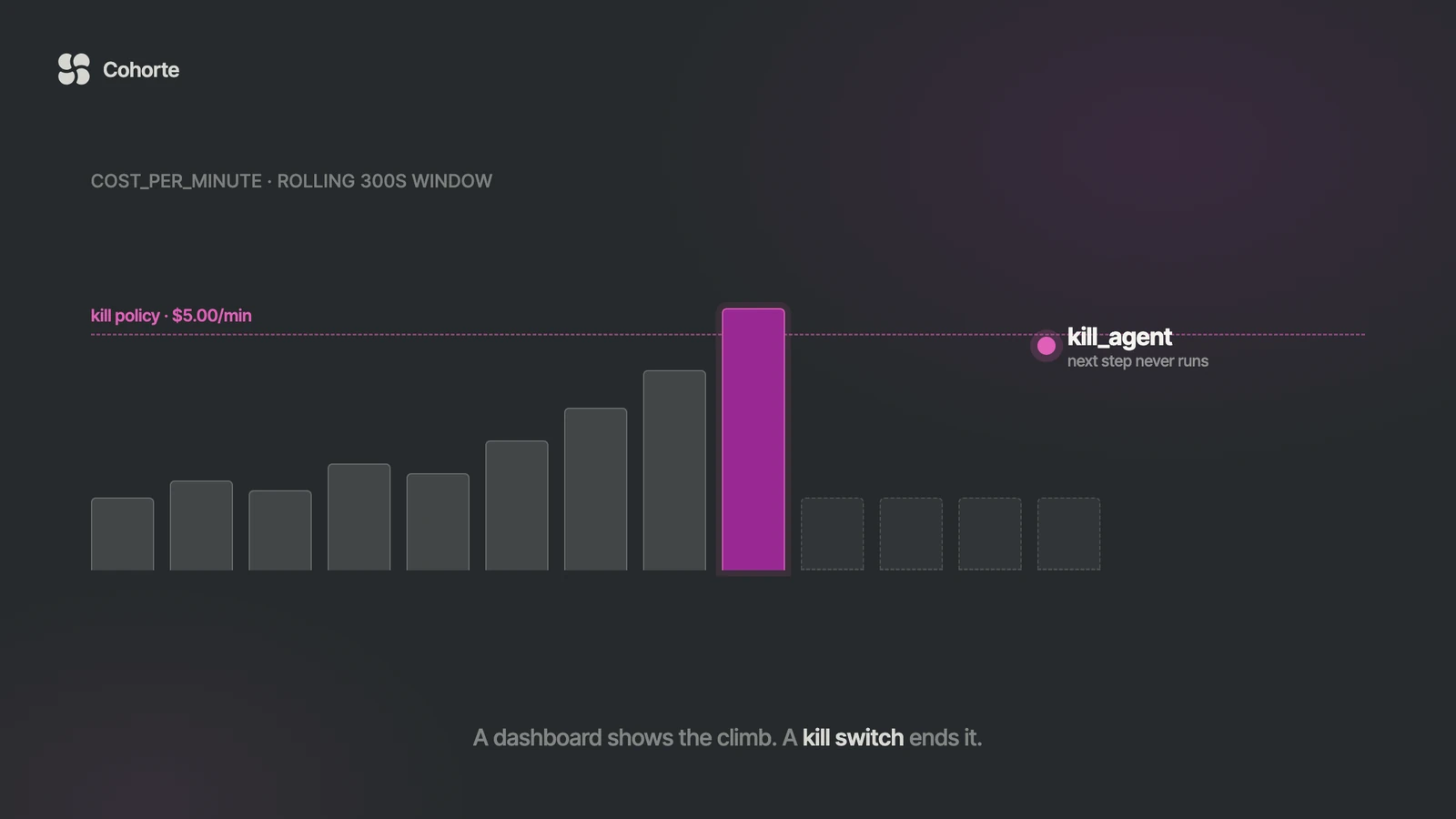
An AI agent in production needs a way to be stopped, and most stacks cannot stop one. They can trace it, log it, chart its spend and replay its spans, all of which describe a problem that is still happening. A kill switch is the control that ends it.
This is the pattern we build into agents that touch money, customer data or outbound communication: structured events, rolling metrics, learned baselines, anomaly rules, and scoped kill policies that stop one agent, one session, or everything. The code below uses theaios-agent-monitor, which is the Apache-2.0 library we open-sourced for exactly this job.
Why stopping is a different capability from watching
Agent failures rarely announce themselves the way infrastructure failures do. The server stays healthy, the model keeps responding, the queue keeps draining, and the logs stay boring while the agent loops tool calls, burns budget, denies legitimate requests, or prepares a well-formatted email for the wrong recipient.
Tracing tells you this after the fact, which is genuinely useful for the post-mortem and useless at the moment it matters. The production question is sharper: can the system stop the agent before the blast radius grows?
That question needs three things underneath it. Monitoring, so there are structured events describing what the agent did. Anomaly detection, so there are metrics and baselines that show when behaviour has drifted. And control, so a policy can stop unsafe work without waiting for a human to notice.
Agent action
  -> record event
  -> compute rolling metrics
  -> update baseline
  -> detect anomaly
  -> trigger alert or kill policy
  -> block future work if killed
Each layer feeds the next, and the kill switch is only ever as good as the signal underneath it.
Agent behaviour belongs in events
The first mistake is recording agent activity as incidental logging. A log line says something happened. An event says what happened, which agent did it, when, what it cost, how long it took, which session it belonged to, and what metadata an investigator will want later.
That distinction decides whether control is possible at all, because a kill policy cannot reason over prose. It needs metrics, and metrics need typed events. So the architecture starts with one rule: every meaningful agent operation becomes an event. An LLM call, a tool call, a guardrail denial, an approval request, an error. All of them.
Once the events exist you can compute rolling metrics such as cost_per_minute, denial_rate, event_count, error_count and avg_latency_ms. Those metrics make baselines possible, baselines make anomalies meaningful, and anomalies plus hard thresholds make containment automatic.
Install and configure
pip install theaios-agent-monitorimport time
from theaios.agent_monitor import AgentEvent, Monitor, load_configThree imports carry the whole pattern. Monitor is the runtime control plane, load_config reads the YAML policy, and AgentEvent is the structured envelope that turns activity into something measurable.
Put the kill switch in the first production config rather than adding it later. If the agent can call tools, spend money, mutate state, message users or touch private data, it belongs there from the start.
# monitor.yaml
version: "1.0"

metadata:
  name: production-agent-monitor
  description: Production agent monitoring

metrics:
  default_window_seconds: 300
  max_window_seconds: 3600

baselines:
  enabled: true
  min_samples: 30
  metrics:
    - denial_rate
    - error_count
    - cost_per_minute
    - avg_latency_ms
  storage_path: .agent_monitor/baselines.json

anomaly_detection:
  enabled: true
  rules:
    - name: cost-spike
      metric: cost_per_minute
      z_threshold: 2.5
      severity: critical
      cooldown_seconds: 600

    - name: denial-surge
      metric: denial_rate
      z_threshold: 3.0
      severity: high
      cooldown_seconds: 300

kill_switch:
  enabled: true
  state_path: .agent_monitor/kill_state.json
  policies:
    - name: auto-kill-on-high-cost
      metric: cost_per_minute
      operator: ">"
      threshold: 5.0
      action: kill_agent
      severity: critical
      message: "Agent exceeded cost-per-minute limit"

alerts:
  channels:
    - type: console
A few production choices are embedded there. The 300-second window is responsive without being twitchy. Baselines let the system learn what normal looks like per agent. Anomaly rules catch statistical weirdness, and the kill policy handles cost velocity that is simply unacceptable.
Those last two do different jobs and should not be collapsed. Anomaly detection says the behaviour is unusual. A kill policy says the behaviour is no longer permitted.
agent-monitor -c monitor.yaml validateValidate before anything reaches production. This is the work that prevents YAML archaeology at two in the morning.
Create the monitor once
from theaios.agent_monitor import Monitor, load_config

monitor = Monitor(load_config("monitor.yaml"))
monitor.kill_switch_engine.load()
The load() call matters whenever kill state is persisted. If an agent was killed before the process restarted, the application should restore that state on startup, because a restart that quietly revives a stopped agent has just performed an unapproved rollback of an operational decision.
Build the monitor once at startup and reuse it. Creating one per request, or loading config per request, puts cost in the hot path, and governance that is slow is governance teams route around.
Record real events
monitor.record(
    AgentEvent(
        timestamp=time.time(),
        event_type="action",
        agent="sales-agent",
        cost_usd=0.007,
        latency_ms=350.0,
        data={"model": "gpt-4"},
    )
)
The fields do specific jobs. timestamp places the event, event_type classifies the behaviour, agent names the operational unit that owns it, cost_usd and latency_ms feed the cost and latency metrics, and data carries structured context without turning the envelope into a kitchen sink.
The library accepts action, guardrail_trigger, denial, approval_request, approval_response, cost, error, session_start and session_end. Most teams start with action, denial and error, then add approval and guardrail events as the agent gains access to higher-risk workflows.
Denials deserve to be first-class
A guardrail denial should never disappear into an application log. When denial rate rises, either the world is attacking the agent or someone broke the policy, and both are worth knowing quickly.
monitor.record(
    AgentEvent(
        timestamp=time.time(),
        event_type="denial",
        agent="sales-agent",
        data={
            "rule": "block-injection",
            "severity": "critical",
        },
    )
)
Recording it this way feeds denial_rate instead of scattering prose across logs, which gives anomaly detection a signal worth using.
Errors too
monitor.record(
    AgentEvent(
        timestamp=time.time(),
        event_type="error",
        agent="sales-agent",
        data={
            "error_type": "TimeoutError",
            "message": "LLM call timed out",
        },
    )
)
An error event does not replace exception handling. It lets the control plane see failure patterns. One timeout is noise. A rising error_count over five minutes might be a provider outage, a bad tool integration or a broken prompt path, and the monitor does not need to know which one to enforce a policy when the pattern crosses a line.
Read the vital signs
snap = monitor.get_metrics("sales-agent")

print(f"Events: {snap.event_count}")
print(f"Cost/min: ${snap.cost_per_minute:.4f}")
print(f"Denial rate: {snap.denial_rate:.1%}")
These are agent-native vital signs, and they tell you things infrastructure metrics cannot. CPU can be calm while the agent is expensive. Memory can be fine while the agent is unsafe. The model can respond in 200 milliseconds while the workflow heads somewhere it was never authorised to go.
| Metric | What it catches | Typical response |
|---|---|---|
cost_per_minute | Loops, tool misuse, bad routing, a fallback model behaving badly | Hard kill policy |
denial_rate | Attack traffic, or a guardrail misconfigured against legitimate work | Alert and investigate |
event_count | Runaway loops and floods | Hard kill policy |
error_count | Provider outages, broken integrations, failing tools | Alert, then kill if sustained |
avg_latency_ms | Provider degradation, retrieval slowness, tool timeouts | Alert |
Let baselines learn what normal means
Static thresholds stay useful for hard limits such as cost ceilings and event floods. They struggle everywhere else, because agents differ. A research agent runs long and talks a lot. A support agent trips guardrails often. A finance agent is low-volume and high-risk. One universal definition of normal produces bad alerts for most of them.
baselines:
  enabled: true
  min_samples: 30
  metrics:
    - denial_rate
    - error_count
    - cost_per_minute
    - avg_latency_ms
  storage_path: .agent_monitor/baselines.json
The min_samples value stops the first three events in a fresh environment from defining reality. Persist the baseline, because a control plane that relearns normal from zero after every restart is amnesia with an incident channel attached.
Scope the kill policy
kill_switch:
  enabled: true
  state_path: .agent_monitor/kill_state.json
  policies:
    - name: auto-kill-on-high-cost
      metric: cost_per_minute
      operator: ">"
      threshold: 5.0
      action: kill_agent
      severity: critical
      message: "Agent exceeded cost-per-minute limit"
That policy stops the one agent that crossed the line, leaving the fleet, the platform and the support agent quietly working in the corner untouched. The library supports three scopes.
kill_agent   -> stop one agent
kill_session -> stop one session
kill_global  -> stop everything
Start most incidents at the smallest useful scope. Global kill is the emergency brake, worth having and worth testing, and reaching for it every time one agent gets strange turns a contained problem into an outage with better branding.
Check kill state before consequential work
if monitor.is_killed("sales-agent"):
    raise RuntimeError("Agent sales-agent is currently suspended")
if monitor.is_killed("sales-agent", session_id="sess-abc-123"):
raise RuntimeError("Agent sales-agent is suspended for this session")This is the circuit breaker, and it belongs before the agent makes an LLM call, calls a tool, sends an email, writes to a database or updates a CRM. The monitor can reject work for killed agents, and the application should still check, because discovering the agent was killed after it sent the message is of no use to anyone.
Wrap the agent step
import time
from dataclasses import dataclass
from typing import Callable

from theaios.agent_monitor import AgentEvent, Monitor


@dataclass
class AgentStepResult:
    text: str
    cost_usd: float
    latency_ms: float
    model: str


class AgentSuspended(RuntimeError):
    pass


def run_agent_step(
    *,
    monitor: Monitor,
    agent: str,
    session_id: str,
    step: Callable[[], AgentStepResult],
) -> AgentStepResult:
    if monitor.is_killed(agent, session_id=session_id):
        raise AgentSuspended(f"{agent} is suspended")

    start = time.time()

    try:
        result = step()

        monitor.record(
            AgentEvent(
                timestamp=time.time(),
                event_type="action",
                agent=agent,
                session_id=session_id,
                cost_usd=result.cost_usd,
                latency_ms=result.latency_ms,
                data={"model": result.model},
            )
        )

        if monitor.is_killed(agent, session_id=session_id):
            raise AgentSuspended(f"{agent} was suspended by policy")

        return result

    except Exception as exc:
        monitor.record(
            AgentEvent(
                timestamp=time.time(),
                event_type="error",
                agent=agent,
                session_id=session_id,
                latency_ms=(time.time() - start) * 1000,
                data={
                    "error_type": type(exc).__name__,
                    "message": str(exc),
                },
            )
        )
        raise
Two kill checks do the work here. The first blocks an agent that is already suspended. Recording the event then updates metrics, updates baselines, runs anomaly detection and may trigger a kill policy. The second check is what separates telemetry from control: if the event that just happened pushed the agent past a hard threshold, the next step does not run.
check -> act -> record -> evaluate -> stop if neededGuard the API boundary too
import time

from fastapi import FastAPI, HTTPException, Request
from theaios.agent_monitor import AgentEvent, Monitor, load_config

app = FastAPI()
monitor = Monitor(load_config("monitor.yaml"))
monitor.kill_switch_engine.load()


@app.middleware("http")
async def monitor_middleware(request: Request, call_next):
    agent = request.headers.get("X-Agent-ID", "default")
    session_id = request.headers.get("X-Session-ID", "unknown")

    if monitor.is_killed(agent, session_id=session_id):
        raise HTTPException(
            status_code=503,
            detail=f"Agent {agent} is currently suspended",
        )

    start = time.time()

    try:
        response = await call_next(request)
        elapsed_ms = (time.time() - start) * 1000

        monitor.record(
            AgentEvent(
                timestamp=time.time(),
                event_type="action",
                agent=agent,
                session_id=session_id,
                latency_ms=elapsed_ms,
                data={
                    "method": request.method,
                    "path": request.url.path,
                    "status_code": response.status_code,
                },
            )
        )

        return response

    except Exception as exc:
        monitor.record(
            AgentEvent(
                timestamp=time.time(),
                event_type="error",
                agent=agent,
                session_id=session_id,
                latency_ms=(time.time() - start) * 1000,
                data={
                    "error_type": type(exc).__name__,
                    "message": str(exc),
                    "method": request.method,
                    "path": request.url.path,
                },
            )
        )
        raise
Now there are runtime checks inside the agent loop and boundary checks at the API layer, which is the useful kind of redundancy: duplicated control at the places where failure costs something.
Manual kill and revive
Automatic policies handle the cases you anticipated. Operators handle the rest.
monitor.kill_agent("sales-agent", reason="Cost spike detected")
monitor.kill_switch_engine.save()

monitor.kill_session("sess-abc-123", reason="Suspicious workflow")
monitor.kill_switch_engine.save()

monitor.kill_global(reason="System-wide anomaly")
monitor.kill_switch_engine.save()
monitor.revive(agent="sales-agent")
monitor.kill_switch_engine.save()
monitor.revive(session_id="sess-abc-123")
monitor.kill_switch_engine.save()
monitor.revive_global()
monitor.kill_switch_engine.save()One rule earns its keep here: a kill without a reason is an incident smell. The reason becomes operational memory, helps the next operator, supports compliance reporting, and keeps the team from inventing folklore about what happened.
Give operators a CLI
Incident response often happens outside the application runtime, so the command line matters.
agent-monitor -c monitor.yaml validate
agent-monitor -c monitor.yaml inspect
agent-monitor -c monitor.yaml status --agent sales-agent
agent-monitor -c monitor.yaml events --agent sales-agent --type action
agent-monitor -c monitor.yaml kill sales-agent --reason "Cost spike"
agent-monitor -c monitor.yaml revive sales-agent
agent-monitor -c monitor.yaml kill sess-abc-123 --session --reason "Suspicious workflow"
agent-monitor -c monitor.yaml revive sess-abc-123 --session
agent-monitor -c monitor.yaml kill ALL --global-kill --reason "Emergency shutdown"
agent-monitor -c monitor.yaml revive ALL --global-revive
agent-monitor -c monitor.yaml export --format soc2Operators should know how to inspect, kill, revive and export evidence before the incident starts, which means this belongs in the runbook instead of the README.
What experience changes
Start with a small event envelope. Capture action, denial, error, cost, latency, agent, session and enough metadata to investigate. Modelling the universe on day one guarantees the work never ships.
Separate agent identity from user identity. Agent IDs are operational units: sales-agent, finance-agent, support-triage-agent. Tenant and user information belongs in metadata.
Treat cost as a safety metric. Teams file cost under finance, and for agents a sudden jump in cost per minute is one of the earliest signs of loops, tool misuse, prompt injection or bad routing.
Prefer scoped containment. Agent-level kill beats global kill, and session-level kill is better still when the problem is isolated to one conversation.
Persist the boring things. Baselines, kill state, events. Production systems restart, containers move, nodes die, and a control plane that forgets everything on restart is a goldfish with tool access.
Practise revival. Revival is part of incident response, and a killed agent that cannot be safely revived is still an incident.
What a kill switch does not solve
Containment is narrow by design, and it is worth being precise about the gap it leaves.
Stopping an agent does nothing about work it already completed. If the agent sent forty emails before cost velocity crossed the threshold, those emails are gone, and the kill switch has only prevented the forty-first. Anything genuinely irreversible needs an approval gate in front of it, which is a policy control rather than a monitoring one.
A kill switch also cannot tell you whether the output was any good. An agent can stay inside every budget, trip no guardrails, produce no errors and still be confidently wrong on every answer it gives. Quality is a different measurement problem, and reliability certification is where it belongs.
And thresholds carry assumptions. A cost ceiling tuned during a quiet week will fire during a legitimate busy one, so the first month of any policy is mostly learning where the real boundary sits. Run the policies, watch what they catch, and adjust the numbers before someone starts ignoring the alerts.
A sane rollout order
Teams that get this working tend to follow roughly the same sequence, and the ordering matters more than the speed.
- Record events. Actions, denials, errors. Change nothing else, and run it for a week so there is data to reason about.
- Read the metrics. Look at cost per minute and event count during normal operation, which is usually the first time anyone sees what the agent actually costs per hour of real traffic.
- Add manual kill. Give operators the CLI and the runbook entry before any automation can stop anything.
- Add one hard policy. Cost velocity, scoped to a single agent, with a threshold well above anything observed in week one.
- Let baselines accumulate, then enable anomaly rules as alerts only, with no kill action attached.
- Promote the rules that proved themselves into kill policies, one at a time.
Skipping to step six is the common failure. A policy written before anyone has looked at real metrics is a guess, and a guess that can stop production agents tends to get switched off after its first false positive, which leaves the system with no containment at all.
What I'd do
Put a cost-per-minute kill policy on any agent that can spend money, before anything else. It is twenty lines of YAML and it is the single control most likely to save a weekend.
Then record three event types and nothing more until they prove useful: actions, denials and errors. Let baselines accumulate for a week before trusting anomaly detection, and keep the approval gate on consequential actions while you watch what the policies actually catch.
Every serious system has a way to stop unsafe behaviour. Databases have circuit breakers, networks have rate limits, payments have fraud holds, deployment systems have rollbacks, and industrial machinery has an emergency stop. Agents deserve the same operational dignity, and a dashboard does not provide it.
FAQ
What is an AI agent kill switch?
A control that stops an agent from continuing execution. A useful one supports scoped containment, so an operator or a policy can stop a single agent, a single session, or the entire system in an emergency, and the application checks that state before doing consequential work.
Why is observability not enough for AI agents?
Observability describes what happened or what is happening. Production agents also need control, because an agent that is spending too much, looping through tools or violating policy keeps doing so while a human reads the dashboard. The monitoring layer should be able to trigger containment itself.
What metrics matter most for AI agent monitoring?
Start with event_count, denial_rate, error_count, cost_per_minute and avg_latency_ms. They map to behaviour, safety, reliability and cost risk, and they catch failure modes that CPU and memory graphs never show.
Should every production agent have a kill switch?
Yes, with the scope matched to the risk. Read-only internal agents may need only manual kill controls, while agents with write access, external communication, financial authority or sensitive data access warrant automatic policies and audit trails.
Is a global kill switch enough?
On its own, no, because global kill is built for platform-wide emergencies. Agent-level and session-level controls are the safer defaults because they reduce blast radius and stop one misbehaving agent from becoming a full outage.
How often should the application check kill state?
Before expensive work, before irreversible work, and between bounded workflow steps. A check that only happens once at session start cannot stop anything that goes wrong later in the run.
The rest of the stack
Agent Monitor is one control surface. We open-sourced five libraries under Apache-2.0 because the same deployment problem kept recurring: teams needed reliability certification, policy enforcement, context orchestration, runtime monitoring and agent-specific authorisation working together instead of scattered across disconnected tools.
- TrustGate: reliability certification for AI endpoints using self-consistency sampling and conformal calibration.
- Guardrails: declarative YAML policy enforcement, approval tiers, audit logs and framework adapters.
- Context Router: intelligent context routing across sources, agents and retrieval paths.
- Agent Auth: agent identity, authorisation, sessions, delegation and agent-to-agent access control.
- Agent Monitor: governance-first observability, anomaly detection, kill switches, alerts and compliance export.
Context Kubernetes sits alongside them as a research prototype and paper companion rather than a library. It is worth reading if the declarative orchestration of enterprise knowledge is the problem you are working on, and it is not something to put in a production dependency list.
The research behind the stack is public: Exploitation Surface on how agentic systems expand the attack and failure surface, MoE Routing on routing architecture for specialised expert systems, reliability certification behind TrustGate, and Context Kubernetes. The operating model that ties them together is in The Enterprise Agentic Platform.
Charafeddine MouzouniOctober 21, 2026