To use LangChain with Ollama, install langchain-ollama and import ChatOllama, OllamaEmbeddings or OllamaLLM from langchain_ollama. The old langchain_community Ollama classes are deprecated, and the community ChatOllama is gone from langchain-community 0.4.2. Every sample below targets langchain-ollama 1.1.0, LangChain 1.5.2 and Ollama v0.40.17, the current releases on 22 November 2026. This guide covers streaming, structured output, tool calling, thinking models, a small RAG chain and an agent built with create_agent.
The setting that breaks local RAG most often is the context window. Ollama sizes it from your GPU memory, 4K tokens under 24 GiB, and ChatOllama sends no window of its own unless you set num_ctx. When a prompt runs past the window, a text-only model such as gpt-oss:20b keeps its first few tokens and roughly the last half of the window, and drops everything in between. Models with a vision projector refuse the prompt with an error instead. Set num_ctx on purpose, then check usage_metadata and the server log the first time a new chain runs.
Someone builds a private assistant over a company handbook on a laptop with a 16 GB GPU. They follow a tutorial, pull gpt-oss:20b because it fits a 16 GB card, and wire up a retriever that pulls the eight most relevant chunks into the prompt.
On the first test questions it does well. Then a colleague asks about parental leave and gets a confident, nicely formatted answer that matches nothing in the policy. The tutorial code has no bug in it. The prompt came to about 5,000 tokens, and Ollama had given the model a 4K window.
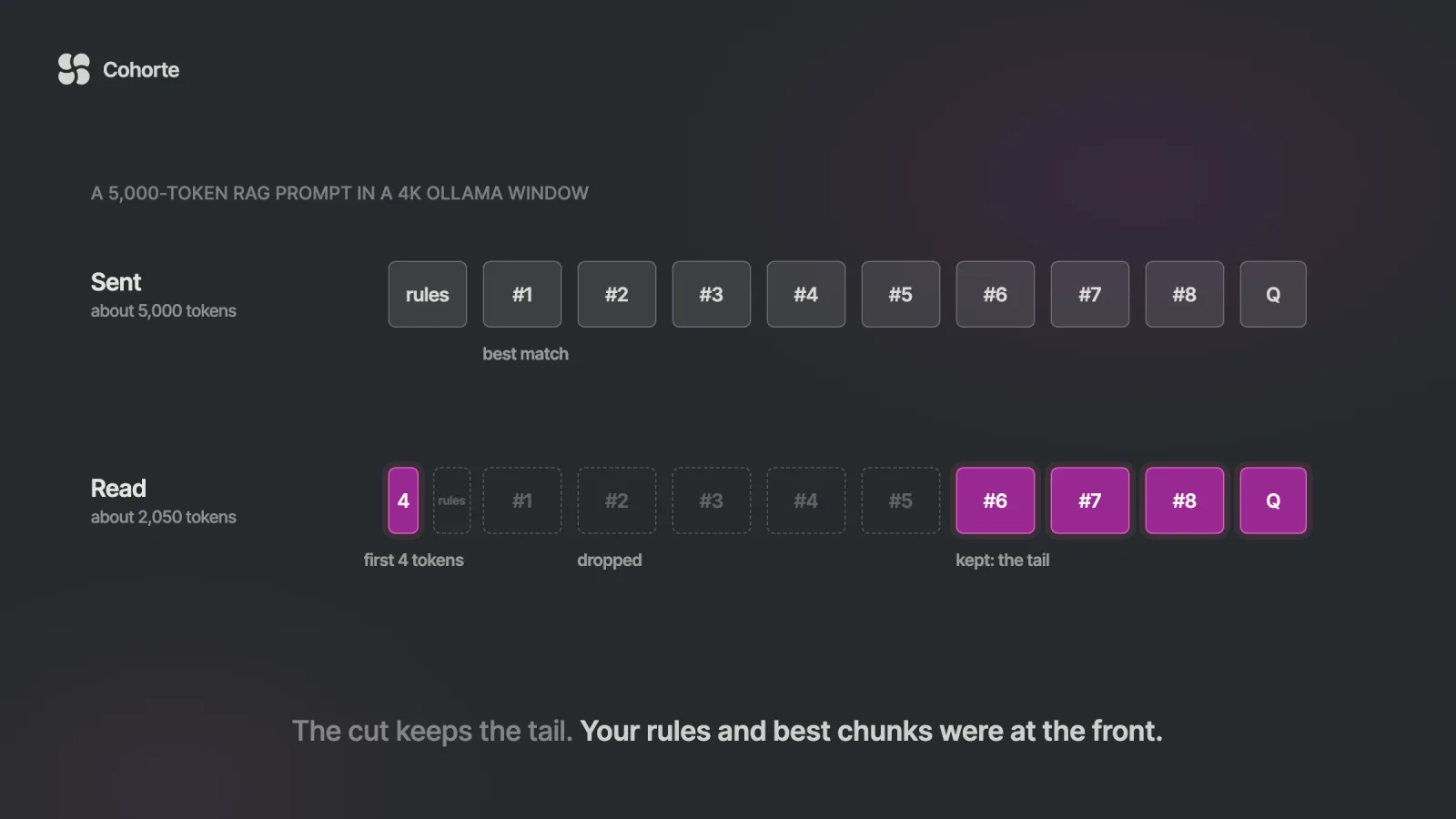
So Ollama cut the prompt to fit. It kept the first handful of tokens and the last two thousand or so, and dropped the middle. That middle held the system instruction to answer only from the documents, plus the chunks the retriever had ranked highest. The model answered from the weakest few chunks and gave no sign that anything was missing.
The line in the server log that records the cut sits in a file most people never open. This guide builds the stack properly on current versions, and it shows you where to look.
Install LangChain and langchain-ollama
You need Ollama running, two Python packages and NumPy. LangChain 1.5.2 requires Python 3.11 or newer, while langchain-ollama on its own accepts 3.10. The integration package is still at 1.1.0, released in April 2026, and it pulls in the official ollama Python client (0.6.1 or later) and langchain-core.
pip install -U langchain langchain-ollama numpyIf you prefer extras, pip install "langchain[ollama]" installs the same integration. NumPy is in the list because LangChain's in-memory vector store needs it for similarity search, and it is easy to miss until the RAG step fails. Then pull one chat model and one embedding model.
ollama pull qwen3.5:9b
ollama pull qwen3-embedding:0.6b
qwen3.5:9b is the default tag of its family, listed at 6.6 to 7.6 GB, with tools, thinking and image input. qwen3-embedding:0.6b is a 639 MB embedding model. If your hardware calls for something else, our guide to the best Ollama models by task and GPU memory has picks for each size.
ChatOllama basics: invoke, stream and parameters
The first call is three lines. ChatOllama talks to Ollama's /api/chat endpoint and returns a normal LangChain AIMessage.
from langchain_ollama import ChatOllama

llm = ChatOllama(model="qwen3.5:9b", temperature=0)
reply = llm.invoke("Name three uses for a local LLM.")
print(reply.content)
print(reply.usage_metadata)
The second print is worth keeping. usage_metadata carries input_tokens and output_tokens, which ChatOllama copies from Ollama's prompt_eval_count and eval_count. That input count is your best evidence of what the model actually read, and we will use it later.
Streaming works the way it does for any LangChain chat model. Each chunk is an AIMessageChunk with a slice of the text.
for chunk in llm.stream("Explain RAG in two sentences."):
    print(chunk.content, end="", flush=True)
Most of what you tune lives in the constructor. These are the parameters that matter for day-to-day work, as defined in the langchain-ollama 1.1.0 source.
| Parameter | What it does | If you leave it unset |
|---|---|---|
model | The Ollama tag to run | Required |
temperature | Sampling randomness | The model's own default (1 for qwen3.5) |
num_ctx | Context window in tokens | The server decides |
num_predict | Cap on output tokens | The server decides |
keep_alive | How long the model stays loaded | 5 minutes, Ollama's default |
reasoning | Thinking on, off, or a level | The model's default behavior |
base_url | Where the server lives | OLLAMA_HOST, else localhost:11434 |
validate_model_on_init | Fail at startup if the model is missing | Off |
One detail in that table trips people up. The docstring for num_ctx in langchain-ollama still says the default is 2048, which predates how Ollama works today. When the field is unset, ChatOllama leaves it out of the request entirely, and the server applies its own default based on your VRAM.
llm = ChatOllama(
    model="qwen3.5:9b",
    temperature=0,
    num_ctx=16384,
    num_predict=1024,
    keep_alive="30m",
    validate_model_on_init=True,
)
Turn on validate_model_on_init in anything you deploy. It lists your local models when the object is created and raises a clear error naming the missing tag, which beats discovering a typo on the first user request.
Migrating from the langchain_community Ollama classes
A lot of tutorials, including some older posts on this blog, still import Ollama from langchain_community. Those classes were deprecated in langchain-community 0.3.1, with removal planned for 1.0. The 0.4.2 release in May 2026 announced that the whole package is being sunset, and its source no longer contains the chat model at all.
| Old import | Replace with | Status in langchain-community 0.4.2 |
|---|---|---|
langchain_community.llms.Ollama | langchain_ollama.OllamaLLM | Deprecated, still ships with a warning |
langchain_community.chat_models.ChatOllama | langchain_ollama.ChatOllama | Removed, the import fails |
langchain_community.embeddings.OllamaEmbeddings | langchain_ollama.OllamaEmbeddings | Deprecated, still ships with a warning |
For most code the change is the import line. Two behaviors differ. The community classes defaulted to http://localhost:11434 and ignored OLLAMA_HOST, while the new ones fall back to the ollama client, which reads the OLLAMA_HOST environment variable first. And if you were using the community Ollama class, ask whether you want OllamaLLM at all.
OllamaLLM calls /api/generate with a single string, while ChatOllama calls /api/chat with messages. Tool calling, structured output and agents all expect a chat model, so new code should start from ChatOllama.
Structured output with ChatOllama
When you need fields instead of prose, pass a Pydantic class to with_structured_output. Since langchain-ollama 0.3.0 the default method is json_schema, which sends your schema in Ollama's format field. Ollama then constrains generation to that schema, which is more reliable than asking for JSON in the prompt.
from typing import Literal
from pydantic import BaseModel, Field
from langchain_ollama import ChatOllama

class Ticket(BaseModel):
    category: Literal["billing", "bug", "other"]
    urgent: bool
    summary: str = Field(description="One short sentence")

llm = ChatOllama(model="qwen3.5:9b", temperature=0)
extract = llm.with_structured_output(Ticket)
t = extract.invoke("I was charged twice. Fix it today!")
print(t.category, t.urgent, t.summary)
You get a validated Ticket back. Ollama's structured-output guide adds two tips that help small models: set the temperature to 0, and describe the expected fields in the prompt as well. If a parse fails now and then, pass include_raw=True and log the raw message so you can see what the model produced.
One limit to know before you plan around it. Ollama's documentation says its cloud models do not support structured outputs, so this feature is for models you run yourself.
Tool calling: which Ollama models support tools
Tool calling depends on the model, so check before you write the code. On ollama.com, models that can call functions carry a tools badge, and the tools filter lists them. Once a model is pulled, ollama show qwen3.5:9b prints a Capabilities section, and the same list is one line of Python away.
import ollama

print(ollama.show("qwen3.5:9b").capabilities)
For qwen3.5:9b that list includes tools, thinking and vision. If tools is missing, Ollama rejects the request with a 400 error saying the model does not support tools. With a capable model, binding a tool is short.
from langchain.tools import tool
from langchain_ollama import ChatOllama

@tool
def order_status(order_id: str) -> str:
    """Look up the shipping status of an order by its ID."""
    return f"Order {order_id} shipped on 18 November."

llm = ChatOllama(model="qwen3.5:9b", temperature=0)
llm_tools = llm.bind_tools([order_status])
msg = llm_tools.invoke("Where is order 4417?")
print(msg.tool_calls)
msg.tool_calls holds the name and arguments the model chose. Your code runs the function and sends the result back as a tool message, or you let an agent do that loop for you, as shown further down.
There is one gap compared with hosted APIs. bind_tools accepts a tool_choice argument, and the source says plainly that Ollama ignores it, so you cannot force a call. If a model answers in prose when you expected a tool call, make the docstring more specific, keep the temperature at 0, or move to a stronger model. Our older post on function calling with LangChain covers multi-tool chains in more depth.
Thinking models in ChatOllama
Models such as qwen3.5, deepseek-r1 and gpt-oss can reason before they answer. ChatOllama controls this with the reasoning parameter, which maps to Ollama's think field.
llm = ChatOllama(model="qwen3.5:9b", reasoning=True)
msg = llm.invoke("Is 3599 a prime number?")
print(msg.additional_kwargs["reasoning_content"][:400])
print(msg.content)
With reasoning=True, the thinking text lands in additional_kwargs["reasoning_content"] and the answer stays clean in content. False asks the model to skip it, and Ollama's documentation notes that models unable to switch it off fall back to their lowest level. A string such as "low" or "high" picks a named level on models that offer levels, which gpt-oss does.
The default deserves a closer look. With reasoning left unset, the model follows its own default, and ChatOllama only keeps thinking text when you asked for it. So a model that thinks by default will still spend time and tokens reasoning, and you will see the wait without seeing the reasoning. If latency matters, set the value explicitly either way.
Embeddings with OllamaEmbeddings
OllamaEmbeddings turns text into vectors through Ollama's /api/embed endpoint. It has embed_documents for batches and embed_query for a single string.
from langchain_ollama import OllamaEmbeddings

emb = OllamaEmbeddings(model="qwen3-embedding:0.6b")
vec = emb.embed_query("refund policy for annual plans")
print(len(vec))
That prints 1024, the output size of Qwen3-Embedding-0.6B. Ollama's documentation asks for the same embedding model at indexing time and at query time, so changing models later means re-embedding everything. OllamaEmbeddings also accepts a dimensions argument if you want shorter vectors from a model that supports it.
Embeddings have a quiet cut of their own. The embed endpoint's truncate option defaults to true, which shortens any input longer than the window instead of raising an error, and OllamaEmbeddings keeps that default. A chunk that is too long gets embedded from its first part only, so keep chunks to a few paragraphs.
A small local RAG chain with ChatOllama
Here is a complete retrieval chain with no services beyond Ollama. It splits a text file on blank lines, embeds the pieces into LangChain's in-memory vector store, and answers from the closest chunks.
from langchain_core.vectorstores import InMemoryVectorStore
from langchain_ollama import ChatOllama, OllamaEmbeddings

emb = OllamaEmbeddings(model="qwen3-embedding:0.6b")
text = open("handbook.md", encoding="utf-8").read()
chunks = [c for c in text.split("\n\n") if c.strip()]
store = InMemoryVectorStore.from_texts(chunks, embedding=emb)

NUM_CTX = 16384
llm = ChatOllama(model="qwen3.5:9b", temperature=0,
                 num_ctx=NUM_CTX)

def build(question, k=6):
    docs = store.similarity_search(question, k=k)
    context = "\n\n".join(d.page_content for d in docs)
    return [
        ("system", "Answer only from the context below. "
                   "If it is not there, say so.\n\n" + context),
        ("human", question),
    ]

reply = llm.invoke(build("How many days of parental leave?"))
print(reply.content)
print(reply.usage_metadata["input_tokens"], "of", NUM_CTX)
Two lines in that sample carry most of the weight. num_ctx=NUM_CTX gives the chain a window large enough for six chunks, and the last line prints how much of it the prompt used. For a real corpus you would swap the blank-line split for a proper text splitter and the in-memory store for a persistent one. The parts that touch Ollama stay the same.
Notice the order, too. similarity_search returns the most similar chunk first, so the best evidence sits at the top of the system message. That order matters in the next section.
How Ollama's default context window cuts a RAG prompt
Ollama's context length page gives the defaults: 4K tokens on GPUs under 24 GiB, 32K from 24 to 48 GiB, and 256K at 48 GiB or more. It recommends at least 64,000 tokens for agents and coding tools. If you never set num_ctx, and the server has no OLLAMA_CONTEXT_LENGTH, a typical laptop runs your chain at 4K.
What happens next depends on the shape of the request. The Ollama v0.40.17 source has two separate mechanisms for it.
The first applies to conversations. Before rendering a chat, Ollama drops messages from the front until the rest fits, always keeping the system messages and the latest message. That is logged only at debug level. In a multi-turn RAG chat, earlier turns quietly disappear.
The second applies when one message alone is too long, which is the normal case for a RAG prompt that stuffs the context into a single system message. On a text-only model whose prompt Ollama renders itself, such as gpt-oss:20b, Ollama shrinks the prompt to about half the window. It keeps the first few tokens, set by num_keep (4 by default), then the final stretch, and drops everything in between. At a 4,096 window that leaves about 2,050 tokens of your prompt.
| Situation | What Ollama does | Where you see it |
|---|---|---|
| Chat history longer than the window | Drops the oldest messages, keeps system and latest | Debug log only |
One long prompt, text-only model such as gpt-oss | Keeps the first few tokens and the tail, cut to about half the window | "truncating input prompt" in the server log |
| One long prompt, model with a vision projector | Rejects the request | A 400 error in your code |
The third row is the better failure. qwen3.5:9b ships with a vision projector, and so do the gemma4:12b and qwen3.8:27b tags, so an oversized prompt raises an error saying the prompt is longer than the context length available to the model. gpt-oss:20b has no projector, and the same chain on it answers without complaint. For other text-only models, the log line in the next section tells you which behavior you got.
Now put that next to the retriever. The system message starts with your grounding instruction and continues with the chunks in order of relevance, best first. A cut that keeps the tail removes exactly those: the instruction and the strongest evidence. What survives is the weakest evidence and the question. The model writes a fluent answer from it anyway.
That is the failure I worry about most in local RAG, because a wrong answer reads exactly like a right one. I wrote about that property of language models in the letter AI Never Says "I Don't Know", and a cut prompt is a clean mechanical example of it.
Set num_ctx in ChatOllama and check it
The fix is to choose the window yourself and check it against what you send. Budget for the system prompt, k chunks at their typical size, the question and the answer. Six chunks of around 500 tokens plus an answer fit easily in 16K. Then verify the budget on every call while the chain is new.
from langchain_core.messages.utils import (
    count_tokens_approximately,
)

ANSWER_ROOM = 1024

def checked_invoke(messages):
    est = count_tokens_approximately(messages)
    if est + ANSWER_ROOM > NUM_CTX:
        raise ValueError(f"~{est} tokens, window {NUM_CTX}")
    reply = llm.invoke(messages)
    used = reply.usage_metadata["input_tokens"]
    if used > NUM_CTX // 2:
        print(f"check: prompt used {used} of {NUM_CTX}")
    return reply
The first check is a rough estimate from LangChain at four characters per token, so it catches the big mistakes before the call. The second uses the real count from Ollama. A prompt that uses more than half the window is either close to the edge or was already cut down to half, and the count alone cannot tell you which. Either way you want to know about it.
For a definite answer, read the server log. On macOS it is ~/.ollama/logs/server.log, on Linux journalctl -u ollama, and in Docker docker logs with your container name. A cut prompt leaves a warning line that starts with truncating input prompt and records the original length, the limit and the new length.
grep "truncating input prompt" ~/.ollama/logs/server.logFinally, confirm the window the model actually loaded with. ollama ps shows a CONTEXT column and a PROCESSOR column, and you want your window in the first and 100% GPU in the second. Ollama also caps num_ctx at the length the model was trained for, with a warning in the log, so asking qwen3:8b for more than its 40K gets you 40K.
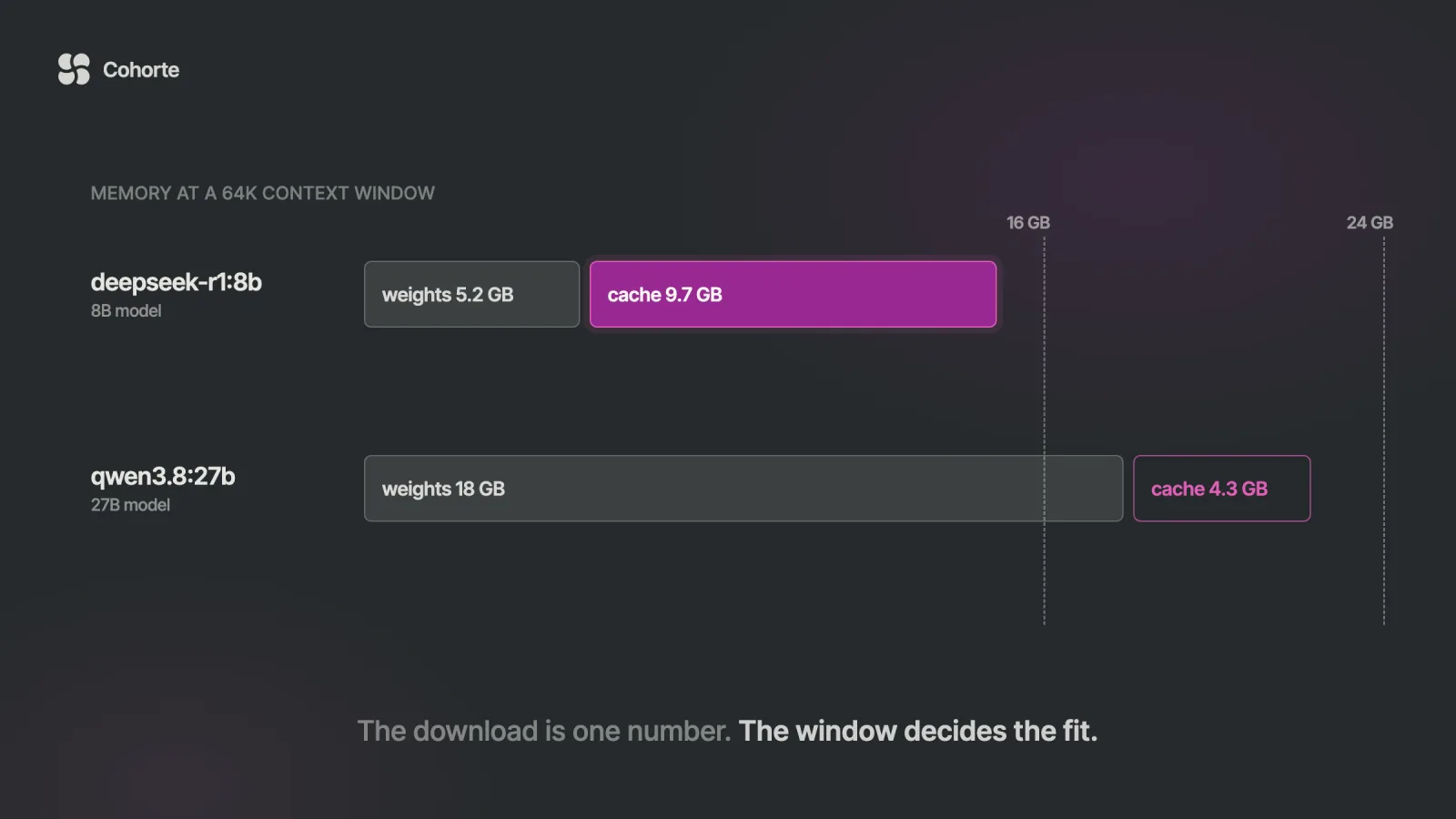
Three side effects come with a bigger window. It costs memory, because the cache grows with every token of window, and our Ollama models guide works through that arithmetic. Two ChatOllama objects with different num_ctx on the same model force a reload each time you switch between them, since Ollama treats a changed window as new runner options. And if several apps share one server, setting OLLAMA_CONTEXT_LENGTH once on the server keeps them all consistent.
A LangChain agent on Ollama with create_agent
In LangChain 1.x, agents come from create_agent in langchain.agents. It runs on LangGraph underneath and takes either a model string or a chat model instance. Pass an instance, because that is where your num_ctx lives. Plain Python functions with docstrings work as tools.
from langchain.agents import create_agent
from langchain_ollama import ChatOllama

def order_status(order_id: str) -> str:
    """Look up the shipping status of an order by its ID."""
    return f"Order {order_id} shipped on 18 November."

def refund_window(plan: str) -> str:
    """Return the refund window for 'annual' or 'monthly'."""
    days = {"annual": "30 days", "monthly": "14 days"}
    return days.get(plan, "unknown plan")

llm = ChatOllama(model="qwen3.5:9b", temperature=0,
                 num_ctx=65536)
agent = create_agent(
    llm,
    tools=[order_status, refund_window],
    system_prompt="You are a support assistant. Use tools.",
)
result = agent.invoke({"messages": [
    {"role": "user",
     "content": "Did order 4417 ship, and what is the "
                "refund window on the annual plan?"}]})
print(result["messages"][-1].content)
The result holds the whole run in result["messages"]: your question, each tool call, each tool result and the final answer. Print the list once and read it, because that is how you find out whether the model called the right tools with the right arguments.
The window here is 64K, following Ollama's guidance for agents, and the reason ties back to the first mechanism above. An agent's history grows with every tool result. When it outgrows the window, Ollama drops messages from the front and keeps the system prompt. In an agent run, the first message after the system prompt is the user's original request, which makes it the first thing to go.
So a long run can lose the task it was given while still looking busy. Give agents a large window, keep tool outputs short, and look at the LangChain 1.x middleware if runs get long: SummarizationMiddleware compresses old history on your terms before Ollama does it on its own. When you are ready to measure an agent like this properly, our guide to evaluating AI agents covers the harness.
Using a remote Ollama server with base_url
Running the model on a GPU box and the code elsewhere takes one argument. On the server, Ollama binds to 127.0.0.1 by default, so expose it with OLLAMA_HOST.
# private network only: see the safer options below
OLLAMA_HOST=0.0.0.0:11434 ollama serve
llm = ChatOllama(
model="qwen3.5:9b",
base_url="http://gpu-box.internal:11434",
client_kwargs={"timeout": 300},
)You can skip base_url and export OLLAMA_HOST on the client machine instead, since the ollama client reads it. The timeout is worth setting, because the underlying client has no timeout by default and a stuck request will wait forever.
Keep the security model in mind. Ollama's own documentation says the local API at port 11434 requires no authentication, so a server bound to 0.0.0.0 answers anyone who can reach the port. Keep it on a private network, or reach it through an SSH tunnel or a proxy that checks credentials; our Ollama API guide shows both setups. ChatOllama can send headers through client_kwargs, and if you point it at Ollama's cloud, the client picks up OLLAMA_API_KEY as a bearer token. What changes for your data in that case is covered in Ollama Cloud vs local models.
Troubleshooting LangChain with Ollama
| Symptom | Likely cause | Fix |
|---|---|---|
| "Failed to connect to Ollama" | Server not running, or wrong address | Start ollama serve or the app; check base_url and OLLAMA_HOST |
model "x" not found, try pulling it first | Tag not pulled, or spelled differently | ollama pull the exact tag; set validate_model_on_init=True |
| Error: model does not support tools | No tools capability | Check ollama show; pick a model with the badge |
| No tool calls, prose answer | Model chose not to call; tool_choice is ignored | Sharper docstrings, temperature 0, stronger model |
| Answers ignore the best documents | Prompt cut to fit a small window | Set num_ctx; grep the log for "truncating input prompt" |
| "prompt is longer than the context length" | Vision model rejected an oversized prompt | Raise num_ctx or retrieve fewer chunks |
| Slow first call, then fast | Model loading into memory | Check load_duration; raise keep_alive |
| Slow every time you switch chains | Different num_ctx values force reloads | Use one window per model, or set it on the server |
| "cosine_similarity requires numpy" | NumPy missing for the vector store | pip install numpy |
The slow-first-call row has a measurable signature. The final response from Ollama includes load_duration in nanoseconds, and ChatOllama passes it through in response_metadata. A large value there with a small one on the next call means the model was loading, which says nothing about how fast it generates.
Further reading. Ollama integrations covers Open WebUI, LiteLLM and the OpenAI-compatible endpoint around the same server. The Ollama Python tutorial does tool calling and structured output with the raw ollama library, without LangChain. And the best Ollama models guide tells you which model fits your GPU at the window you just chose.
What I'd do
Install langchain-ollama 1.1.0 with LangChain 1.5 and replace every langchain_community Ollama import in the codebase today, starting with ChatOllama, which no longer exists there. Pick one chat model with the tools badge and one embedding model, and confirm both with ollama show. Decide the window from your real prompt sizes, set it as num_ctx or OLLAMA_CONTEXT_LENGTH, and keep the budget check in the chain until a week of logs shows no "truncating input prompt" lines. Then write the model tag, the window, the chunk size and k into a shared setup file, the way an AI Operating System keeps decisions written down, so the next person does not rediscover the 4K default. Deciding what goes into a window, in what order and at what size is the subject of Context Architecture, and Engineering Foundations covers tool use and evaluation-first development for the agent side. If you would rather build the whole personal setup project by project, the AI OS Course does that.
FAQ
How do I use LangChain with Ollama?
Install Ollama and pull a model, then run pip install -U langchain langchain-ollama. Import ChatOllama from langchain_ollama and create it with the tag, for example ChatOllama(model="qwen3.5:9b", num_ctx=16384). It behaves like any LangChain chat model, with invoke, stream, bind_tools and with_structured_output.
What is the difference between ChatOllama and OllamaLLM?
ChatOllama sends a list of messages to Ollama's /api/chat and returns an AIMessage, with tool calls and structured output. OllamaLLM sends one string to /api/generate and returns text. Use ChatOllama for new code; OllamaLLM mainly replaces the old community Ollama class.
Is from langchain_community.llms import Ollama deprecated?
Yes. It has been deprecated since langchain-community 0.3.1 in favor of from langchain_ollama import OllamaLLM, and it still ships with a warning in 0.4.2. The community ChatOllama is gone from 0.4.2, and the package itself is being sunset, so move to langchain_ollama now.
Which Ollama models support tool calling in LangChain?
Models with the tools badge on ollama.com, such as qwen3.5, qwen3.8, qwen3 and gpt-oss. Check a pulled model with ollama show or ollama.show(name).capabilities. Without the capability, Ollama returns an error saying the model does not support tools.
How do I set the context window in ChatOllama?
Pass num_ctx, for example ChatOllama(model="qwen3.5:9b", num_ctx=32768), or set OLLAMA_CONTEXT_LENGTH on the server. Without either, Ollama picks a default from your VRAM, which is 4K under 24 GiB. Confirm the loaded window in the CONTEXT column of ollama ps.
Can I build a LangChain agent with Ollama?
Yes. Use create_agent from langchain.agents with a ChatOllama instance and a list of tools, then call agent.invoke({"messages": [...]}). Pick a model with the tools capability and give it at least a 64K window, which is Ollama's recommendation for agents.
The handbook assistant from the opening was built correctly in every visible way. What it lacked was one number in the constructor, and the habit of checking how much of the prompt the model actually read.
Choose the window yourself, and make the chain tell you when it does not fit.
Charafeddine MouzouniNovember 22, 2026