
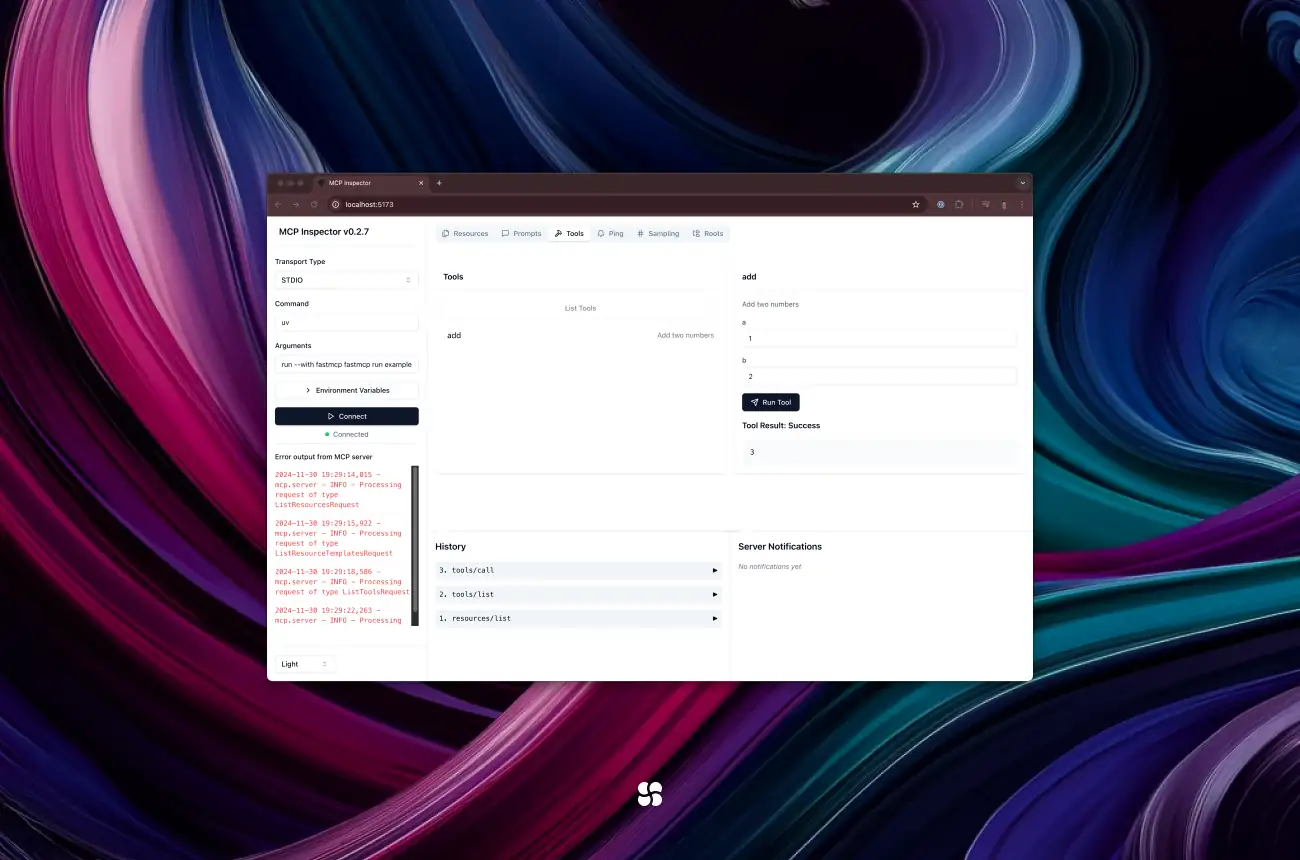
A custom MCP server in Python is one file: import FastMCP, decorate a function with @mcp.tool, call mcp.run(). Gitingest turns any repository into a single text file you can hand to a model so it scaffolds that server for you. This guide does exactly that, then covers what the 2025 version could not: FastMCP 4 (the current major, September 2026), stdio versus streamable HTTP and where SSE stands, middleware and auth, a Dockerfile, and which Gemini model to use now.
Updated September 2026: FastMCP version and decorator notes on each code block, transports and SSE status per the 2026-07-28 MCP spec, middleware and auth, Docker, Gemini model choice, FAQ. The original walkthrough and code are kept below.
Why Roll Your Own MCP Server?
- Custom tool endpoints tailored to your codebase or APIs
- Minimal boilerplate thanks to FastMCP’s decorators
- Automated scaffolding with Gemini 2.5 Pro in AI Studio
- Rapid iteration: from repo to running server in minutes
Prerequisites
- Python 3.10+ (with access to
pipxor a virtual environment) - Git (to clone repos)
- AI Studio account with access to Gemini 2.5 Pro
- uv CLI (installed via
pip install uvfor local testing)
1. Install & Run Gitingest
Gitingest turns any GitHub repository into a single prompt‑friendly text file.
MCP makes tool-use cleaner, but it doesn't remove accountability — designing agents that can be trusted in production is the focus of Cohorte's Building Accountable AI Agents course (E3).
# Install via pipx for isolation
pipx install gitingest

# Ingest the FastMCP repo
gitingest https://github.com/jlowin/fastmcp -o fastmcp_source.txt- Output:
fastmcp_source.txtcontains directory structure, READMEs, and source files.
2. Write Your MCP Server (server.py)
Using FastMCP v2.x, define your tools in pure Python. Here’s a minimal example exposing a “directory tree” endpoint:
What changed since this was written: the pin fastmcp>=2.0 now resolves to FastMCP 4.x (4.0.2 as of September 2, 2026). The code below still runs: @mcp.tool() with parentheses is still accepted, and mcp.run() still defaults to stdio. Two things are worth knowing. Since v3 the decorator returns your original function (so github_directory_structure(...) is directly callable in tests), and the docs now write @mcp.tool without parentheses. And transport settings no longer go in the constructor; they go in run(). The same tool in the current form:
# server.py, FastMCP 4.x form
from fastmcp import FastMCP
import httpx

mcp = FastMCP("GitHub Directory Server")

@mcp.tool
async def github_directory_structure(owner: str, repo: str, branch: str = "main") -> str:
    """Return the repo's directory tree in ASCII form."""
    url = f"https://api.github.com/repos/{owner}/{repo}/git/trees/{branch}?recursive=1"
    async with httpx.AsyncClient() as client:
        resp = await client.get(url, timeout=10)
        resp.raise_for_status()
    return "\n".join(e["path"] for e in resp.json()["tree"] if e["type"] == "tree")

if __name__ == "__main__":
    mcp.run()  # stdio (default)
    # mcp.run(transport="http", host="127.0.0.1", port=8000)  # streamable HTTP, served at /mcp
# server.py
# requirements:
#   fastmcp>=2.0
#   httpx>=0.27
#   rich>=13.7

from fastmcp import FastMCP
import httpx
from rich.tree import Tree

# Initialize the MCP server instance
mcp = FastMCP("GitHub Directory Server")

@mcp.tool()
async def github_directory_structure(
    owner: str,
    repo: str,
    branch: str = "main",
) -> str:
    """
    Return the repo’s directory tree in ASCII form.
    """
    url = f"https://api.github.com/repos/{owner}/{repo}/git/trees/{branch}?recursive=1"
    async with httpx.AsyncClient() as client:
        resp = await client.get(url, timeout=10)
        resp.raise_for_status()
        data = resp.json()

    tree = Tree(f"{owner}/{repo}@{branch}")
    for entry in data["tree"]:
        if entry["type"] == "tree":
            tree.add(entry["path"])
    return tree.__str__()

if __name__ == "__main__":
    mcp.run()
Key points:
- Use
@mcp.tool()(with parentheses) to register each endpoint. - Return primitives (
str,list, etc.)—FastMCP handles JSON serialization. - Async I/O via
httpx.AsyncClient()keeps your server non‑blocking.
3. Manage Dependencies & Run Locally
Option A: Inline PEP 723 Block
Simply list your requirements at the top of server.py (shown above), then:
pip install uv
uv run server.py
Option B: Dedicated requirements.txt
fastmcp>=2.0
httpx>=0.27
rich>=13.7
pip install -r requirements.txt uv
uv run server.pyFor a richer local dev experience (hot‑reload, inspector UI):
What changed since this was written: fastmcp dev is now a command group. The MCP Inspector is fastmcp dev inspector server.py, and hot reload moved to fastmcp run server.py --reload. Extra packages can be passed with --with instead of a virtualenv:
fastmcp run server.py --reload --with httpx --with rich
fastmcp dev inspector server.py --with httpx --with rich
uv init my-mcp
cd my-mcp
uv venv && source .venv/bin/activate
uv pip install fastmcp httpx rich
fastmcp dev ../server.py
4. Test Your Endpoint
In another terminal, invoke the tool via MCP’s CLI:
What changed since this was written: the FastMCP CLI now has list and call commands that take a local file, an HTTP URL or a config file as target, with key=value arguments. The Python client is the other option and works in-memory, against a file, or against a URL:
fastmcp list server.py
fastmcp call server.py github_directory_structure owner=jlowin repo=fastmcp
# test_server.py
import asyncio
from fastmcp import Client
from server import mcp

async def main():
    async with Client(mcp) as client:  # in-memory; Client("http://localhost:8000/mcp") for HTTP
        result = await client.call_tool("github_directory_structure", {"owner": "jlowin", "repo": "fastmcp"})
        print(result)

asyncio.run(main())
uv run mcp call mcp github_directory_structure \
  --json '{"owner":"jlowin","repo":"fastmcp"}'
You should see an ASCII tree of the fastmcp repo.
5. Upload & Scaffold with Gemini 2.5 Pro
- Upload
fastmcp_source.txtin Google AI Studio’s Files panel. - Copy the returned file ID (e.g.,
files/abcd1234). - Prompt Gemini in a “Code Generation” notebook:
What changed since this was written: ask for FastMCP 4, not v2.x, or the model will scaffold constructor-level transport settings that v3 removed. Gemini 2.5 Pro is still available (see which model to use now), but the Files API is the same either way: upload with client.files.upload(file=...), get a files/... name back, and files expire after 48 hours. Updated prompt:
<<file:files/abcd1234>>
Generate a Python MCP server using FastMCP 4 (from fastmcp import FastMCP) that:
1. Exposes a github_directory_structure tool with @mcp.tool.
2. Runs over stdio by default and over streamable HTTP with mcp.run(transport="http", host="0.0.0.0", port=8000).
3. Provides requirements.txt (fastmcp>=4, httpx) and a Dockerfile.
<<file:files/abcd1234>>
Generate a Python MCP server using FastMCP v2.x that:
1. Exposes a github_directory_structure tool.
2. Includes proper @mcp.tool() decorators.
3. Provides requirements.txt and Dockerfile.
Gemini 2.5 Pro will emit a multi‑file scaffold you can download, review, and immediately run.
6. Deploying in Production
What changed since this was written: you no longer wrap mcp.app in FastAPI to get HTTP. mcp.run(transport="http", host="0.0.0.0", port=8000) serves streamable HTTP at /mcp, and mcp.http_app() returns an ASGI app if you want to mount it or run it under uvicorn. Auth is a constructor argument (FastMCP(name=..., auth=...)), covered below.
- Containerize with the generated
Dockerfile. - Switch transports (e.g., HTTP) by wrapping
mcp.appin FastAPI. - Secure endpoints via API keys or OAuth middleware.
Final Checklist
-
gitingestv0.1.4+ viapipx -
server.pyusesFastMCPand@mcp.tool() - Dependencies installed &
uv run server.pysucceeds - AI Studio prompt references the correct file ID
- Local test returns a valid directory tree
FastMCP in 2026: what changed (version, transports, decorators)
Three facts first. FastMCP is at 4.0.2 (released September 2, 2026; 4.0.0 shipped August 31), requires Python 3.10+, and lives at PrefectHQ/fastmcp on GitHub since the move from jlowin/fastmcp. FastMCP 4 is built on version 2 of the official MCP Python SDK (mcp 2.1.1 on PyPI) and serves the current protocol revision, 2026-07-28, while still speaking to clients on the older handshake-based revisions. Gitingest is at 0.3.1 (July 31, 2025), now under coderamp-labs/gitingest; the pipx install gitingest and -o flag above are unchanged.
Versions. FastMCP 1.0 was folded into the official SDK in 2024; "FastMCP v2" is the standalone project this post was written against. v3.0.0 (February 18, 2026) kept the surface API (@mcp.tool() still works) and rebuilt the internals on a provider architecture; the visible changes were decorators returning the original function, transport settings moving from the constructor to run(), and get_tools() becoming list_tools(). v4.0.0 moved to SDK v2: model fields are snake_case in Python (input_schema, mime_type, is_error) while the wire format is unchanged, HTTP goes through httpx2, McpError takes keyword arguments, ctx.sample() and ctx.list_roots() are gone, background tasks moved to a separate fastmcp-tasks package, and import_server() became mount(). The changelog says most v3 servers upgrade without code changes; a one-tool server like ours does.
Transports. mcp.run() is stdio: the client launches your script as a subprocess and talks over stdin/stdout, which is what Claude Desktop, Claude Code, Cursor and Gemini CLI do for local servers. mcp.run(transport="http") is streamable HTTP, one endpoint at /mcp that takes POSTs and answers with JSON or a per-request SSE stream. transport="sse" still exists for old clients; the FastMCP docs recommend HTTP for all new projects. On the spec side, the 2026-07-28 revision made streamable HTTP stateless (no more Mcp-Session-Id, no initialize handshake, every request carries an MCP-Protocol-Version header) and requires servers to validate the Origin header and recommends binding to 127.0.0.1 when running locally.
Decorators and return values. @mcp.tool and @mcp.tool() are both accepted; the parenthesised form takes name, description, tags. Returning a dict, dataclass or Pydantic model produces structured content automatically; a primitive such as our str is wrapped under a result key when the return type is annotated. If you are deciding whether MCP is even the right protocol for the agent-to-agent side of your system, we compared it with Google's A2A in MCP vs A2A for business automation.
Middleware and auth for a real server
Middleware is a class you subclass from fastmcp.server.middleware.Middleware and register with mcp.add_middleware(). Hooks are named by scope: on_message for everything, on_request, on_call_tool, on_read_resource, on_list_tools and so on; each receives a MiddlewareContext and a call_next. FastMCP ships LoggingMiddleware, TimingMiddleware, RateLimitingMiddleware, ErrorHandlingMiddleware and ResponseCachingMiddleware, among others. One catch after v4: on_initialize never fires on a 2026-07-28 connection, because there is no handshake anymore; hook on_request or on_call_tool instead.
Auth applies only to the HTTP transports; a stdio server inherits the security of the machine it runs on. For a server that sits behind an identity provider, pass a JWTVerifier (JWKS URI, issuer, audience) as auth=. StaticTokenVerifier exists for local development and stores tokens in plain text, so keep it out of production. OAuthProxy covers providers without dynamic client registration (GitHub, Google, Azure), and RemoteAuthProvider covers those with it; note that the 2026-07-28 spec deprecates Dynamic Client Registration in favour of Client ID Metadata Documents, so check the FastMCP auth docs before wiring a new OAuth flow.
from fastmcp import FastMCP
from fastmcp.server.auth.providers.jwt import JWTVerifier
from fastmcp.server.middleware import Middleware, MiddlewareContext

class ToolAudit(Middleware):
    async def on_call_tool(self, context: MiddlewareContext, call_next):
        print(f"-> {context.method}")
        return await call_next(context)

auth = JWTVerifier(
    jwks_uri="https://auth.example.com/.well-known/jwks.json",
    issuer="https://auth.example.com",
    audience="github-directory-server",
)

mcp = FastMCP(name="GitHub Directory Server", auth=auth)
mcp.add_middleware(ToolAudit())
The built-in middleware classes live under fastmcp.server.middleware; their exact import paths and the fields on context are what tend to move between minor versions, so check the middleware page of the docs against your installed version.
Docker: a minimal Dockerfile for a FastMCP server
FastMCP's docs do not ship an official Dockerfile (the project configuration page lists container environments as a possible future feature). What they do document is the run form for containers: mcp.run(transport="http", host="0.0.0.0", port=8000), started with plain python server.py, exposed at /mcp. So the image is just Python plus your dependencies:
# Dockerfile
FROM python:3.12-slim
WORKDIR /app
COPY requirements.txt .
# requirements.txt: fastmcp>=4, httpx
RUN pip install --no-cache-dir -r requirements.txt
COPY server.py .
EXPOSE 8000
CMD ["python", "server.py"]
# server.py, last lines
if __name__ == "__main__":
    mcp.run(transport="http", host="0.0.0.0", port=8000)
docker build -t github-directory-server .
docker run -p 8000:8000 github-directory-server
fastmcp list http://localhost:8000/mcp
Two production notes from the docs. If you run several replicas behind a load balancer, build the app with mcp.http_app(stateless_http=True) and serve it with uvicorn so no replica needs session affinity (the 2026-07-28 protocol has no sessions anyway). Behind nginx, set proxy_buffering off and a long proxy_read_timeout, or SSE responses stall. And 0.0.0.0 is for inside the container only: put auth on the server and keep the port behind your proxy.
Which Gemini model to use now
As of September 2026, Google's model page still lists gemini-2.5-pro as a stable model with no shutdown date announced, so the AI Studio step above works as written. The 2.5 Pro previews (gemini-2.5-pro-preview-03-25, -05-06, -06-05) were shut down on December 2, 2025, and gemini-3-pro-preview was shut down on March 9, 2026. The current Pro model is gemini-3.1-pro-preview (preview status); the Flash line has moved on to gemini-3.8-flash as the latest stable. Our rule: scaffold with gemini-3.1-pro-preview for the best code, pin gemini-2.5-pro if you need a stable ID in a pipeline, and read the deprecations page before you hard-code either. FastMCP also has a Gemini SDK integration that passes an open Client session as a tool in GenerateContentConfig(tools=[mcp_client.session]); the docs example still names gemini-2.0-flash, which is shut down, so swap the model ID.
FAQ
What is FastMCP v2, v3 and v4?
FastMCP 1.0 was merged into the official MCP Python SDK in 2024. v2 is the standalone project this post was written against. v3 (February 2026) kept the decorator API and moved transport settings into run(). v4 (August 2026, current: 4.0.2) sits on MCP SDK v2 and the 2026-07-28 protocol; most v3 servers upgrade without code changes.
Should I use stdio or HTTP transport?
Stdio for a server a desktop client launches locally (Claude Desktop, Claude Code, Cursor, Gemini CLI). Streamable HTTP (mcp.run(transport="http"), endpoint /mcp) for anything shared, remote or containerised. HTTP is also the only transport where FastMCP auth applies.
Is SSE deprecated in MCP?
The original HTTP+SSE transport has been deprecated since protocol revision 2025-03-26 and is formally listed in the deprecated features registry under the 2026-07-28 revision, eligible for removal. Streamable HTTP replaced it; it still uses SSE internally for per-request streams. FastMCP keeps transport="sse" for old clients but recommends HTTP for new projects.
How do I add auth to an MCP server?
Pass an auth provider to the constructor: FastMCP(name=..., auth=JWTVerifier(jwks_uri=..., issuer=..., audience=...)) for bearer tokens issued by your identity provider, OAuthProxy for GitHub, Google or Azure, StaticTokenVerifier for local development only. Auth only covers HTTP transports; stdio relies on the local machine.
Can I run a FastMCP server in Docker?
Yes. Use python:3.12-slim, pip install fastmcp and your dependencies, and run mcp.run(transport="http", host="0.0.0.0", port=8000) as the CMD. Expose port 8000, put auth on the server and a reverse proxy in front with buffering off. For several replicas, build mcp.http_app(stateless_http=True) and serve it with uvicorn.
Does it work with Ollama, Claude or Gemini clients?
Claude Desktop, Claude Code, Cursor and Gemini CLI: yes, via fastmcp install <client> server.py (stdio) or the client's own config for an HTTP URL. Gemini API: yes, pass the FastMCP Client session as a tool. Ollama: its documented API does tool calling but has no built-in MCP client, so you need a bridge that turns MCP tools into Ollama tool definitions; check the Ollama docs for current status.
Now you have it: a robust, custom MCP server—ready to power any LLM‑based application.
Until the next one,
Oghenetega AdugboApril 17, 2025