
The Model Context Protocol (MCP) is an innovative, open standard designed to bridge AI assistants with your data sources—be it content repositories, business tools, or development environments. This guide not only walks you through setting up and using MCP but also tackles common questions about its architecture, security, deployment options, and performance.
1. Understanding the MCP Architecture
Where Are MCP Requests Executed?
- Server-Side Execution:
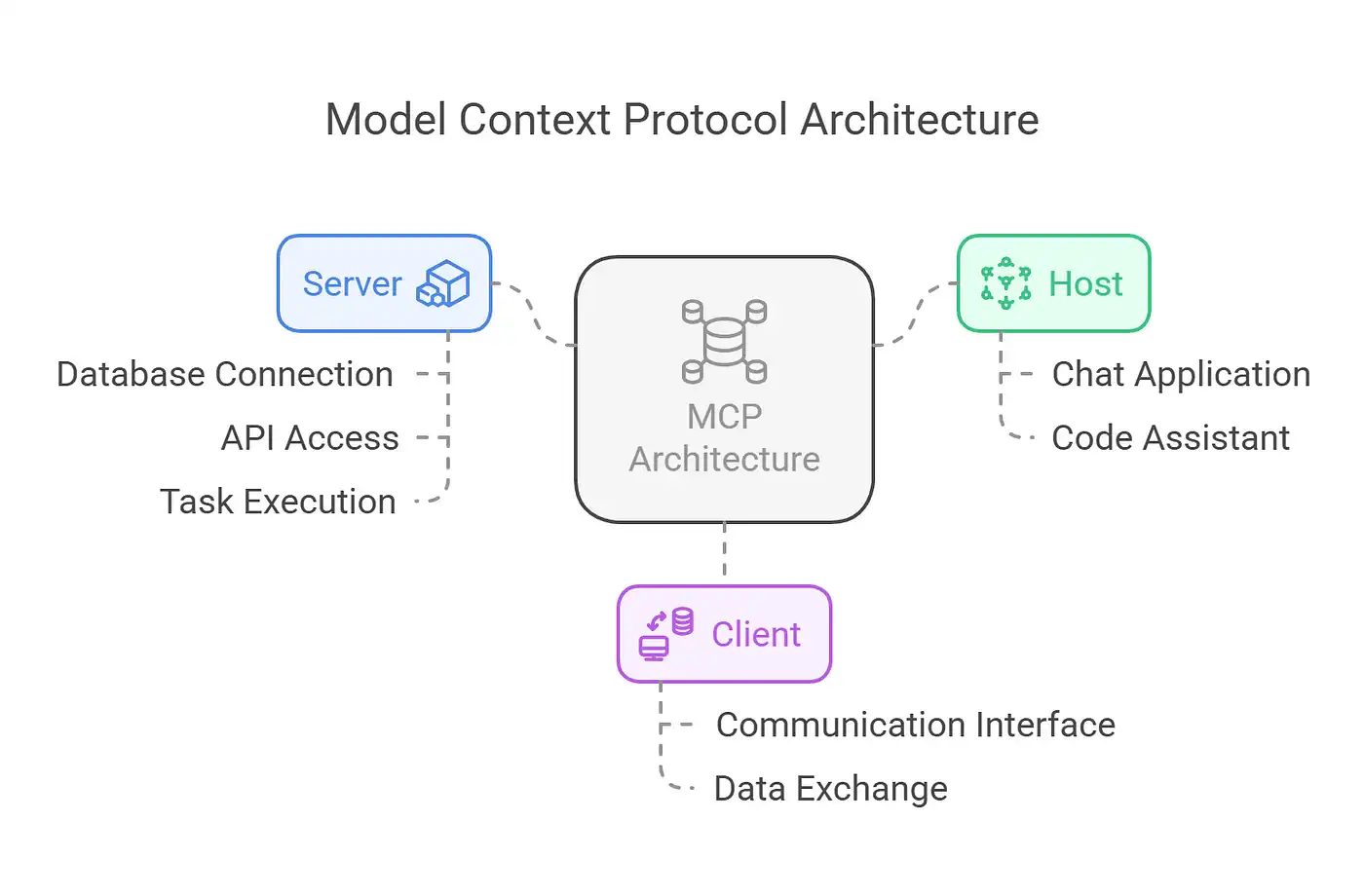
MCP requests are executed on the MCP server. Although the AI client (often powered by an LLM) generates the natural language query, it’s the server that processes the request by interfacing with your data sources. This separation ensures that heavy data processing is offloaded from the client. - Role of the Client:
The client’s job is to leverage its language model capabilities to generate and send requests. It does not execute data queries directly but passes them securely to the server. - Securing Your Secrets:
Sensitive information—such as API keys and credentials—is stored and managed on the server. By keeping secrets on the server side, MCP ensures that they are protected by robust encryption and strict access controls, keeping them hidden from the client.
Deployment Options: Hosting Versus Managed Services
- Self-Hosting vs. Managed MCP Servers:
Yes, an MCP server is always required as part of the architecture. However, you have flexibility:- Self-Hosting: You can deploy your own MCP server, giving you complete control over security and configuration.
- Managed Services: Alternatively, managed providers offer MCP server solutions. Although this might involve sharing credentials, providers employ industry-standard security practices to protect your secrets. If you’re uncomfortable with this, self-hosting remains a viable option.
Orchestration and Concurrency
- Efficient Processing:
MCP servers are designed to handle multiple simultaneous requests using asynchronous programming, multi-threading, or event-driven architectures. This ensures that calls are processed concurrently without blocking. - Call Orchestration:
In scenarios where data must be aggregated from multiple sources, MCP servers integrate with orchestration frameworks (such as task queues or workflow managers). This coordination ensures that requests and responses are managed in an orderly fashion, enhancing scalability and robustness.
2. Getting Started with MCP
Installation and Setup
Begin by installing a pre-built MCP server (an example repository is available on GitHub). For a local setup with Python, follow these steps:
1. Clone the Repository and Install Dependencies:
git clone https://github.com/anthropic/mcp-server-example.git
cd mcp-server-example
pip install -r requirements.txt
2. Start the MCP Server:
python mcp_server.pyThe server will initialize and start listening for incoming MCP client requests.
3. Building a Simple Agent: Step-by-Step Example
Let’s create a basic agent that connects to your local MCP server, sends a query, and processes the returned data.
Step 1: Connect to the MCP Server
Create an MCPClient class to manage communication:
import requests

class MCPClient:
    def __init__(self, server_url, api_key):
        self.server_url = server_url
        self.headers = {"Authorization": f"Bearer {api_key}"}

    def send_request(self, payload):
        response = requests.post(f"{self.server_url}/execute", json=payload, headers=self.headers)
        if response.status_code == 200:
            return response.json()
        else:
            raise Exception(f"Request failed with status: {response.status_code}")

# Initialize the client
client = MCPClient("http://localhost:8000", "your_api_key_here")
Step 2: Formulate and Send a Query
For example, to retrieve a list of documents from a data source:
query_payload = {
    "action": "list_documents",
    "parameters": {
        "folder": "inbox"
    }
}

try:
    result = client.send_request(query_payload)
    print("Query Result:", result)
except Exception as e:
    print("Error:", e)
Step 3: Process the Response
Handle and display the returned documents:
query_payload = {
    "action": "list_documents",
    "parameters": {
        "folder": "inbox"
    }
}

try:
    result = client.send_request(query_payload)
    print("Query Result:", result)
except Exception as e:
    print("Error:", e)
Before you connect a server you did not write: MCP security: tool poisoning and the 15-point checklist covers how tool poisoning and connector prompt injection work, what the 2026 spec guarantees, and the checks for servers and clients.
4. Addressing Key Insights and Questions
Q: Do I Always Need to Host My MCP Servers?
Yes, an MCP server is a necessary component because it’s responsible for securely executing data requests. However, you’re not locked into building one from scratch:
- Self-Hosting: Provides full control over your environment.
- Managed Solutions: Offer convenience with robust security, though they require sharing credentials. Managed providers adhere to strict security measures to protect your secrets.
Q: How Are Orchestration and Concurrency Handled?
- Concurrency: MCP servers utilize asynchronous and multi-threaded architectures to handle multiple requests concurrently.
- Orchestration: Integration with orchestration frameworks ensures that complex, multi-step workflows are managed efficiently. This guarantees that data from various sources is aggregated correctly, even when multiple calls are made simultaneously.
5. Final Thoughts
The Model Context Protocol offers a modern, secure, and scalable way to connect AI agents with your data sources. By abstracting the complexity of data integration, MCP allows developers to focus on enhancing AI capabilities while ensuring that sensitive information remains protected. Whether you opt for self-hosting or managed services, MCP’s robust design—with built-in orchestration and concurrency handling—paves the way for building intelligent, context-aware applications.
For further details and ongoing updates, refer to the official Model Context Protocol documentation
Tega AdeyemiMarch 27, 2025