Last Tuesday, I watched my startup founder friend Marco stare at his laptop for 20 minutes, paralyzed by a simple decision: which AI tool should handle his investor deck analysis.
"I've got ChatGPT Plus, Claude Pro, and now everyone's talking about Gemini," he muttered. "Do I really need another subscription?"
I pulled up Gemini, uploaded his 47-page deck, and asked it to cross-reference three competitor analyses from his Drive folder—all simultaneously. Thirty seconds later, we had a synthesis that would've taken him hours to compile manually.
"Holy s***," Marco said. "It already knows my entire Google Workspace."
That's the thing about Google's AI blitz. While everyone debates which chatbot is "smarter," Google built something fundamentally different: AI that lives where you already work.
Since Gemini 2.5 Pro dropped and claimed the #1 spot, surpassing GPT-4o/Claude-3.5 on key benchmarks, I've been stress-testing it in real workflows. Here's what actually works—and what definitely doesn't.
Google's Absurd 30-Day AI Sprint
No one's shipping faster than Google these days. While OpenAI debates strawberry flavors and Anthropic perfects reasoning, Google dropped 24 AI tools in 30 days:
The Workspace Revolution:
- Gemini Side Panel → AI assistance directly in Gmail, Docs, Sheets, Drive
- Smart Replies → Contextual email drafts that actually sound like you
- Take Notes for Me in Meet → Auto-capture meeting summaries
- AI Mode Search → Chat with Google results instead of just browsing
- Ask Photos → Finally, natural language photo search that works
The Creative Suite:
- Imagen 4 → Photoreal image generation (rivals Midjourney)
- Veo 3 → Video + sound generation
- Flow → AI-powered film studio
- Whisk → Remix image prompts with surgical precision
The Developer Tools:
- Jules → Streamlined Gemini API development
- Canvas → Real-time whiteboarding with AI collaboration
- Stitch → Generate app mockups from plain text descriptions
The Infrastructure:
- Ironwood TPU v7 → 42.5 exaflops per pod (yeah, that's a real number)
- AI Ultra → $250/month pro tier for power users
The Specialized Models:
- Gemma 3 → Lightweight 4B model optimized for mobile
- MedGemma → Medical imaging analysis
- LearnLM → Education-focused reasoning
Bookmark this list. You'll sound brilliant in your next team meeting. But here's what matters: The Gemini app now has over 400 million monthly active users and the best of Google AI is now included in Workspace Business & Enterprise plans, giving you AI features like Gemini and NotebookLM Plus with no add-on needed.
Translation: This isn't experimental anymore. It's infrastructure.
The Setup 90% Miss (Start Here or Stay Disappointed)
Most people jump into Gemini and think it's "meh" because they skip the most critical configuration step.
You don't start in the Gemini app.
You start in Gmail.
Here's the magic sequence:
Step 1: Unlock the Workspace Integration
- Open Gmail → Settings → General Tab
- Search for "smart features"
- Enable both:
- Smart Features
- Google Workspace Smart Features
- Hit Save
This single setting transforms Gemini from a basic chatbot into a workspace-aware AI assistant that can access your emails, docs, drive files, and calendar context.
Step 2: Configure Your Gemini Apps
- Head to gemini.google.com
- Click Settings → Apps
- Turn OFF everything you don't use
- Keep ONLY:
- Google Workspace (essential)
- YouTube (if you have Premium)
Why the selective approach? You want intentional triggers, not accidental noise from apps you never touch.
The Result: Now when you ask Gemini to "summarize this week's project emails from Sarah," it actually knows what you're talking about.
The Great Model Selection Science
Here's what nobody tells you about choosing between Gemini Flash and Pro: It's not about which is "better"—it's about matching cognitive load to task complexity.
Recent benchmarks tell the story: GPT-4o demonstrated elite-level performance, achieving scores above 85 on multiple benchmarks like MMLU, HumanEval, and MGSM. However, no single model dominated across every task. Meanwhile, Gemini 2.5 Pro shines in technical accuracy but struggles with audience empathy. Claude 4 Sonnet offered a balance of creativity, practicality.
Forget about "research papers" benchmarks.
It always boils down to one question: chat model (LLM) vs. reasoning model.
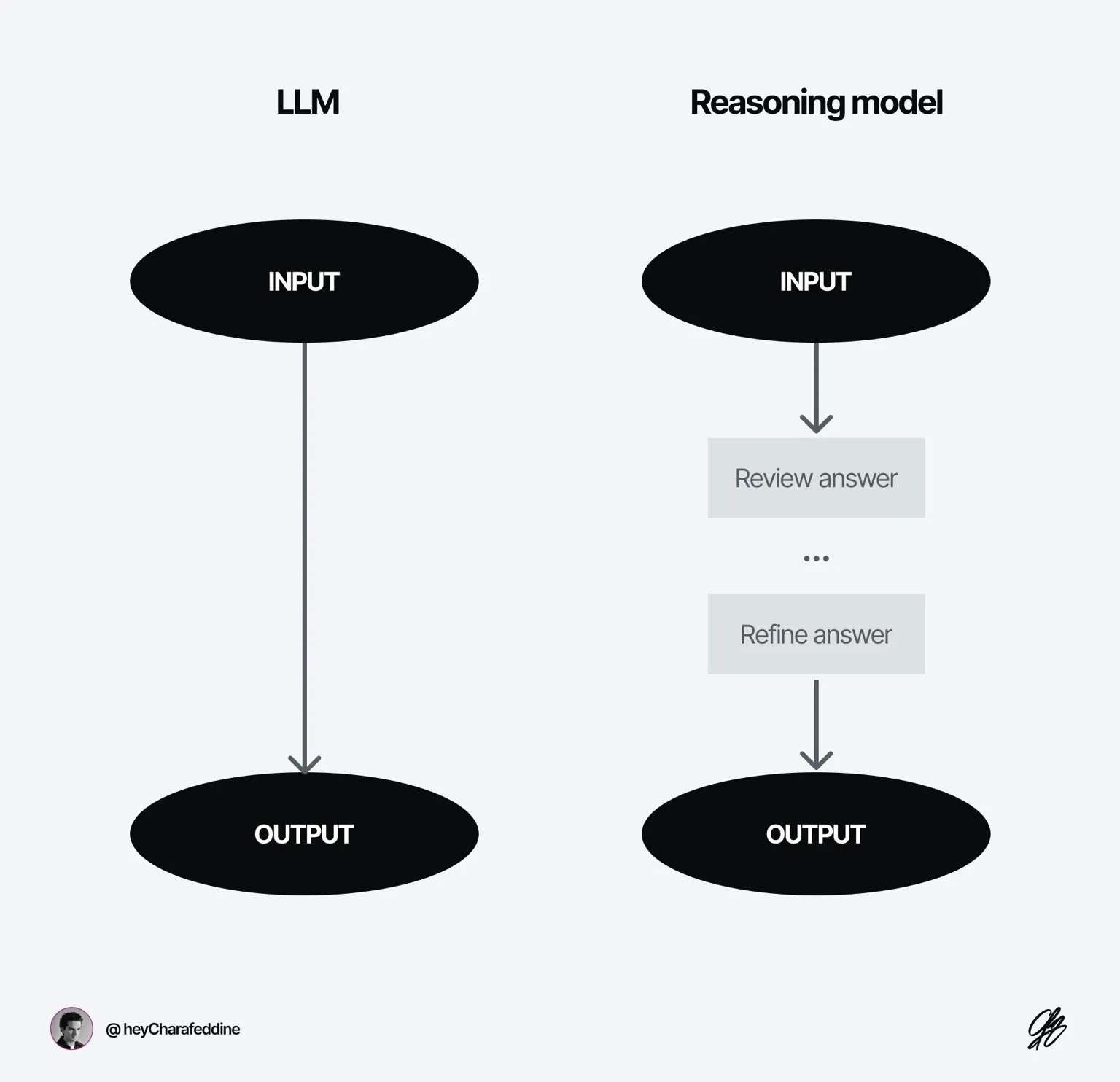
The Simple Rule:
| Task Type | Model Choice | Why This Works |
|---|---|---|
| Routine & Repetitive | Flash (Chat Model) | Fast execution, consistent output, direct answers |
| Strategic & Complex | Pro (Reasoning Model) | Deep analysis, multi-step logic, nuanced decisions |
Flash Use Cases (Speed Wins):
- Data format conversions (CSV → JSON, Traditional Chinese → Simplified)
- SEO optimizations (meta descriptions, title tags)
- Email polishing and quick rewrites
- Basic code snippets and debugging
- Fact lookups and simple research
- Casual conversations and brainstorming
Pro Use Cases (Depth Wins):
- Cross-cultural business communication (preserving nuance)
- Strategic planning with multiple constraints
- Complex financial modeling and analysis
- Comprehensive code reviews and architecture decisions
- Multi-document synthesis and research
- High-stakes content creation
Pro Tip: Those claiming "always use reasoning models for everything" clearly haven't optimized for speed. Using Pro for simple tasks is like hiring a consultant to make coffee—you'll wait 40 seconds for an over-engineered answer.
Quick Reference Across Platforms:
| Platform | Chat Model | Reasoning Model |
|---|---|---|
| Gemini | Flash | Pro |
| ChatGPT | GPT-4o, 4* | o* |
| DeepSeek | V-* | R-* |
Real-World Test: Can Gemini Run My Entire Project Loop?
(Spoiler: Halfway)
I wanted to test Gemini's workspace integration with a common workflow: extract → analyze → distribute.
The Challenge: Transform scattered email threads into actionable project management without manual copy-paste hell.
I want to make this guide useful for everyone - whether you're using Gemini Premium or the free version.
So I'll focus on the features that are available now for everyone — no premium subscription needed.
Note: I've already built this workflow in my Claude desktop app using MCP integrations (if you're curious about that setup, check my previous newsletters).
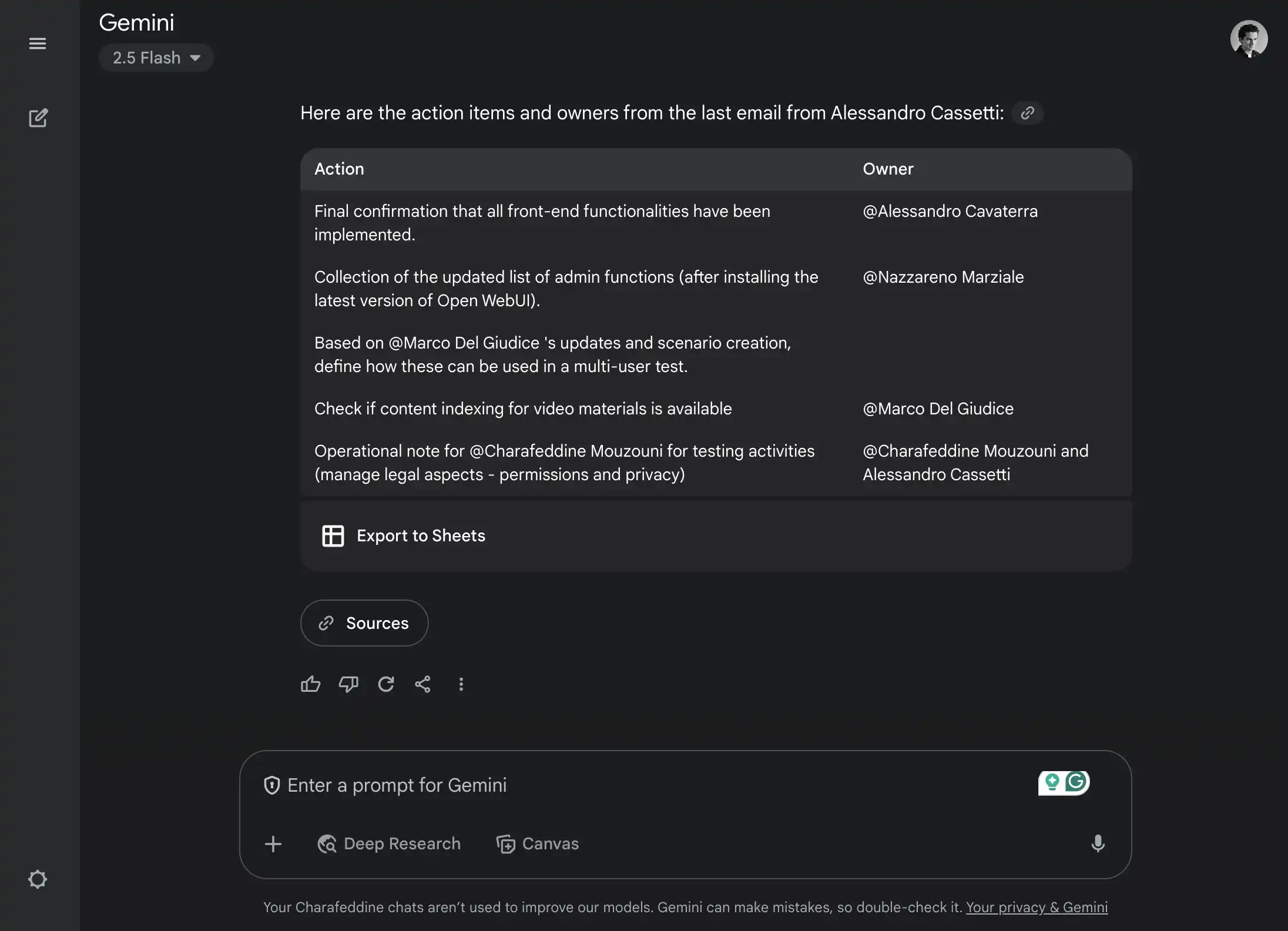
Step 1: Information ExtractionI prompted: "Extract all actions, tasks, and owners from the last email from Alessandro. Put everything in a table."
Using @Gmail integration, Gemini pulled the email context and delivered a clean table with:
- Task descriptions
- Assigned owners
- Due dates
- Priority levels
Bonus: There's an "Export to Sheets" button right in the interface.
Step 2: The Agentic Test (Where It Breaks)Then I tried: "Put all those items in a Google Sheet, name it 'actions_from_alessandro' and save it in my Drive folder called 'O_Project'"
Here's where Google's workspace integration hits a wall. Gemini excels at pulling information from your workspace but struggles with pushing actions back. It can't create files, update spreadsheets, or execute complex workspace actions.
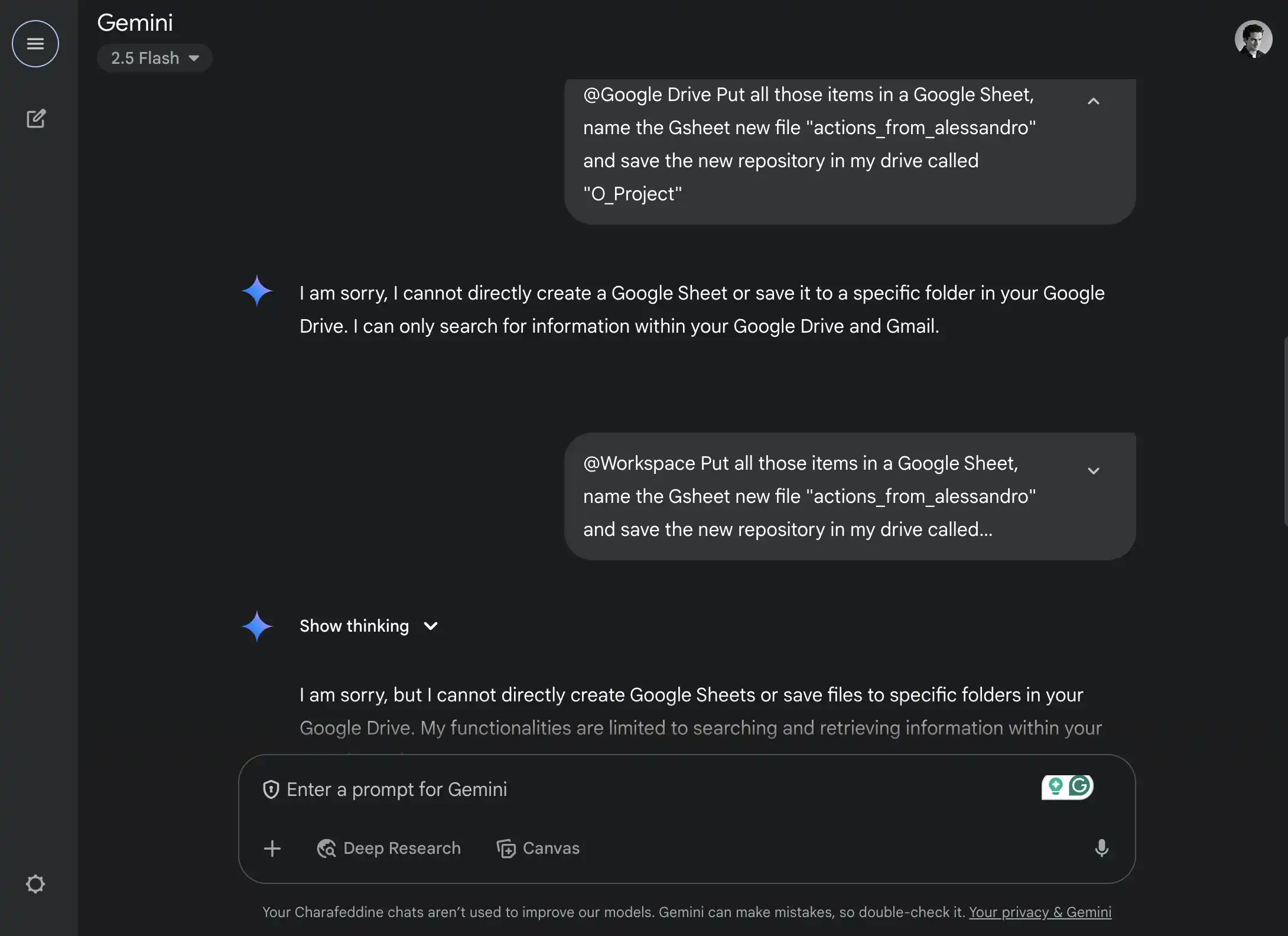
The Reality Check: Gemini Agents are brilliant at synthesis and analysis but not yet ready for full workflow automation. Recent coding benchmarks show mixed results—Claude takes the lead in most programming tasks, while Gemini 2.5 Pro shows strength in specific areas but still has execution gaps.
What Actually Works:
- Voice-to-Google Tasks integration (surprisingly powerful for quick capture)
- Cross-document analysis and summarization
- Email context understanding and drafting
- Calendar-aware scheduling suggestions
Bottom Line: Gemini transforms information work but doesn't replace workflow tools yet. Think "supercharged research assistant" rather than "AI employee."
Lab Test: Turn Any PDF Into an Interactive Game (This Is Ridiculous)
Here's where Gemini's 1-million-token context window creates magic.
I grabbed a dense 30-page OpenAI prompting guide and threw it at Gemini Pro with this challenge:
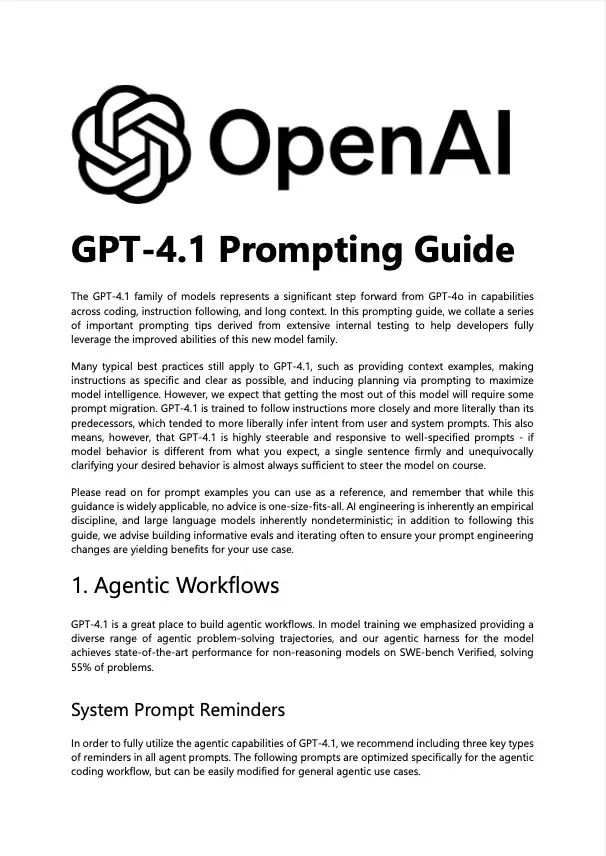
Prompt:
Turn this paper into an interactive fun game designed to test my knowledge.
Requirements:
- Questions start easy, get progressively harder
- 10 questions total
- Explain wrong answers with examples
- Make it genuinely engaging with:
- Achievement progression
- Storyline elements
- Interactive graphics
- Professional polish
What Happened Next:
- Gemini analyzed the entire document
- Built a complete quiz game with HTML/CSS/JavaScript
- Added progress bars, scoring system, and visual feedback
- Created a narrative around "AI Prompt Mastery"
- Fixed its own bugs in real-time
The Result: A publication-ready interactive learning tool in under 60 seconds.
Try This With:
- Employee onboarding documents
- Industry reports and white papers
- Training manuals and compliance guides
- Academic papers and research
This feature works across ChatGPT and Claude too, but Gemini 2.5 Pro takes the lead in single-shot execution—especially with longer documents thanks to that massive context window.
The Workspace Swiss Army Knife
The real superpower isn't Gemini as a chatbot—it's Gemini as ambient intelligence throughout your existing workflow.
With Smart Features enabled, the Gemini Side Panel becomes productivity infrastructure:
Email Mastery
Scenario: You get a vague conference invite. You're interested but need to negotiate timing.
Old Way: Spend 10 minutes crafting the perfect diplomatic response.
New Way:
- Open Gemini Side Panel
- Paste your rough thoughts: "interested but timing might be tough"
- Get: "Thanks for thinking of me! I'd love to explore this opportunity—could we discuss a date that works around my current commitments?"
Professional. Warm. Perfect tone.
Spreadsheet Intelligence
Scenario: You're tracking workshop signups across multiple channels.
Instead of manual table building:
=AI("Create signup summary by channel with conversion rates")
Need sentiment analysis on feedback?
=AI("Categorize this feedback: Price, UX, Feature Request, Other", D2)
Translation needs?
=AI("Translate to business-appropriate Mandarin", D2)
Gemini fills the logic. You refine the results. Hours saved.
Document Collaboration
Writing a project retrospective?
Prompt: "We received this client feedback [paste]. Write a professional summary of our planned response."
Working with meeting notes?
- Use @AI Summary blocks
- Click "Refresh" as discussions evolve
- Export clean summaries to stakeholders
Need cross-document insights?
- Right-click any Drive folder → "Summarize contents"
- Get executive briefings from scattered files
The Integration Advantage
Gemini in the side panel of Gmail, Docs, Sheets, Slides, Drive, and Chat—Get AI assistance directly in the flow of your work represents a fundamentally different approach than standalone AI tools. Instead of context-switching between apps, intelligence flows through your existing workspace.
This is where Google's integration beats Microsoft Copilot (which feels clunky) and standalone tools like ChatGPT (which require constant copy-paste).
The Unfair Context Advantage
While everyone debates reasoning capabilities, Gemini 2.5 Pro quietly offers an unfair edge: 1 million tokens of context—roughly 700,000 English words.
The Competition:laude 4 Sonnet:
- Claude 4 Sonnet: 200k tokens
- o3: 200k tokens
- Gemini 2.5 Pro: 1M tokens
Translation: You can feed Gemini two Harry Potter books plus your annotations and get coherent analysis in a single conversation.
Real-World Applications:
- Strategy Consulting: Cross-analyze competitor 10-Ks, market research, and internal reports simultaneously
- Legal Research: Compare case precedents, regulations, and client documents in one prompt
- Academic Research: Synthesize multiple papers, datasets, and theoretical frameworks
- Business Intelligence: Analyze quarterly reports, customer feedback, and operational data together
Example Prompt:"Here are three competitor analysis reports [upload], our Q4 performance data [upload], and customer interview transcripts [upload]. What strategic opportunities do you see that others are missing?"
This isn't just "more context"—it's qualitatively different analysis that becomes possible when an AI can hold massive amounts of information simultaneously.
The One Significant Flaw
Gemini has an over-safety problem that creates real workflow friction.
Example: I asked about Jimmy Carter's presidency challenges for a historical analysis piece. Gemini refused, deeming presidential criticism "sensitive political content."
Meanwhile, ChatGPT and Claude provided balanced, factual analysis without drama.
The Pattern: Google's safety filters are tuned so conservatively they block legitimate research, historical analysis, and business strategy discussions.
Impact: You'll hit walls when exploring:
- Competitive analysis (mentions of other companies)
- Historical events (anything with conflict)
- Business case studies (failure analysis)
- Market research (demographic discussions)
Workaround: Rephrase sensitive queries as "academic research" or "case study analysis." Sometimes it works.
But this represents a deeper issue: AI safety shouldn't feel like AI censorship. When safety measures create more friction than actual risks, adoption suffers.
The Strategic Verdict
After stress-testing Gemini across real workflows, here's the honest assessment:
What Google Got Right:
- Workspace Integration: Seamless AI throughout your existing tools
- Context Capacity: Industry-leading 1M token window
- Practical Features: Side panel, voice integration, cross-app intelligence
- Speed at Scale: Over 7 million developers are building with Gemini, five times more than this time last year
What's Still Missing:
- Agentic Capabilities: Can't execute complex actions in your workspace
- Over-Safety: Blocks legitimate business and research queries
- Inconsistent Performance: Struggles with audience empathy compared to Claude's conversational intelligence
The Bottom Line: Gemini isn't the smartest AI, but it's becoming the most integrated AI. In productivity workflows, integration often beats raw intelligence.
My Recommendation: Use Gemini for workspace tasks, document analysis, and routine automation. Keep Claude or ChatGPT for creative work, complex reasoning, and sensitive research.
The future isn't about finding the "best" AI—it's about orchestrating the right AI for each context.
What's Next
Google's AI integration represents a inflection point: AI transitioning from "tool you visit" to "intelligence that lives in your workflow."
The best of Google AI is now included in Workspace Business & Enterprise plans, making this transformation accessible to millions of knowledge workers without additional subscriptions.
Try these workflows this week:
- Enable Smart Features in Gmail (if you haven't already)
- Test the PDF-to-game conversion with your team's training materials
- Use @AI formulas in Sheets for your next data analysis
- Upload 3+ documents to Gemini and ask for strategic synthesis
What I'm Watching:
- When will Google enable true agentic capabilities in Workspace?
- How will Microsoft Copilot respond to Google's integration advantage?
- Which use cases will emerge from that 1M token context window?
Your Feedback Makes This Better: Email me and tell me which workflows you've tested, what broke, and what blew your mind. Every response makes the next issue sharper.
The AI landscape shifts weekly. The builders who win are those who use rather than just learn.
Until next time,
— Charafeddine
P.S. If this breakdown saved you hours of testing, forward it to someone still trying to figure out which AI tool to use. They'll thank you.