
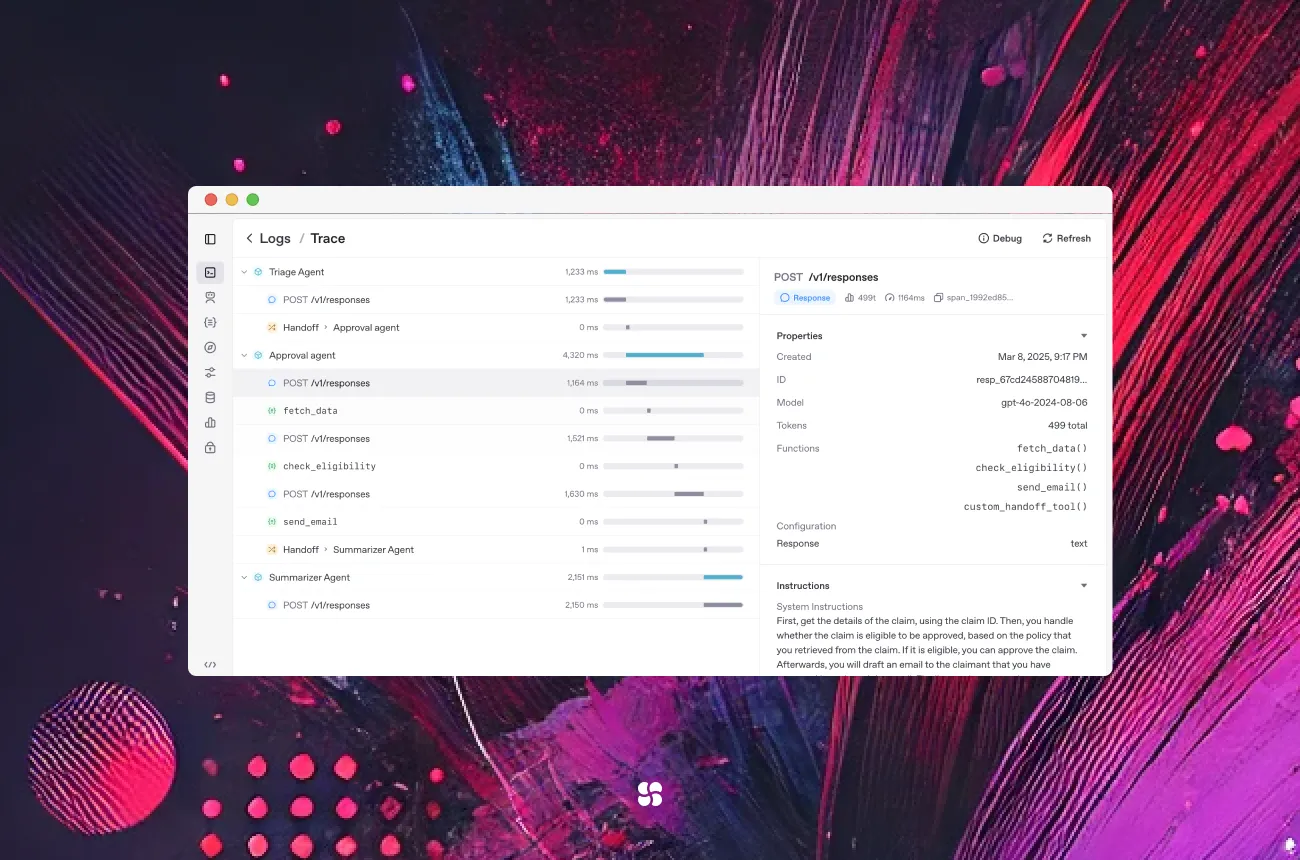
We’ve all tried to glue LLMs, tools, and guardrails into something production-worthy—only to spend days debugging plumbing. The OpenAI Agents SDK strips the complexity down to a few powerful primitives (Agents, Tools, Handoffs, Guardrails, Sessions) and gives you built-in tracing. In this guide, we’ll show exactly how to use it, why it matters, and where it beats (or differs from) alternatives like LangGraph, CrewAI, and PydanticAI. Expect copy-paste-ready code, sharp implementation tips, and no fluff. OpenAI GitHub
Why the Agents SDK matters (and what it actually is)
OpenAI’s Agents SDK is a lightweight framework for building agentic apps with minimal abstractions. You model Agents (LLMs with instructions and tools), connect them via Handoffs, add Guardrails to keep them safe, and plug in Sessions to remember state. It’s provider-agnostic: use OpenAI Responses or Chat Completions—and via LiteLLM, 100+ non-OpenAI models—without changing your app’s architecture. OpenAI GitHub+1
What you get out-of-the-box
- Agent loop (tool calling, multi-turn control)
- Guardrails (input/output checks that can halt runs fast)
- Sessions (SQLite/SQLAlchemy/Conversations API)
- Tools (hosted tools like WebSearch/FileSearch/Computer Use/Code Interpreter, function tools, agents-as-tools)
- Tracing (view runs in the OpenAI Traces dashboard; configurable processors) OpenAI GitHub+2OpenAI GitHub+2
Install & hello world (60 seconds)
python -m venv .venv
source .venv/bin/activate   # Windows: .venv\Scripts\activate
pip install openai-agents
export OPENAI_API_KEY=...
from agents import Agent, Runner
agent = Agent(name="Assistant", instructions="You are a helpful assistant.")
result = Runner.run_sync(agent, "Write a haiku about recursion in programming.")
print(result.final_output)This is the canonical quickstart in the docs (the final_output property is guaranteed). OpenAI GitHub+1
The core mental model (skip this and you will re-learn it the hard way)
- Agents are LLMs with instructions, tools, and optional typed outputs.
- Tools are either hosted (WebSearch, FileSearch, Computer, Code Interpreter) or function tools (your Python functions via
@function_tool). - Handoffs transfer control between agents when a task requires specialization.
- Guardrails run in parallel to the agent to validate input/output and can short-circuit on violations.
- Sessions persist conversation history with zero boilerplate. OpenAI GitHub+2OpenAI GitHub+2
Practical use case 1: “Billing Assistant” with real tools + context
Goal: A single agent that can call your internal function securely and return typed results.
from typing import Optional
from pydantic import BaseModel
from agents import Agent, Runner, function_tool, RunContextWrapper

class AppContext(BaseModel):
    user_id: str
    org_id: Optional[str] = None

# Turn any Python function into a tool
@function_tool
def get_user_balance(ctx: RunContextWrapper[AppContext], user_id: str) -> str:
    # here you'd check ctx.context.user_id / org_id, authz, etc.
    # ...and call your billing store
    return "NGN 182,500.00"

# Typed output (optional but recommended for reliability)
class BalanceReply(BaseModel):
    balance: str

assistant = Agent(
    name="Billing Assistant",
    instructions="Be concise. Use tools when needed.",
    tools=[get_user_balance],
    output_type=BalanceReply,
)

ctx = AppContext(user_id="user-123", org_id="cohorte")
res = Runner.run_sync(assistant, "What's my balance?", context=ctx)
print(res.final_output.balance)  # "NGN 182,500.00"
Why this pattern?
- Uses
@function_tool(preferred) rather than inventing a custom Tool class. - Adds a typed output for safer downstream handling.
- Passes a Pydantic context object so tools can enforce authz. OpenAI GitHub
Practical use case 2: Guardrails that actually stop bad inputs/outputs
You do not instantiate a Guardrail class. You write decorated functions and attach them on the agent as input_guardrails=[...] or output_guardrails=[...].
from pydantic import BaseModel
from agents import (
    Agent, Runner, RunContextWrapper,
    GuardrailFunctionOutput,
    input_guardrail, output_guardrail
)

class MessageOut(BaseModel):
    response: str

@input_guardrail
async def block_math_homework(ctx: RunContextWrapper, agent: Agent, user_input: str):
    if "solve for x" in user_input.lower():
        return GuardrailFunctionOutput(tripwire_triggered=True, output_info="Homework-like request.")
    return GuardrailFunctionOutput(tripwire_triggered=False, output_info="ok")

@output_guardrail
async def forbid_emails(ctx: RunContextWrapper, agent: Agent, output: MessageOut):
    flagged = "@" in output.response
    return GuardrailFunctionOutput(tripwire_triggered=flagged, output_info="Email detected" if flagged else "ok")

agent = Agent(
    name="Support",
    instructions="Answer billing/account questions only.",
    input_guardrails=[block_math_homework],
    output_guardrails=[forbid_emails],
    output_type=MessageOut,
)

print(Runner.run_sync(agent, "Help me with my account").final_output.response)
Guardrails work on the first (input) or last (output) agent in the run and raise a tripwire exception when triggered—cheap, fast, and effective. OpenAI GitHub
Practical use case 3: Multi-agent routing with handoffs
You can let agents call other agents as tools or explicitly hand off control. Here’s a simple “frontline → specialist” pattern:
from agents import Agent, Runner

triage = Agent(
    name="Triage",
    instructions="Decide who should handle the query: 'Billing' or 'Tech'. If billing, hand off to Billing.",
)

billing = Agent(
    name="Billing",
    instructions="Handle billing inquiries only. If non-billing, handoff back to Triage.",
)

query = "I was charged twice for my subscription."

# Hand off to billing when needed; the SDK’s result tracks where it ended
result = Runner.run_sync(triage, query, handoffs=[billing])
print(result.last_agent.name, "→", result.final_output)
On the RunResult object you can reliably use: final_output, last_agent, new_items, raw_responses, etc. (No undocumented fields.) OpenAI GitHub
Practical use case 4: Streaming token-by-token (for responsive UIs)
from agents import Agent, Runner

agent = Agent(name="Streamer", instructions="Stream tokens.")
stream = Runner.run_streamed(agent, "Write a limerick about Lagos devs")

for ev in stream.stream_events():
    if ev.type == "response.delta":
        print(ev.delta, end="", flush=True)
from agents import Agent, Runner
agent = Agent(name="Streamer", instructions="Stream tokens.")
stream = Runner.run_streamed(agent, "Write a limerick about Lagos devs")
for ev in stream.stream_events():
if ev.type == "response.delta":
print(ev.delta, end="", flush=True)
from agents import Agent, Runner, SQLiteSession

agent = Agent(name="Assistant", instructions="Reply concisely.")
session = SQLiteSession("user-42")             # in-memory by default
# session = SQLiteSession("user-42", "conversations.db")  # persistent

print(Runner.run_sync(agent, "Hi", session=session).final_output)
print(Runner.run_sync(agent, "What did I just say?", session=session).final_output)
For complex infra, there’s an SQLAlchemySession backend; Redis-like stores are available via extensions/extras in recent releases. OpenAI GitHub
Tools: when to use hosted vs function tools
Hosted tools (WebSearch, FileSearch, Computer, Code Interpreter, Image Generation, Hosted MCP) run alongside models—great for web-connected or sandboxed tasks. Function tools turn any Python function into a tool with auto-generated schemas and docstrings; you can also create a FunctionTool manually if you need full control. OpenAI GitHub
from agents import Agent, Runner, WebSearchTool, FileSearchTool

agent = Agent(
    name="Researcher",
    tools=[
        WebSearchTool(),
        FileSearchTool(max_num_results=3, vector_store_ids=["VECTOR_STORE_ID"]),
    ],
)
print(Runner.run_sync(agent, "What should I know about Lagos' tech scene today?").final_output)
Hosted-tools availability depends on using the OpenAI Responses model; for non-OpenAI providers, switch to LiteLLM and be aware hosted tools may not be available. OpenAI GitHub+1
Tracing & privacy: see everything, leak nothing
- Tracing is on by default and viewable in the OpenAI Traces dashboard.
- Disable or customize tracing (and sensitive data capture) via
RunConfigand environment variables. - You can pipe traces to 3rd-party observability tools (Langsmith, W&B Weave, Langfuse, etc.). OpenAI GitHub
Production tip: Set OPENAI_AGENTS_DISABLE_TRACING=1 or configure RunConfig.trace_include_sensitive_data=False for workflows that touch PII/PHI. OpenAI GitHub
Using non-OpenAI models (Anthropic, Google, etc.) via LiteLLM
Install the extra and drop in a model:
pip install "openai-agents[litellm]"from agents import Agent, Runner, function_tool
from agents.extensions.models.litellm_model import LitellmModel
@function_tool
def get_weather(city: str): return f"{city}: sunny."
agent = Agent(
name="Haiku",
model=LitellmModel(model="anthropic/claude-3-5-sonnet-20240620", api_key="..."),
tools=[get_weather],
)
print(Runner.run_sync(agent, "Weather in Tokyo?").final_output)LiteLLM support is documented and currently beta, but it’s the cleanest route to provider-agnostic setups. OpenAI GitHub
How it compares (so you pick the right tool, fast)
| Scenario | Use the Agents SDK when… | Consider alternatives |
|---|---|---|
| You want simple primitives with strong defaults | You value a minimal surface: Agents, Tools, Sessions, Handoffs, Guardrails | LangGraph if you prefer explicit graph orchestration with nodes/edges, checkpointing, and long-running control loops. (LangChain) |
| You need hosted tools (web search, computer use, code interpreter) | You’re fine running on OpenAI Responses for built-ins | CrewAI if you want “crews” of role-playing agents and a separate control plane; its philosophy is different but popular in ops automation. (GitHub) |
| You prefer typed, schema-first development | You already use Pydantic heavily; Agents SDK supports typed outputs too (output_type=...) |
PydanticAI for a framework that puts strict typing/validation at the center of the dev experience. (ai.pydantic.dev) |
Quick rule of thumb: start with Agents SDK for most app teams. If your mental model is “graph orchestration,” reach for LangGraph; if your mental model is “role-based crews + a control plane,” try CrewAI; if your dev culture is “everything typed up front,” PydanticAI will feel natural. LangChain+2GitHub+2
Real-world implementation tips (from messy projects we’ve shipped)
- Type your outputs. Set
output_type=YourPydanticModelso downstream code never guesses at shapes. It also plays nicely with guardrails. OpenAI GitHub - Guardrails early. Tripwire on risky inputs before you call that expensive model. Output guardrails can block on prohibited content. OpenAI GitHub
- Use Sessions from day one. Start with
SQLiteSession("user-xyz")locally; switch to SQLAlchemy or the Conversations API for prod. OpenAI GitHub - Separate “business tools” from LLM config. Keep tools focused and testable. Prefer
@function_toolfor quick wins; build a customFunctionToolonly when you truly need it. OpenAI GitHub - Stream where UX matters. For chat UIs and long jobs, wire
run_streamed(); it’s the difference between “snappy” and “frozen.” OpenAI GitHub - Be privacy-conscious by default. Disable sensitive data capture for regulated flows; consider custom trace processors (W&B, Langfuse, etc.). OpenAI GitHub
- If you’re going multi-provider, plan for LiteLLM. It’s currently beta, but the swap-in story is far cleaner than writing adapters yourself. OpenAI GitHub
Debugging & observability checklist
- Runs not showing up? Check the OpenAI Traces dashboard; tracing is enabled by default. OpenAI GitHub
- No tool calls? Verify tools are decorated with
@function_tooland added toAgent(..., tools=[...]). OpenAI GitHub - Weird results object? Stick to documented fields:
final_output,last_agent,new_items,raw_responses. OpenAI GitHub - Hosted tools missing? Ensure you’re using the Responses model family (or compatible setup). OpenAI GitHub
Key takeaways (pin these)
- Less plumbing, more product. Agents SDK covers 80% of the orchestration you’d otherwise hand-roll. OpenAI GitHub
- Guardrails & typed outputs = reliability. Add them early; they pay off immediately. OpenAI GitHub+1
- Sessions are free wins. Turn them on and forget about manual context wrangling. OpenAI GitHub
- Great defaults, extensible edges. Hosted tools, tracing, LiteLLM integration… with escape hatches when you need them. OpenAI GitHub+2OpenAI GitHub+2
- Pick the framework that matches your mental model. SDK for simple primitives; LangGraph for graphs; CrewAI for role-based crews; PydanticAI for strict typing. LangChain+2GitHub+2
Use these resources as your starting point
- OpenAI Agents SDK – Docs (Python): the definitive guide (Quickstart, Tools, Guardrails, Sessions, Streaming, Tracing). OpenAI GitHub+5OpenAI GitHub+5OpenAI GitHub+5
- OpenAI Agents SDK – GitHub (Python): source, examples, release notes. GitHub+1
- Using any model via LiteLLM: provider-agnostic setup instructions and example. OpenAI GitHub
- LangGraph (LangChain): graph-based agent orchestration. LangChain
- CrewAI: role-based multi-agent framework, examples. GitHub+1
- PydanticAI: schema-first agent framework. ai.pydantic.dev+1
Cohorte Engine Room
October 08, 2025