
Building applications with large language models can feel like piecing together a complex puzzle. You might find yourself juggling API calls, prompt templates, vector databases, and custom tools – all in code. If you’ve ever wished for a more intuitive way to design and experiment with these AI workflows, LangFlow might just be the answer. LangFlow is a visual, drag-and-drop tool for creating AI applications and agents, built on the popular LangChain framework. In this guide, we’ll explore what LangFlow is, how it fits into the LangChain ecosystem, and how you can use it to rapidly prototype AI solutions. We’ll walk through building a simple customer support agent step-by-step, and we’ll compare LangFlow to similar tools like Flowise, n8n, and others. Along the way, we’ll keep things friendly, conversational, and occasionally humorous – because even busy developers and AI VPs deserve a smile while learning.
What is LangFlow (and How Does It Relate to LangChain)?
LangFlow can be thought of as LangChain’s visual younger sibling. To understand LangFlow, let’s first recall what LangChain offers. LangChain is a robust framework that simplifies the integration and management of language models in applications. It provides the building blocks for LLM-powered apps – things like prompt templates, memory for conversation context, integrations with external tools (APIs, databases, web searches), and so on. In short, LangChain handles the heavy lifting of connecting an LLM to other components and data sources, so you can chain together model calls and tool usages to create more complex behavior.
Now, LangFlow builds on LangChain to make this process even easier by offering a graphical interface. Instead of writing Python code to compose your chains or agents, LangFlow lets you drag and drop pre-built components on a canvas and connect them visually. Each component on the canvas corresponds to a LangChain concept (an LLM, a prompt, a tool like a database or API, etc.). By wiring these components together, you define the flow of information and logic in your AI application. Under the hood, LangFlow is powered by LangChain’s Python library – it’s essentially a UI layer that generates and orchestrates LangChain pipelines for you.
In the LangChain ecosystem, LangFlow serves as a user-friendly “IDE” for LLM applications. It fits naturally for developers who are prototyping new ideas or demoing chains to non-developers, as well as for engineers who want to quickly test different chain configurations. Since LangFlow is open-source and Python-based, it remains fully customizable and extensible for those who need to dive into code. In essence, if LangChain is the engine, LangFlow is the sleek dashboard that lets you drive it without popping the hood each time.
Why Use LangFlow? – Usability, Architecture, and Unlocked Possibilities
1. Visual Usability: LangFlow’s primary appeal is its intuitive drag-and-drop interface. You can assemble complex AI workflows by simply selecting components from a library and drawing connections between them. No need to write boilerplate code for linking an LLM to a vector database or a tool – just connect the nodes. This lowers the barrier to entry for those who aren’t deep into coding, and accelerates experimentation for seasoned developers. For example, want to try a different LLM or prompt in your pipeline? In LangFlow you can swap out a model component or tweak a prompt template in seconds, which encourages rapid iteration.
2. Clear Architecture: Each flow you build in LangFlow has a clear visual architecture. This makes it easier to reason about what your AI app is doing. You can see at a glance how data flows from a user’s input, through various processing steps, to the final output. It’s like having a bird’s-eye view of your chain’s logic. This transparency is great for debugging and for communicating design to others.
In team settings, a LangFlow diagram on screen can quickly show product managers or AI VPs how an AI feature works – no need to wade through code. Moreover, LangFlow uses a modern web-based architecture: it runs a local server (or cloud service) with a browser UI, built on the React Flow library for the flow diagrams. The flows themselves are saved as structured data (JSON files containing all the nodes and their connections), which means they are shareable and versionable. You can export a flow you created and import it into another LangFlow instance easily. (In fact, LangFlow recently added options to export flows as JSON and even as Python code in some cases, so you can integrate or hand-off your work to the codebase if needed.)
3. Rapid Prototyping & Experimentation: By combining ease-of-use and clarity, LangFlow unlocks the possibility to prototype AI ideas extremely fast. Instead of spending hours writing glue code, you can drag out components like “OpenAI LLM” or “Pinecone Vector DB” and configure them via a form. This means you can try out that crazy idea for a multi-step AI assistant in minutes and see if it works. LangFlow’s Playground mode lets you test your flow interactively once it’s built – there’s a built-in chat interface where you can input queries and observe the responses as well as each step’s output. For instance, if you have a chain that first calls a tool then an LLM, you’ll be able to see what the tool returned and what the LLM did with it. This rapid feedback loop encourages iterative improvement.
4. Complex Capabilities Made Simple: LangFlow isn’t just for trivial demos – it supports advanced patterns like Retrieval-Augmented Generation (RAG) and multi-agent tool-using systems out of the box. You can build a chatbot that first looks up relevant knowledge in a vector database, a marketing copy generator that pulls data from the web, or an AI agent that uses multiple tools to answer a query. All these scenarios, which typically involve integrating several components, are made simpler by LangFlow’s visual metaphor.
To illustrate, LangFlow provides a component called a “Tool-calling agent” – essentially an agent that can decide which connected tool to invoke for a given user request. You can attach, say, a Calculator tool and a Web Search tool to this agent node, and the agent will intelligently pick the right one based on the question (math questions trigger the calculator; informational questions trigger the web search).
In code this would require writing an agent loop; in LangFlow it’s just a matter of connecting these nodes together. LangFlow comes with a growing library of such tools and integrations (LLMs, vector stores, web scrapers, PDF loaders, etc.), so you have a rich toolbox ready for use.
5. “Flow as API” and Deployment Options: After designing a flow, LangFlow gives you multiple ways to use it in the real world. You can run the flow in the LangFlow Playground UI for interactive sessions, or you can deploy the flow as an API endpoint to integrate with external applications. In fact, LangFlow provides a REST API where each saved flow can be executed via an HTTP call (with appropriate auth). This means you could hook your LangFlow-designed chain into a Slack bot or a web app by calling the flow’s URL – no need to rewrite the logic elsewhere.
Additionally, LangFlow supports embedding chat widgets on your website, so a flow can be deployed as a chat assistant on a page with a few lines of script. And for those with enterprise needs, LangFlow offers both an open-source version you can self-host and a cloud service (provided by DataStax) where flows can be deployed at scale with collaboration features. In short, it’s the same LangFlow whether you’re using OSS or Cloud (as the official tagline says) and it’s aimed to get you from a Jupyter notebook idea to a production-ready app faster.
6. Extensibility for Developers: While LangFlow is low-code, it’s still very much developer-friendly under the hood. If something isn’t available out of the box, you can write custom Python components and import them into LangFlow. For example, if you have a proprietary data source or a special model, you can implement it as a Python class following LangFlow’s component interface and then use it like any other node in the UI. This extensibility ensures that more advanced developers are not limited by the UI – you get the best of both worlds: speed of visual building plus the full power of Python when needed.
7. Collaboration and Learning: A perhaps underrated benefit of LangFlow is how it fosters collaboration and understanding. The visual nature means it’s easier to explain AI workflows to non-engineers. As an AI VP or team lead, you could sketch out an idea for a new AI feature in LangFlow and show it to stakeholders for feedback. It demystifies the “black box” of AI by exposing the sequence of steps in a friendly diagram. One user noted that LangFlow is great as a “visual demonstrator to show other teams how to implement something (people are still learning the basics, like how vector DBs work, what text splitting does, etc.)”.
In educational contexts, LangFlow can be a sandbox for new practitioners to play with prompts and chains without getting lost in setup. And if something goes wrong, the interface includes logging and debugging info (for instance, you can see error messages or intermediate outputs), which can be easier than sifting through stack traces in code.
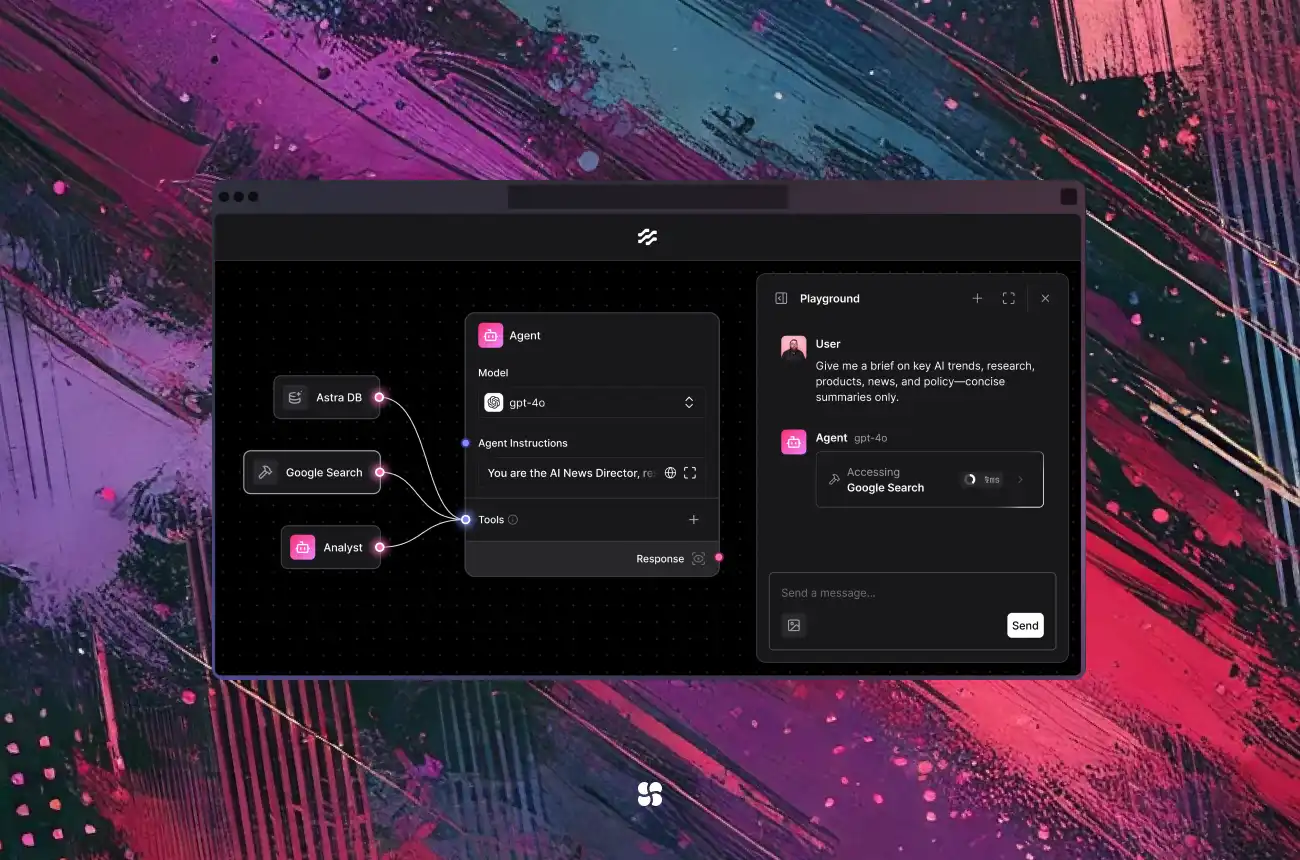
An example LangFlow visual workflow (screenshot). Each node on the canvas represents a component of an AI application – such as a prompt template, an LLM model, or a tool. Arrows show the flow of messages between components. The right side panel (Playground) lets you chat with the constructed agent. In this flow, an agent node (center) is connected to a Search tool and an Analyzer chain, enabling it to fetch information and synthesize an answer for the user’s query. Building such multi-step, multi-tool agents is much simpler with LangFlow’s drag-and-drop interface.
Step-by-Step: Building a Customer Support Agent with LangFlow
Let’s roll up our sleeves and build something tangible: an AI-powered customer support assistant. Imagine we have a bunch of company FAQs and documentation, and we want to create a chatbot that can answer customer questions using that data. This is a classic use case for LangChain/LangFlow, often implemented as a retrieval-augmented Q&A bot – the bot will retrieve relevant info from your knowledge base and then formulate an answer. We’ll walk through how you could do this in LangFlow, step by step, focusing on the high-level process (and we’ll peek at what the underlying LangChain code might look like too).
Overview of the Approach
Before diving into LangFlow, here’s the plan for our support agent:
- We need to ingest our support documents (product manuals, FAQ pages, etc.) into a vector database so we can perform similarity search on them. This typically involves splitting documents into chunks, embedding those chunks into vectors, and storing them in a vector store.
- Then for each user question, the agent will retrieve relevant document chunks from the vector store (based on embedding similarity to the question).
- The retrieved context, along with the user’s question, will be fed into an LLM (like GPT-4 or an open-source model) which will compose a helpful answer.
- We’ll manage the conversation so that the agent can handle follow-up questions (this could involve memory, but for simplicity we might not delve into multi-turn memory here).
- Finally, the agent will output the answer as a chat response.
Now, let’s do this in LangFlow.
Step 1: Set Up LangFlow and Create a New Project
First, ensure you have LangFlow installed and running. You can install it via pip and launch it locally:
pip install langflow
python -m langflow run
This will start the LangFlow web app (by default at http://localhost:7860). Open that in your browser. You’ll see the LangFlow interface, which includes a dashboard of projects/flows. Go ahead and create a new project for our customer support agent (or use the default project). Within that project, click “New Flow” and give our flow a name (e.g., "SupportAgent"). You’ll be greeted with an empty canvas where we’ll build our chain.
Note: If it’s your first time, LangFlow provides some starter templates. In fact, there’s a “Vector Store RAG” starter flow that is very similar to what we’re building. We’ll explain things manually here for learning purposes, but know that you can also start from those templates and modify as needed.
Step 2: Ingest Documents into a Vector Store (Data Preparation)
On the left sidebar, you’ll have a palette of components. Look for Document loaders, Text splitters, Vector stores, and Embeddings components. LangFlow allows you to create a mini-flow for ingestion (loading data) and then another flow for query. In our case, we might use an CSV/PDF/Text Loader (depending on your docs format) to load content, then a Text Splitter to chunk it, then connect that to a Vector Store (like FAISS, Pinecone, or Astra DB) along with an Embeddings Model (like OpenAI’s text-embedding-ada model) to actually index the text.
If using the Vector Store RAG template as reference – it splits the flow into two parts: a Load Data flow and a Retriever flow. The load data part would handle one-time ingestion. For simplicity, let’s assume we have already indexed our documents into a vector store (perhaps using a separate LangFlow ingestion flow or an external script). We will focus on the query side of things – the support chatbot itself.
Step 3: Build the Retrieval QA Chain in LangFlow
Now onto the main event: the flow that takes a user query and returns an answer with relevant info.
- Chat Input: Drag a Chat Input component onto the canvas. This node represents the user’s question coming in (in a chat application). It will be our flow’s entry point, providing the user’s query text.
- Embeddings & Vector Search: We need to convert the user query into a vector and query the knowledge base. Drag in an Embeddings component (e.g., OpenAI Embeddings) and a Vector Store component (e.g., FAISS or Pinecone). Connect the Chat Input’s output to the Embeddings node (this will take the user’s question text and produce an embedding). Then connect the output of Embeddings to the Vector Store node. Configure the vector store node with the specifics of your database (in LangFlow, you’d enter API keys or file paths depending on which store). For example, if using Astra DB (DataStax) as in LangFlow’s template, you’d input your Astra vector DB credentials in the node’s fields. The vector store component will perform a similarity search: finding the stored document chunks most relevant to the question’s embedding.
- Retrieve & Combine Documents: The Vector Store node’s output will be a set of retrieved documents or texts. In LangFlow’s paradigm, you might see a Retriever or VectorStoreQ&A chain component that encapsulates this behavior. For clarity, you can also manually add a Prompt component here to format the retrieved info + question for the LLM. In the LangFlow RAG example, they use a Parser node to process retrieved chunks and then a Prompt node to construct the final question-with-context prompt. So, drop a Prompt Template node in and connect the Vector Store output to it. Edit the prompt template to something like:
- “You are a helpful support agent. Use the following context to answer the user’s question.\n\nContext:\n{{context}}\n\nQuestion: {{question}}\nAnswer in a friendly and concise manner.”
- You can map the retrieved documents to the
{{context}}variable and the original question to{{question}}. LangFlow’s interface will allow you to specify which inputs feed into which fields of the prompt. - LLM Model: Next, drag an LLM component (for instance, OpenAI’s ChatGPT or an open-source model) onto the canvas. Connect the output of your Prompt node to the input of the LLM node. Configure the LLM with your API key and desired model (GPT-4, GPT-3.5, etc., or even a local model if you have one set up – LangFlow supports all major LLMs via LangChain). This LLM will take the assembled prompt (question + retrieved context) and generate an answer.
- Chat Output: Finally, add a Chat Output component and connect the LLM’s output to it. This simply ensures the answer is returned to the user through the chat interface. The Chat Output node is basically the terminus that prints the model’s response back in the UI chat.
At this point, our flow might look like: ChatInput → Embedding → VectorStore → Prompt → LLM → ChatOutput, possibly with a couple of helper nodes in between. We have effectively recreated a RetrievalQA chain visually. To double-check, here’s the logic: the user question goes in, gets embedded, similar docs are retrieved, those docs + question become a new prompt which goes into the LLM, and out comes an answer.
In code, an equivalent LangChain setup might look like this (for those curious):
from langchain.llms import OpenAI
from langchain.vectorstores import FAISS
from langchain.chains import RetrievalQA

# Suppose we already have a FAISS vector store of docs (docsearch)
llm = OpenAI(model_name="gpt-3.5-turbo", temperature=0.5)  # or another model
qa_chain = RetrievalQA.from_chain_type(llm, chain_type="stuff", retriever=docsearch.as_retriever())

query = "How do I reset my password?"  # user question
result = qa_chain.run(query)
print(result)
The above code sets up an OpenAI LLM and a retriever from a FAISS vector store, then asks a question. LangFlow is essentially doing this under the hood for us. The nice part is we didn’t have to code any of it – we configured it visually, which reduces chances for trivial bugs (like passing the wrong variable) and makes it straightforward to tweak parameters (e.g., the number of documents to retrieve or the prompt wording) via the UI.
Step 4: Test the Agent in the Playground
With the flow constructed, it’s time to test our support agent. LangFlow provides a Playground or chat interface built into the editor. Hit the “Playground” button (often a ▶️ play icon or a chat icon in the UI) to switch into chat mode for this flow. You’ll see a chat window where you can input a query.
Try asking a question that you know is answered in your documentation, like: “Hi, I forgot how to reset my account password. What should I do?” When you press enter, LangFlow will run the entire flow. You might momentarily see the components light up in sequence on the canvas as data flows through them. Within a few seconds, an answer should appear in the chat output. Ideally, it will say something like: “No problem! To reset your password, go to the login page and click ‘Forgot Password’. Then check your email for a reset link...” (whatever your docs contain).
If the answer looks reasonable and cites the correct info from your knowledge base, congrats – your RAG-based support chatbot is working! 🎉 If not, you might need to fine-tune: perhaps the prompt needs tweaking (to ensure the model uses the context) or maybe more documents should be retrieved to give the model enough info. You can iteratively adjust these in the LangFlow UI (e.g., increase the number of k documents in the Vector Store node, or improve the instruction in the Prompt node).
Step 5: Iterate and Enhance (Optional)
From here, you could enhance the agent further:
- Add a Memory component if you want the chatbot to remember previous questions in the session (LangFlow has Conversation Buffer Memory nodes that can be attached to the LLM).
- Introduce Tools/Agents if some queries require actions. For example, maybe some support questions require looking up current account info – you could integrate an API tool for that and use a Tool-using agent.
- Adjust the tone or format of answers by editing the prompt (you can make the style more formal or more playful depending on your brand).
- Test edge cases: Ask questions that might not have answers in the docs to see how the agent responds (perhaps integrate a fallback response like “Sorry, I’ll forward your question to a human support rep.”).
- Finally, consider how to deploy this: LangFlow can host it, or you can export the flow and run it in a script. One neat way is to use the LangFlow API: you could deploy LangFlow on a server and expose this flow via an API endpoint, then your website or app can send user questions to that endpoint and get answers back. This essentially turns your flow into a microservice.
Throughout this process, we’ve stayed within the friendly confines of a visual builder. For a busy developer or AI product lead, the ability to see and tweak the chain in one interface can save a lot of time. It also makes the work more fun – it’s almost like playing with Lego blocks, except the creation is an AI assistant at the end!
Comparing LangFlow to Flowise, n8n, and Other Tools
The AI tooling ecosystem is growing rapidly, and it’s natural to ask how LangFlow differs from other “flow” or automation tools out there. Let’s look at a few notable ones: Flowise, n8n, Make (Integromat), and touch on others like Dify or Voiceflow, to understand the similarities and differences. It’s a bit like comparing different power tools – each has its specialty.
LangFlow vs. Flowise
LangFlow and Flowise are often mentioned in the same breath. Both are open-source visual builders for LLM applications. They even look somewhat similar (both use the React Flow library for their UI diagrams). However, there are key differences:
- Tech Stack & LangChain Integration: LangFlow is built in Python and designed to work tightly with LangChain (Python). In fact, LangFlow’s raison d'être is to simplify building LangChain apps. Flowise, on the other hand, is built on Node.js/TypeScript and uses LangChainJS under the hood. Practically, this means if you’re a Python/LangChain user (or plan to eventually move your prototype into a LangChain Python project), LangFlow aligns perfectly. Flowise might appeal if you’re more comfortable in the Node/JavaScript ecosystem or want to integrate with JS-based systems.
- Components and Integrations: Flowise started with a goal of being a broader low-code LLM tool, and it is known for having many built-in integrations and nodes beyond just LangChain components. It supports things like conditionals, various data sources, and a wide array of connectors. Flowise’s philosophy is “build any genAI app” whereas LangFlow focuses on LangChain-specific workflows. According to one comparison, “Flowise offers the most integrations and many additional tools... suitable for creating any GenAI application prototypes. LangFlow has fewer integrations as it is specifically designed for LangChain applications.”. In practice, this means if you have a use case that needs hooking into an unusual system or a not-yet-supported service, Flowise might have a node for it sooner. LangFlow’s library is growing too (and thanks to LangChain’s own expanding integrations, LangFlow can tap into those), but it might lag slightly behind in quantity of pre-built connectors.
- User Interface and Learning Curve: Both tools feature drag-and-drop, but users often report slight differences in feel. LangFlow’s interface is quite detailed and offers a lot of LangChain-specific configuration options (which is great if you know LangChain well). Flowise’s interface is aimed to be very approachable, possibly at the cost of exposing fewer fine-tuning parameters. One analysis noted: “Langflow’s interface is intuitive for those familiar with LangChain but might have a steeper learning curve for newcomers. Flowise prioritizes user-friendliness and accessibility... ideal for those who may not be as familiar with AI development concepts.”. So, if you’re already a LangChain power user, LangFlow will feel like home. If you’re newer to LLM apps, Flowise might get you going a tad quicker.
- Customization and Extensibility: For developers who need custom components, LangFlow’s Python nature makes it pretty straightforward to write and plug in new modules (just as you would extend LangChain). Flowise allows custom nodes too, but being JavaScript-based, you’d be writing in TypeScript and its plugin system may be less mature. A developer who tried both mentioned, “Langflow is much simpler to create and share custom components (it’s all Python-based LangChain)... Flowise is harder to make custom components for, in my opinion.”. This suggests that if your application will eventually require a lot of custom logic, LangFlow might be advantageous.
- Community and Traction: Both projects are popular on GitHub, but interestingly LangFlow has garnered an even larger community/star count (likely boosted by its inclusion in popular AI courses and social media demos). Flowise is no slouch – it has tens of thousands of users and even offers a hosted cloud version with tiered pricing (Flowise Cloud). LangFlow, in partnership with DataStax, also offers a cloud hosting option (so both have enterprise-oriented offerings). From a community standpoint, you’ll find active Discord channels for both. It’s hard to quantify, but given LangFlow’s tie-in with LangChain (which itself has a huge community), you might indirectly benefit from that synergy (e.g., solutions to LangChain problems often apply to LangFlow as well).
- Advanced Features & Enterprise Needs: Flowise has put effort into features like multi-modal support (e.g., mixing image and text input) and some security features for their cloud (like encryption and OAuth). LangFlow, especially the open source version, initially had basic auth and security since it was often run locally. Newer versions of LangFlow have improved here – including authentication options and API keys for the server – but a third-party comparison pointed out that Flowise historically had an edge in enterprise security features (Flowise Cloud offers data encryption, etc.). If you’re building something internal that needs to be locked down or multi-user from the get-go, evaluate these aspects. Both tools are evolving quickly, so this gap may be closing.
Bottom line (LangFlow vs Flowise): If your goal is rapid LangChain prototyping in Python with maximum flexibility, LangFlow is likely the better fit. It’s basically LangChain’s visual interface, so you’ll feel right at home and can easily transition between code and UI. If your goal is broad no-code AI app building and you favor a JS environment or need one of Flowise’s unique integrations, then Flowise might make you happier. They’re not enemies – they’re more like siblings who have grown in slightly different directions. Many developers even use them complementarily or just choose based on project tech stack. Both are free to use and deploy yourself, so one approach is to try each on a simple project and see which clicks for you.
LangFlow vs. n8n (and Make, Zapier, etc.)
Moving to n8n and Make – these are general-purpose automation tools (think of them as open-source Zapier or workflow orchestrators). Comparing them to LangFlow is a bit of an apples vs oranges situation, but let’s clarify:
- Purpose: LangFlow is specialized for AI/LLM workflows. n8n/Make are generalized workflow automation platforms. In n8n, you create flows that can involve anything from “when a new row is added in Google Sheets, send me an email” to “monitor an API and trigger an action”. They have nodes for dozens of services (Twitter, Slack, Databases, etc.). Recently, n8n and similar tools have added nodes for AI services (like an OpenAI node to call GPT-4, etc.), so you can use them to build an AI-assisted workflow. For instance, you could have n8n listen for a support ticket, then send the ticket text to GPT-4 for summarization, then route that summary somewhere.
- Level of Abstraction: When it comes to building an AI agent or chain, LangFlow operates at a lower level (the actual LLM chain logic). n8n operates at a higher level (orchestration of whole processes). One power user described their usage like this: “I use n8n for non-AI related triggers and integrations... then I use LangFlow for prototyping AI-specific solutions that may be called through n8n”. This highlights a common pattern: you might use n8n to handle the plumbing (webhooks, API endpoints, scheduling) and call into a LangFlow flow to handle the AI reasoning part. In fact, LangFlow’s ability to expose flows via API makes this synergy possible – you can have an HTTP Request node in n8n call the LangFlow endpoint with the user’s input and get back the AI-generated response. It’s a best-of-both-worlds approach.
- Ease of AI Workflow Building: Trying to build something like a multi-step RAG chain purely in n8n would be cumbersome. You would have to manually configure multiple nodes (call OpenAI embedding, call a vector DB, etc.) and handle the data passing between them. It’s doable, but n8n doesn’t have built-in semantic search or chain logic – you’d be stitching it together. LangFlow already has those pieces logically connected (since it’s designed for that). So, for the internal logic of an AI agent, LangFlow is far more convenient. On the flip side, for integrating that logic into a larger business workflow, n8n/Make shine. For example, after getting an answer from our support chatbot (LangFlow), you could have n8n log the Q&A to a Google Sheet, send a Slack notification to a human agent, or create a support ticket if the answer was unsatisfactory – all those surrounding steps are trivial in an automation tool like n8n.
- User Experience & Audience: n8n and Make are often used by operations or integration engineers, and even no-code citizen developers, to connect systems. They might not be familiar with LangChain concepts like “Memory” or “Agents”. LangFlow is more targeted to developers working with LLMs (though it does make it easier for non-coders to participate, it still assumes some knowledge of AI concepts). So in terms of audience: If you tell an enterprise IT integrator “use LangFlow,” they might need to learn LangChain basics; if you tell an AI researcher “use n8n,” they might find it lacking in AI-specific tools. That said, the boundaries are blurring as these domains converge.
In summary (LangFlow vs n8n): Use LangFlow when your goal is to design and iterate on the AI logic itself (the brain of the operation). Use n8n/Make when your goal is to handle all the external triggers, data routing, and non-AI steps around it. They can be complementary: for example, an incoming support email could be fed through n8n to LangFlow’s agent, and the result sent back via n8n to whatever system needs it. One can think of LangFlow as a specialized cog in a larger automation machine that n8n manages. Each excels at its domain.
Other Notable Tools (Dify, Voiceflow, etc.)
Besides Flowise and n8n, a few other tools often come up:
- Dify: Dify is an open-source platform for building and deploying ChatGPT-style applications (often Q&A bots over your data). It provides a nice UI for end-users and some logic to handle retrieval from documents. Compared to LangFlow, Dify is more of a ready-to-use app builder (with user-facing chat UI out of the box), whereas LangFlow is an under-the-hood workflow builder. If you purely want a chatbot on your website that can answer from PDFs, Dify might get you there with slightly less tinkering. However, it’s also less flexible in constructing arbitrary chains – LangFlow gives you more low-level control. Think of Dify as a template-driven solution, versus LangFlow as a blank canvas.
- Voiceflow: Voiceflow has been around as a tool for designing voice and chat assistants (originally Alexa/Google Home skills). It has a flow-based interface too, oriented towards dialog design. In the past couple of years, Voiceflow has integrated LLMs to allow more dynamic AI responses. Voiceflow is great for conversation designers and supports multi-modal interactions (especially voice, as the name implies). If you are crafting a very guided conversational experience with defined dialogue paths and want to incorporate an LLM at certain points, Voiceflow might be useful. However, Voiceflow isn’t as focused on the kind of arbitrary tool use or data retrieval that LangChain/LangFlow handle. Also, Voiceflow is a proprietary SaaS (with a free tier) – it’s not open-source. It might appeal more to UX designers for chatbots, whereas LangFlow appeals to developers.
- Zapier + LLMs: Zapier (a popular SaaS automation tool) has introduced Zapier Natural Language Actions and plugins that let ChatGPT perform actions via Zapier. This is somewhat analogous to LangFlow’s agent using tools, but managed by Zapier’s ecosystem. It’s a cool feature for giving an agent access to many apps (since Zapier has hundreds of integrations). However, it’s not a visual builder that you control – it’s more like giving GPT a swiss army knife via Zapier and hoping it uses it well. LangFlow, by contrast, lets you explicitly design how tools should be used in a controlled chain.
- Custom Code + Streamlit/Gradio: Some developers might wonder, “Why not just write Python code with LangChain and use a UI library like Streamlit to make a demo?” That’s a perfectly fine approach for many cases. The difference is that LangFlow provides a lot of structure and pre-built components, which can significantly speed up development. Streamlit or Gradio give you UI elements, but you still have to code the chain logic by hand. LangFlow is more constrained (which can be good for reliability) and tailored specifically to chaining LLM calls. It also can be handed over to less code-savvy colleagues to tweak flows, which a custom script cannot. So it depends on your needs – if you love coding and need full control, you might skip LangFlow for production and write it manually after prototyping. If you want a maintainable low-code solution or to empower non-developers to contribute, LangFlow is extremely useful.
Friendly Advice and Final Thoughts
We’ve covered a lot, so let’s recap the key points in a digestible way:
- LangFlow in a Nutshell: It’s a visual builder for AI applications that leverages LangChain under the hood. It turns code into a canvas, letting you design LLM chains and agents by connecting blocks. This makes developing complex AI workflows more intuitive and collaborative.
- Why it Matters: LangFlow can save time and headaches. Instead of wrestling with boilerplate code or reading sparse log prints, you get a clear diagram of your AI’s brain. It unlocks rapid prototyping – you can focus on creativity and problem-solving instead of plumbing code (to paraphrase the LangFlow motto: “Don’t let boilerplate code slow you down... Focus on creating AI magic.”).
- Build Versus Buy (or Code vs Click): LangFlow isn’t here to replace coding; it’s here to simplify and accelerate the routine parts. You still need to understand concepts like embeddings, tools, and prompts to build effective flows. But once you do, LangFlow is like having a smart assistant that sets up a lot of the infrastructure for you. And you can always export to code or dive into Python if something needs a manual tweak.
- Comparisons: We saw that Flowise is a close competitor focusing on broader integration and a JS stack, n8n/Make are complementary tools for general workflow automation, and there are other niche tools for specific needs. The good news is none of these are zero-sum – you can mix and match. For instance, prototype with LangFlow, then implement final logic in code, or call LangFlow from n8n, etc. The ecosystem is rich, so use each tool for what it’s best at. In particular, if you’re already a LangChain enthusiast, LangFlow is a natural addition to your toolkit, whereas if you’re experimenting with no-code AI apps generally, try Flowise as well and see which you prefer.
- Production Considerations: A word of realistic caution (with empathy): neither LangFlow nor similar tools magically solve all production challenges. As one user pointed out, LangFlow (like LangChain) can sometimes have breaking changes between versions – this is a byproduct of how fast these libraries evolve. If you build a mission-critical app, you’ll want to pin versions and test thoroughly when upgrading. Also, visual flows can become complex too, so good design principles still apply (document your flows, handle exceptions, etc.). Treat LangFlow as an accelerant, but continue to use software engineering best practices around it.
- Community & Support: Given LangFlow’s popularity (it’s got tens of thousands of GitHub stars and a vibrant Discord), help is usually around if you get stuck. The official LangFlow docs and site have lots of examples and guides (see LangFlow’s official site and documentation for reference: docs). And because it’s open-source, you can inspect the code or even contribute. You’re not locked in – you can always export your flow and incorporate it into a custom project if needed.
To close on a personal note: LangFlow brings a bit of joy into AI development. It’s not often you can build something as futuristic as a multi-agent AI system by drawing it out, almost like a whiteboard sketch, and then have it actually run. Whether you’re a developer rushing to demo a concept to a client, or an AI VP strategizing how your team can experiment faster, LangFlow offers a welcoming, efficient environment to innovate. It lowers the communication gap between “idea” and “working prototype.” And who knows – you might even have a little fun tinkering with flows, tweaking parameters, and watching your AI creations come to life.
Timeless Takeaway: Tools like LangFlow remind us that complex technology can be made accessible. By abstracting the repetitive parts of AI app development, we get to spend more time on what really matters – understanding user problems, crafting better prompts, and refining the AI’s behavior. In that sense, LangFlow isn’t just a convenience; it’s an enabler of creativity and collaboration in the AI space. So go ahead, give it a try – you might build the next great AI tool faster than you think, one node at a time.
Tega AdeyemiJune 18, 2025