Three new models, smarter “thinking,” prettier outputs… plus the tests that actually matter.
We were just trying to make a slideshow.
Nothing heroic. No “moonshot.” Just:
“Hey ChatGPT, here’s a link. Pull the key points. Make it a deck.”
And then… it did.
One prompt. Full presentation. Real structure. Real design. The kind of output that normally takes us an hour of fiddling with layouts, copying sources, and quietly resenting PowerPoint.
We stared at the screen like:
“Wait… did it actually do the whole thing?”
“Yeah.”
“Like… the whole thing?”
“Yep. Including sources.”
“…Okay. We’re testing this.”
That’s what this post is: what GPT-5.2 promises, what it actually delivered in real workflows, and how to pick the right model so you don’t accidentally choose “fast wrong” when you needed “slow right.
What OpenAI Dropped: GPT-5.2 Comes in Three Flavors
GPT-5.2 isn’t one model. It’s a lineup:
- GPT-5.2 Instant
Fast. Minimal reasoning. Great for quick drafts, summaries, “clean this up” tasks.
Also… great at being confidently wrong on anything tricky. - GPT-5.2 Thinking
Slower. More deliberate. Better at multi-step logic, complex instructions, and not faceplanting on nuance. - GPT-5.2 Pro
The “max power” option—not available on every plan. (In many setups, you’ll only see it on higher-tier subscriptions like Pro and some Business plans.)
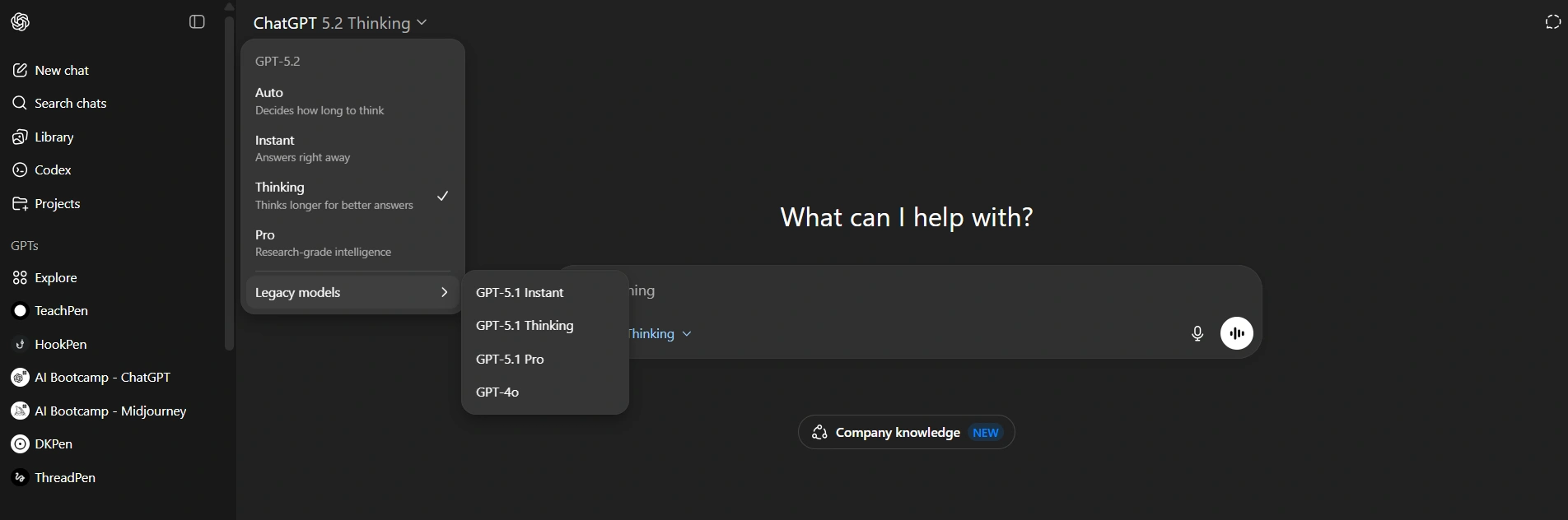
Also worth noting: older models are often available under a Legacy section—meaning we can run the exact same prompt and compare outputs apples-to-apples. That’s what we did.
Benchmarks Look Great. Real Work Is the Truth Serum.
The official charts usually look like:
“New model DESTROYS old model.”
But we’ve all seen it: a benchmark win doesn’t always translate into “this actually saves us time on Tuesday afternoon.”
So instead of treating benchmarks like gospel, we tested GPT-5.2 on tasks we actually do:
- build small web apps in one shot
- “vibe code” UI pages in Canvas
- generate spreadsheets and planning docs
- make slide decks from sources
- analyze images and screenshots
- reduce hallucinations on trap questions
- follow constraints like exact word counts
Quick Start: How We Tested
Here’s the simple process:
- Pick one prompt per task. Don’t “help” the model with follow-ups.
- Run it in:
- Model A (e.g., GPT-5.1 Thinking)
- Model B (GPT-5.2 Thinking)
- Compare:
- correctness
- completeness
- design / formatting
- how many fixes it needs before it’s usable
Rule: If it needs 5 follow-ups to become usable, it wasn’t a “one-shot win.”
The Upgrades That Actually Matter in Daily Work
1) Better “Creation” Outputs (Spreadsheets, Slides, Layouts)
GPT-5.1 could generate spreadsheets… technically.
But the outputs often landed in the “prototype zone”:
- structure: mostly right
- formatting: meh
- usability: not quite
- manual cleanup: unavoidable
GPT-5.2’s outputs are visibly more polished—the kind of difference you notice immediately if you build deliverables for anyone else.
Why this matters:
“Almost usable” still means “we’re doing cleanup work.”
Polish isn’t cosmetic—it’s time saved.
2) More Reliable Performance Across Long Chats
GPT-5.2 Thinking is positioned as stronger at staying consistent during long conversations.
And that’s a big deal because long sessions are where models usually start to:
- forget constraints
- contradict earlier decisions
- drift into “freestyle mode”
- deliver something that sounds right but violates the requirements
In our experience, GPT-5.2 Thinking held the thread better—especially when we stayed out of Auto and explicitly chose Thinking.
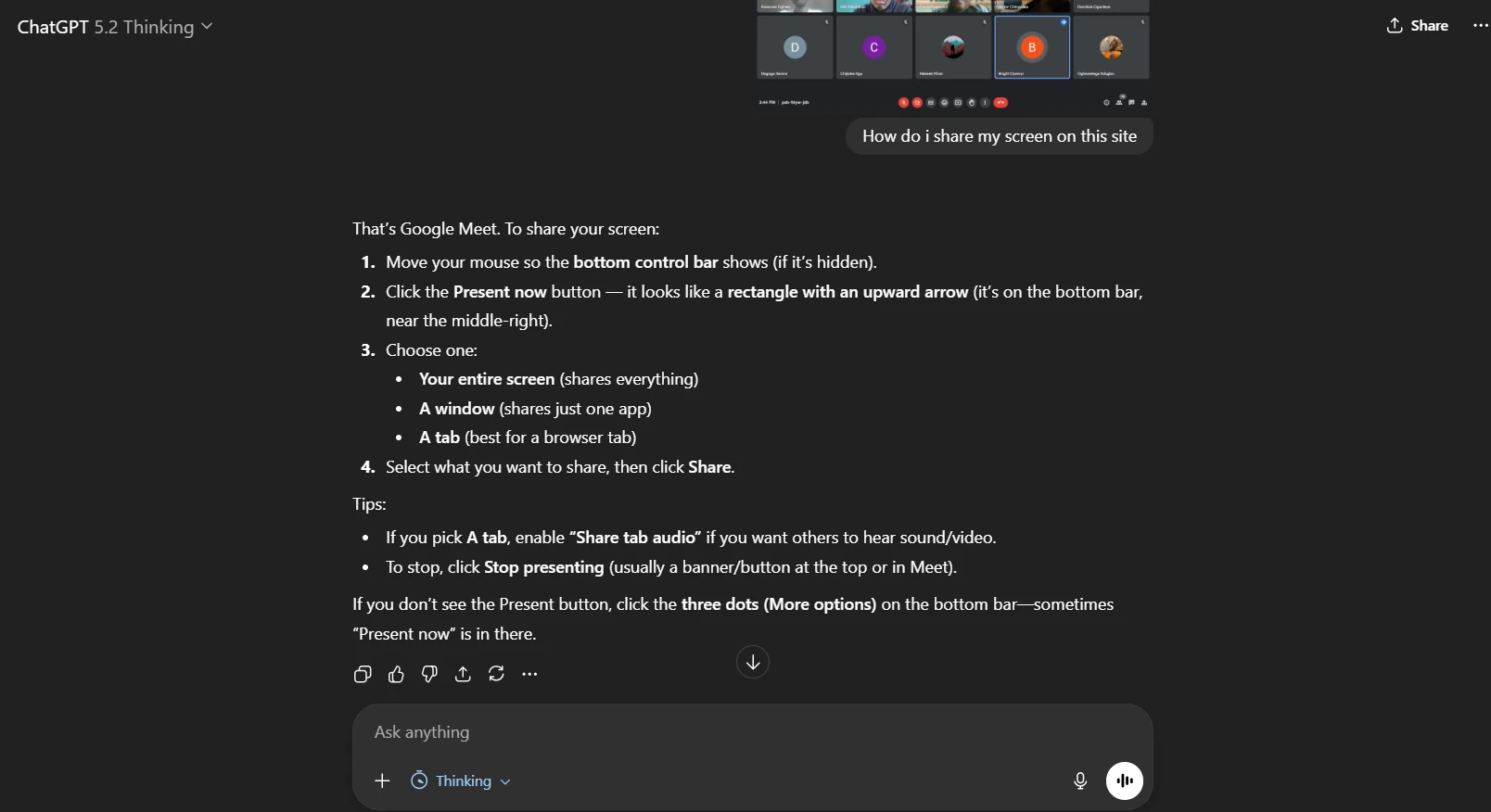
3) Better Vision for Screenshots and Interfaces
This is a sleeper feature—until you use it weekly.
We regularly take screenshots of tools we don’t understand and ask:
- “Where do we click?”
- “Why is this button disabled?”
- “How do we replicate this layout?”
GPT-5.2’s vision accuracy looks improved, especially on UI screenshots.
4) Fewer Hallucinations (If the claim holds)
Hallucinations are still the biggest trust-killer in AI.
So when we see a claim like “hallucinations are down,” our response is basically:
“Okay. Prove it.”
We tested behavior using trap questions (more below). GPT-5.2 Thinking handled at least one classic “bait” correctly by refusing to invent a citation.
Important nuance: hallucination reduction isn’t “solved.”
It’s “less frequent.” You still verify anything important.
Model Choice: Auto Is Convenient… Until It Betrays Us
Auto mode is trying to be helpful by choosing between speed (Instant) and reasoning (Thinking).
That’s fine for casual use.
But for work, Auto has one fatal flaw: it sometimes chooses speed when the task needs careful reasoning.
Here’s the pattern we saw:
- Auto responds fast
- Sounds confident
- Gets it wrong
- Thinking responds slower
- Gets it right
Our rule:
- Casual task → Auto is fine
- Work task → Manually choose Thinking
- High-stakes task → Thinking + verification + citations
If we’re doing real work, we’ll wait. We’d rather be correct than fast.
Test #1: A One-Page HTML App (Same Prompt, Two Models)
This was a “single prompt” web app test—one of the types of demos commonly used in model launch examples.
The prompt we used (copy/paste)
Create a single-page HTML app that simulates an ocean scene.
Include controls for wind speed, wave height, time of day, and storminess.
Wind and wave settings should visibly affect the water.
Time of day should affect lighting.
Storminess should change the environment (clouds/rain) if possible.
Return a single HTML file with embedded CSS/JS.
What GPT-5.2 Thinking did well
- the app looked more “real” and less cartoony
- several controls worked as expected
- lighting changes were noticeably better
What still didn’t fully land
- some storm effects were partial or inconsistent
- a few interactions felt “almost” complete
How GPT-5.1 Thinking compared
It “did the thing,” but the result felt:
- more cartoon/game-like
- less realistic
- less “simulator” and more “animation”
Round winner on output quality: GPT-5.2
Test #2: “Vibe Coding” a Modern Website in Canvas Mode
This is the dream workflow:
“Build a modern website. Make it clean. Make it functional. One shot.”
The prompt (copy/paste)
Create a modern website UI in Canvas mode for comparing AI tools.
Requirements:
- Clean, modern design with light/dark mode toggle
- A list/grid of tools with tags and categories
- Filtering by category and search
- A compare feature: select two tools and show a comparison view
- Use a simple dataset embedded in code (10+ tools)
- Avoid overly complex UI flows; prioritize usability
Return the full working code for Canvas preview.
What GPT-5.2 did better
- noticeably better visual styling
- spacing, hierarchy, and components looked “shippable”
- modal and transparency effects were strong
- light mode worked correctly
The reality check
The logic and usability flow was messy:
- filtering system got overly complicated
- some UI parts felt broken or confusing
- the compare feature worked, but the “selection flow” wasn’t smooth
Also: GPT-5.2 wrote a lot more code (think “big UI dump”), which can create two problems:
- harder to debug
- more surface area for bugs
Takeaway: GPT-5.2 is improving on UI polish, but “one-shot functional product UI” still isn’t guaranteed.
Test #3: The Slideshow That Started This Whole Thing
Now the fun part.
We asked GPT-5.2 to build a deck from a link/source pack. It took a while—around 28 minutes—because it had to process the content and generate a full presentation.
But the result was legitimately impressive:
- professional layout
- strong visual hierarchy
- consistent design patterns
- exportable as a PowerPoint file
Was it perfect? No.
Some slides were too dense.
But compared to what we used to get? Massive upgrade.
And yes—we still use presentation-first tools (like Gamma) because they’re built for this. The point is: GPT-5.2 is now close enough to be useful when we don’t want to switch tools.
Quick Writing Test: Hooks, Style, and “Does It Know Us?”
We ran a hook-writing test with minimal context to see if it could match our tone from the conversation.
The prompt (copy/paste)
Write 8 hook options for our video about GPT-5.2.
Keep it conversational, not hypey. No “new era,” no “game-changer,” no trailer voice.
Aim for curious + grounded.
What happened
- GPT-5.1 Instant leaned heavily into generic hype
- GPT-5.2 Instant still had some hype lines, but at least one was closer to natural voice
Takeaway: it’s improving, but if you care about voice consistency, you still want:
- a custom GPT trained on your tone
- examples of your writing
- clear “voice rules” (banned phrases, allowed vibe, sentence style)
Because otherwise AI will always try to narrate your life like a movie trailer.
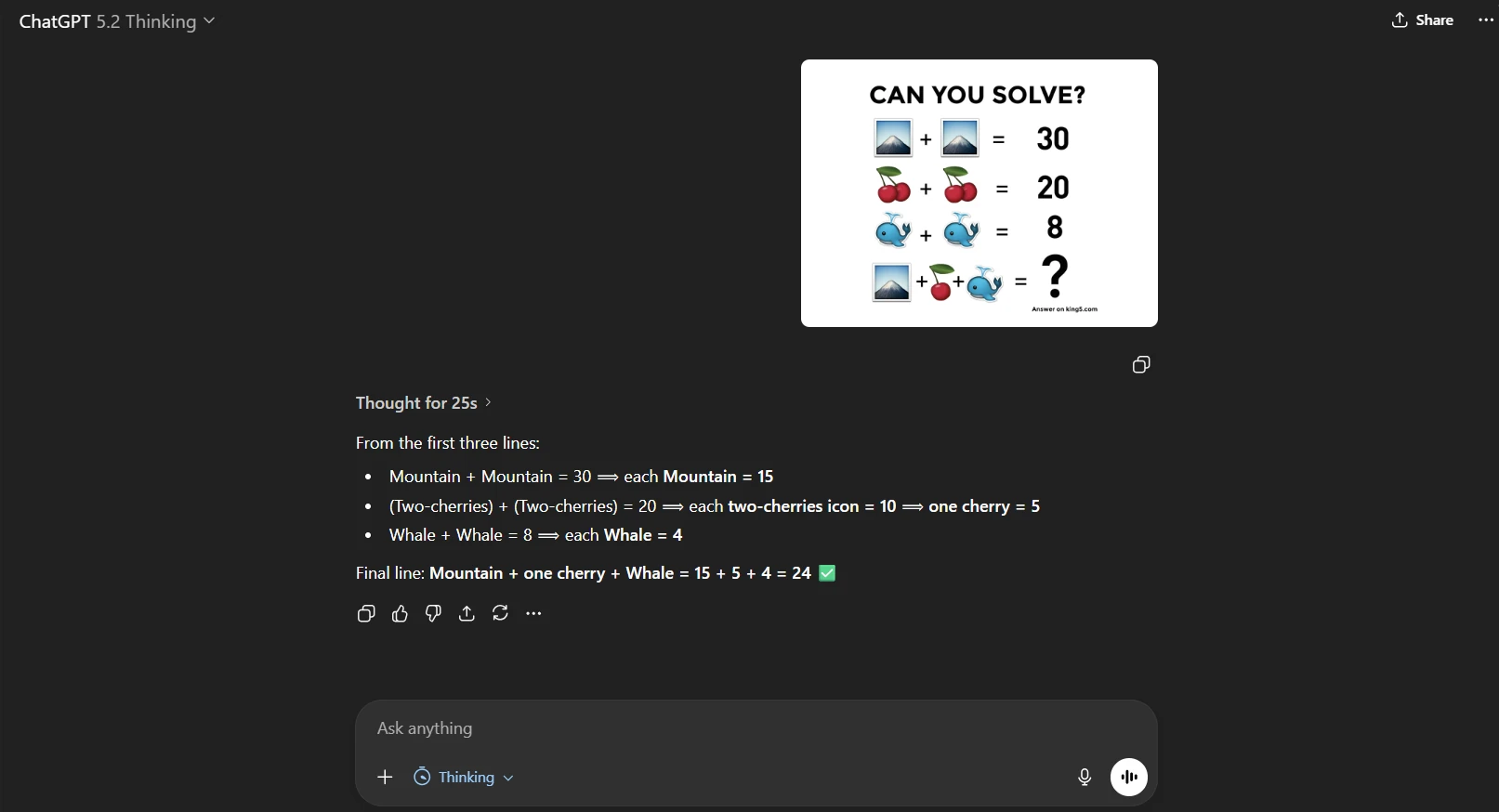
Vision Test: Auto Got It Wrong, Thinking Got It Right
We used an image-based reasoning test where the prompt was inside the image (so the model just had to “see and solve”).
- Auto answered fast → wrong
- Thinking answered slower → correct
Takeaway: if accuracy matters, choose Thinking manually. Always.
Hallucination Test: The Einstein “Black Hole” Trap
We asked:
“Give the exact citation from a research paper where Albert Einstein first used the phrase ‘black hole.’”
It’s a trap. Einstein didn’t coin that term.
GPT-5.2 Thinking didn’t fabricate a fake citation (good sign).
Practical habit that helps: ask for sources in a way that forces verification.
A simple anti-hallucination prompt pattern
Give your answer with:
1) a source link or citation
2) the exact quote (1–2 lines) that supports the claim
3) if you can’t verify it, say so clearly
This doesn’t eliminate hallucinations, but it reduces “confident nonsense” dramatically.
The Unexpected Win: Exact Word Count Actually Worked
We asked for an exact 300-word product description.
It hit exactly 300 words—which is rare.
The tradeoff: it thought for about 1 minute 43 seconds.
So yes, we’re seeing the new reality:
- more accuracy
- more constraint-following
- more time spent thinking
And honestly? That’s fine. “Fast wrong” costs more than “slow right.”
So… Is GPT-5.2 Actually Better?
Yes—especially if we use it correctly.
Where it’s clearly improved
- better visual polish in created outputs
- more reliable long-session behavior (in Thinking)
- stronger vision for UI screenshots
- better constraint-following when reasoning is enabled
- less likely to bluff when asked for citations (in our trap test)
Where it still needs work
- one-shot apps can still be messy or partially broken
- Auto still sometimes chooses speed when you needed reasoning
- writing style still defaults to generic unless trained
Practical Recommendations: Which Model We Use And When
Use Instant when:
- brainstorming
- quick drafts
- summarizing
- rewriting
- low-stakes tasks
Use Thinking when:
- instructions are detailed
- correctness matters
- you’re analyzing images
- you’re producing deliverables you’ll ship
- you want fewer hallucinations
Use Pro when:
- you need maximum capability and you have access
- you’re doing heavy creation workflows regularly
- you want the best chance at “one shot” success
And if we’re tempted to leave it on Auto?
Sure—for casual.
But for work: we choose Thinking and save ourselves the cleanup spiral.
The Takeaways That Matter
If we had to boil it down:
- GPT-5.2 Thinking is the real upgrade—use it on purpose.
- Creation outputs (slides/spreadsheets/layouts) are noticeably more polished.
- Auto is convenient but unreliable for “accuracy required” tasks.
- Hallucinations are improving, but verification habits still matter.
- We’re moving closer to AI that doesn’t just help us think… it helps us finish.
Tega AdeyemiDecember 12, 2025.